In this post I will show you the easiest way to combine AI, convolution neural network(CNN) and docker container to classified object in real time. So all thing you need to know is basic knowledge about docker and neural network. If you are very new to programming, don’t worry, just follow the step below, and you will have a program classified object in real time.
in the video above I’m driving a car go around with a camera on top, to tracking other car and person inside it. I use CUDA Yolo + Nvidia GPU. You can also do the same, all you need to do is download my Docker file and run it.
For who need to understand the theories behind, I will summaries like this. The docker file will create a Ubuntu Linux environment and install Nvidia GPU+OpenCV+darknet in to it. Darknet is a wonderful neural network, it was train by around 10 millions picture and can real-time recognize about 70 categories (car, dog, cat, ship, plane….). If you want to learn more about darknet, you can read my article : https://thanhnguyensite.net/2020/11/05/neural-network/
OK! now let’s go the AI world:
Darknet Nvidia-Docker Ubuntu 16.04
Prerequisites
Make sure you have the NVidia driver for your machine
Build the machine (this step might take a while, go make some coffee)
docker build -t darknet .
On start.sh make sure you have the correct address of your webcam, in file start.sh line 8, if you use laptop onboard webcam, then choose: device=/dev/bus/usb/003/004:/dev/video0, if use external webcam, then: device=/dev/bus/usb/003/004:/dev/video0
Find your webcam bus
lsusb -t
Change the following line with the correct webcam bus
--device=/dev/bus/usb/003/002:/dev/video0
Map a local folder to the Docker Container
Format:
/local/folder:/docker/folder
on start.sh change the following line
-v /home/projects:/dev/projects \
Run the machine with Webcam
sh start.sh
Darknet
Make sure you have the weights for what you want to run
Keras is a high-level deep learning API designed to make neural network development easier and more productive. Today, it is most commonly used through TensorFlow as tf.keras.
Why Keras became popular
One reason Keras became popular is that it lets developers build useful models with a small amount of code. Instead of focusing on low-level tensor operations too early, you can focus on model structure, training, and evaluation.
Core concepts
Layers: building blocks such as Dense, Conv2D, LSTM, Dropout
Models: a stack or graph of layers
Loss functions: how the model measures error
Optimizers: how the model updates weights
Metrics: what you track during training
A minimal example
from tensorflow import keras
from tensorflow.keras import layers

model = keras.Sequential([
    layers.Dense(64, activation="relu", input_shape=(10,)),
    layers.Dense(32, activation="relu"),
    layers.Dense(1, activation="sigmoid")
])

model.compile(optimizer="adam", loss="binary_crossentropy", metrics=["accuracy"])
What Keras is good for
Rapid prototyping
Educational deep learning projects
Production training pipelines with TensorFlow
Computer vision, tabular ML, NLP, and time-series work
Final thoughts
Keras lowers the barrier to entry for deep learning. It is not only beginner-friendly; it is also powerful enough for many real-world machine learning systems.
YOLO, short for You Only Look Once, changed how many engineers think about object detection. Earlier detection systems often used multi-stage pipelines that proposed regions first and classified them later. YOLO reframed detection as a direct prediction problem: take an image, run one forward pass, and predict bounding boxes plus class scores quickly enough for real-time use.
That design choice made YOLO especially attractive in robotics, video analytics, and autonomous systems, where latency matters as much as raw accuracy.
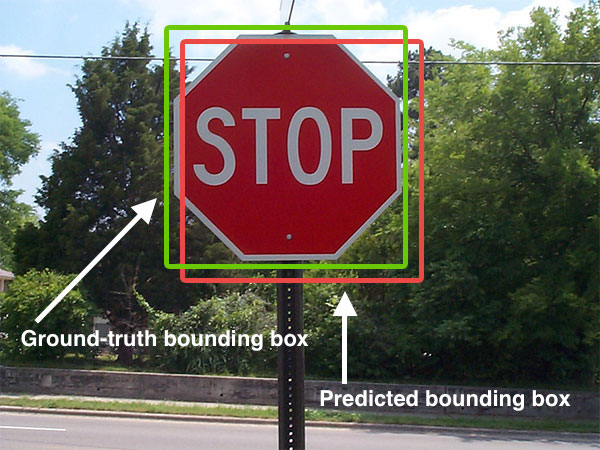
Image classification answers a simple question: what is in this image? Detection answers a harder one: what objects are present, where are they, and which class belongs to each box?
That difference matters in real systems. A vehicle or robot does not only need to know that a scene contains a pedestrian. It needs to know where the pedestrian is, how that person moves across frames, and whether the detection is stable enough to influence planning.
YOLO became popular because it made this detection step fast and practical at scale.
Why YOLO became influential
There are three main reasons YOLO spread so widely:
Speed: real-time inference made it attractive for video and edge deployment.
Simplicity: a single unified detector was easier to explain and deploy than older multi-stage systems.
Strong engineering ecosystem: later implementations and tooling made training, exporting, and deployment more accessible.
Over time, the YOLO family evolved a lot. Anchor strategies changed, backbones improved, post-processing changed, and modern variants added tasks such as segmentation, pose, tracking, and oriented boxes. But the core identity remained: detection should be fast enough to use in real systems.
How YOLO works at a practical level
Conceptually, YOLO takes an image and predicts object locations and categories in one inference path. A modern pipeline usually includes:
image resize and normalization
feature extraction with a backbone network
multi-scale detection heads
confidence scoring and class prediction
post-processing to remove duplicate boxes
The exact architecture depends on the version you use, but the operational idea is stable: produce detections quickly enough for downstream systems to react.
from ultralytics import YOLO

model = YOLO("yolo11n.pt")
results = model("street_scene.jpg")

for result in results:
    for box in result.boxes:
        print(box.cls, box.conf, box.xyxy)
The code above looks simple, but the real engineering work is often around dataset quality, deployment constraints, label consistency, camera setup, and tracking across frames.
Where YOLO fits in a larger system
YOLO is rarely the whole perception stack. In a deployed system it usually feeds into something larger:
multi-object tracking
sensor fusion
risk estimation
behavior planning
alerting or actuation logic
For example, in an autonomous-driving context, YOLO-style detection may identify vehicles, pedestrians, bikes, and traffic cones. But planning still needs temporal tracking, motion prediction, and safety rules before it can turn those detections into driving decisions.
What YOLO is especially good at
YOLO tends to work well when you need:
fast detection on live video
compact deployment on edge hardware
simple integration into monitoring or robotics pipelines
good tradeoffs between speed and accuracy
This is why it appears so often in drones, traffic monitoring, warehouse robots, industrial safety, and smart-camera systems.
Where YOLO is not enough by itself
Even a strong detector has limits. YOLO alone does not solve:
precise depth estimation
fine-grained pixel segmentation
long-term tracking identity under heavy occlusion
full scene understanding for planning
robust performance under severe domain shift without retraining
That is why practical systems usually pair detection with tracking, segmentation, map context, or other sensors.
Real engineering concerns
If you plan to deploy YOLO in a real product, the hard questions are usually not about the marketing benchmark. They are about:
label quality and class definitions
how often false positives appear in safety-critical scenes
how small distant objects can be while still being detected
latency on the exact target hardware
nighttime, rain, motion blur, or camera vibration
monitoring drift after deployment
In many teams, the biggest performance gains come from better data and better deployment choices, not from chasing a new model name every week.
Conclusion
YOLO became influential because it made object detection fast, practical, and easy to integrate into real systems. It remains a strong choice when engineers need real-time perception on images or video. But the best way to use YOLO is to treat it as one reliable module inside a broader perception stack, not as the full system by itself.