Running ROS 2 in Docker is a practical way to make robotics development more reproducible. Robotics projects often depend on specific Ubuntu versions, DDS settings, package combinations, and middleware behavior. Containers help reduce the classic “it works on my machine” problem.
Why ROS 2 and Docker Work Well Together
You can standardize the development environment across machines.
You can onboard collaborators faster.
You can test builds in CI using the same container image.
You can isolate dependencies for multiple robotics projects.
A Basic ROS 2 Dockerfile
FROM ros:humble
WORKDIR /ws
RUN apt-get update && apt-get install -y     python3-colcon-common-extensions     && rm -rf /var/lib/apt/lists/*
COPY . /ws
RUN . /opt/ros/humble/setup.sh && colcon build
CMD ["bash"]
This is only a starting point, but it shows the general pattern: start from a ROS base image, install required tools, copy the workspace, and build it.
Practical Challenges
Robotics containers are not always as simple as web application containers. You may also need to think about:
GUI forwarding for RViz or Gazebo,
access to USB devices and sensors,
network configuration for DDS discovery,
volume mounts for source code and logs.
A Useful Development Workflow
Keep the source code mounted into the container during development.
Use a stable base image for the ROS distribution.
Separate frequently changing code from slower-changing dependencies to speed up rebuilds.
Use Docker Compose or scripts to simplify multi-container robotics setups.
Final Thoughts
Docker is not a magic answer for robotics, but it is extremely helpful for reproducibility. When combined with ROS 2, it gives teams a cleaner and more portable development workflow, especially when projects grow beyond one machine or one engineer.
Wikipedia defines Robot as a machine capable of carrying out complex series of actions automatically. The advantages and importance of Robots are contentious, the robotics field is evolving every day and the benefits of robots are becoming inevitable. This article is not meant to discuss the advantages of robots, but to get you started with ROS(Robot Operating System).
This article describes ROS installation, file system, packages, nodes, topics, messages, service, publishers, subscribers, and ROS GUI tools. The programming language used in this article is Python. Refer to this github repo for the codes in this article.
ROS is an open-source meta operating system or a middleware used in programming Robots. It consists of packages, software, building tools for distributed computing, architecture for distributed communication between machines and applications. It also provides tools and libraries for obtaining, building, writing, and running code across multiple computers. It can be programmed using python, c++, and lisp.
ROS vs Framework vs OS(Operating System)
Operating System(OS) manages communication between computer software and hardware. In the process of managing this communication, it allocates resources like the central processing unit(CPU), memory, and storage. Examples are windows, Linux, android, mac OS, etc.
Framework in computer programming is an abstraction in which software providing generic functionality can be selectively changed by additional user-written code, thus providing application-specific software. Software frameworks may include support programs, compilers, code libraries, toolsets, and application programming interfaces(APIs) that bring together all the different components to enable the development of a project or system. Examples are Django, Laravel, Tensorflow, Flutter, etc.
Robot Operating System(ROS) is not a full-fledged operating system, it is a “meta operating system”. It is built on top of a full operating system. It is called an OS because it also provides the services you would expect from an operating system, including hardware abstraction, low-level device control, implementation of commonly-used functionality, message-passing between processes, and package management. It is a series of packages that can be installed on a full operating system like Ubuntu.
ROS level of concepts
Filesystem level — these are resources located on the disk. For example, packages, package manifests (package.xml), repositories, messages types, service types, etc.
Computation level — these involve the communications between peer to peer networks of ROS. Examples are nodes, master, parameter server, messages, topics, services, bags.
Community level — these involve the exchange of software and knowledge between members of the community. Examples are distributions, repositories, ROS wiki.
catkin is the new build system (generate executable files from source files) for ROS while rosbuild was the build system used in the past. catkin uses CMake more cleanly and only enhances CMake where it falls short on features, while rosbuild uses CMake but invokes it from Makefiles and builds each package separately and in-source. catkin was designed to be more conventional than rosbuild, allowing for better distribution of packages, better cross-compiling support, and better portability.
ROS Distributions, Installation, and File System
ROS distributions are named alphabetically. For instance, the last 3 distributions are Lunar Loggerhead, Melodic Morenia, and Noetic Ninjemys. ROS can be officially built on Linux distributions but it also supports other operating systems. This article uses ROS Melodic distribution on Ubuntu 18 Linux distribution.
You can install other distributions by changing the distribution name. For instance, you can change melodic to noetic but note noetic support Ubuntu Focal Fossa(20.04). This installation installs the full version, you can install smaller versions for instance:
This installation does not contain the GUI tools.
After proper installation, you need to source the ROS setup script. source command reads and executes commands from the file specified as its argument in the current shell environment.
To avoid sourcing the setup file every time a new terminal is opened, you can add the command to the .bashrc file. It will automatically run when you open a new terminal.
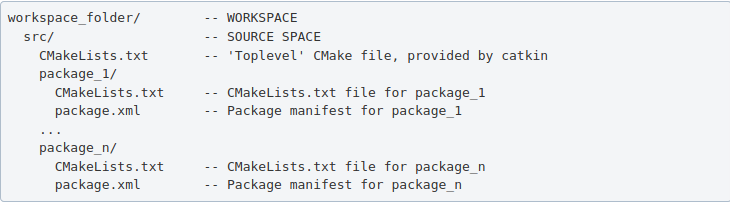
ROS packages are saved in a catkin “workspace” folder. The package folders are saved in the “src” folder in the catkin “workspace”.
The catkin_make command builds all packages located in “catkin_ws/src” folder. After running catkin_make command, two new folders “build” and “devel” will be created. Note, you should always run catkin_make command when you are in the “catkin_ws” directory. The “build” folder is where CMake and Make are invoked, while the “devel” folder contains any generated files and targets, including setup.sh files. A “CMackeLists.txt” file is also created in the src folder(I explained more about this file below).
Ros Package — contains libraries, executables, scripts, and other artifacts for a specific ROS program. Packages are used for structuring specific programs. Files in a package also have a specific structure. A ROS package folder could contain:
launch folder — it contains the launch files(launch files are used to run multiple nodes).
src folder — it contains the source files for instance python or c++ files.
package.xml — also called manifest file, contains package metadata, dependencies, and other metadata related to the package.
CMakeLists.txt -it contains executables, libraries, etc. it is catkin metapackage.
A ROS package must be in the parent “catkin_ws/src” folder, its folder, and must contain package.xml and CmakeList.txt.
Creating a ros package
This command creates a package called “bio_data_package” with dependencies std_msgs, rospy, and roscpp. This command automatically creates a folder named the package name, this package folder contains the “package.xml”, “CMakeLists.txt”, “include” folder and “src” folder. The “src” folder in the workspace folder is different from the “src” folder created in the package folder. Build all the packages in “catkin/src” by running catkin_make, source the “setup.bash” in the “devel” folder to add new environment variables.
ROS Package command-line tool — rospack
rospack is used to get information about packages. Note: Tab completion, press the tab key once to complete a command, and twice to show you suggestions. For instance, you press tab twice after rospack.
rospack list — list all the ROS packages in your workspace rospack find bio_data_package — to output the path of package “bio_data_package”
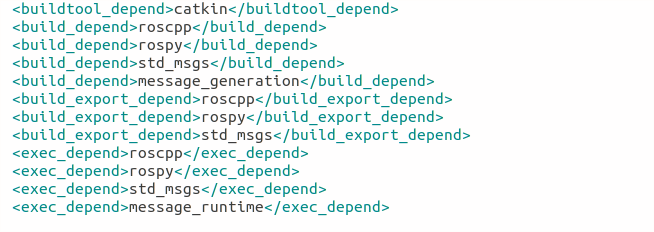
The package.xml contains tags that describe the package. The required tags are name, version, description, maintainer and license.
<name> – the name of the package.
<version> – the version of the package, usually it should be three integers separated by dots.
<description> – a description of the package.
<maintainer> – information about the maintainer i.e someone you can contact if you need more information about the package.
<license> – the license to the package.
<buildtool_depend>(build tool dependency) – the build system required to build the package, this is usually catkin or rosbuild.
<build_depend>(build dependency) – the dependencies of the package, each dependency is enclosed in a build_depend tag.
<build_export_depend>(build export dependency) – a dependency that is included in the headers in public headers in the package.
<exec_depend>(Execution Dependency) – a dependency that is among the shared libraries.
<test_depend>(Test Dependency) – a dependency required for unit test.
<doc depend>(Documentation Tool Dependency) – a dependency required to generate documentation.
A ROS node is an executable that uses ROS to communicate with other nodes. The concept of ros node helps in fault tolerance as each node does not depend on another node.
ROS Master — provides naming and registration services to the rest of the nodes in the ROS system. Publishers and Subscribers register to the master, then ROS Master tracks ROS topics being published by the publisher and ROS Topics being subscribed to by the subscribers. It also provides the Parameter Server.
rosout — rosout is the name of the console log reporting mechanism in ROS. rosout subscribes to /rosout topic.
Parameter Server — is a shared, multi-variate dictionary that is accessible via network APIs. Nodes use this server to store and retrieve parameters at runtime.
roscore — master + rosout + parameter server. It controls the entire ROS system. It must be running to enable ROS nodes to communicate. It is a collection of nodes and programs that are pre-requisites of a ROS-based system.
Once roscore is running, you can open a new terminal to run other ros nodes.
ROS node command-line tool — rosnode
ROS Run
rosrun — this is used to run a node in a package
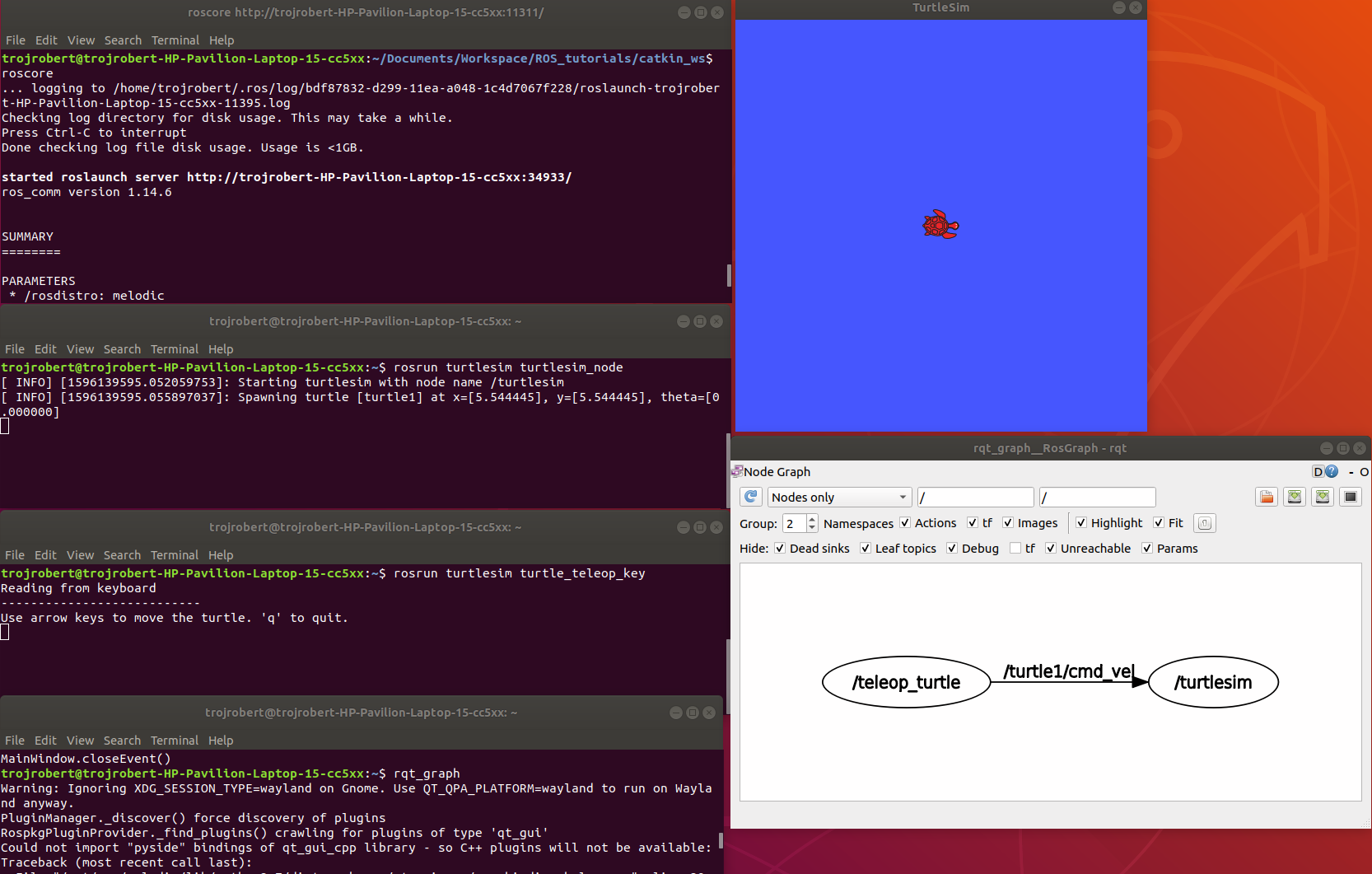
turtlesim_node display a GUI with a turtle.
Run the command on a different terminal
The turtle_teleop_key node provides a way to control the turtle with a keyboard. Click on the terminal where you ran rosrun turtlesim turtle_teleop_key, then press the arrow keys, the turtle moves in the direction of the arrow key pressed.
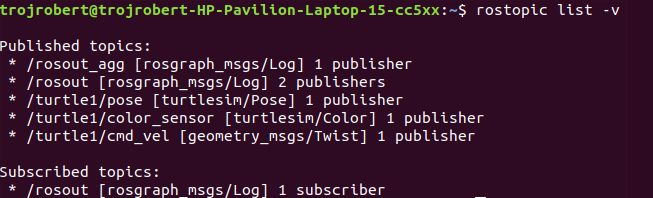
Ros Topics are the buses used by ROS nodes to exchange messages. Imagine a ROS Topic as a water pipe and ROS Message as the water, the two ends of the pipe are where the nodes are located. Topic transport message between a publisher node and a subscriber node. Ros Topics have anonymous publish/subscribe semantics. Nodes that generate message/ data publish to a specific topic, and nodes that consume or need data subscribed to a specific topic. The relationship between publishers and subscribers is many to many.
In the example above, the turtle_teleop_key node publishes the key pressed to the /turtle/cmd_vel topic and the turtlesim node subscribes to that same topic.
ROS topic command-line tool — rostopic
rostopic hz [topic] (shows how fast the messages are publishing) rostopic hz /turtle/cmd_vel
Nodes communicate by sending ROS messages to each other using ROS Topic. A message can be of primitive type integer, floating-point, boolean, etc. A publisher and subscriber should communicate using the same topic type. The topic type is determined by the message type.
Creating a ROS message
Create a msg folder in your package folder. We created a new package call bio_data_package in the example above. Inside this newly created “msg” folder, create a msg file called name.msg
Step 1
Copy the following command into the “name.msg” file. You can also check on github
Now you should have something like this, please don’t modify other lines.
Step 3
Open the CmakeList.txt file for the bio_data_package package in a text editor. This is needed for steps 3 to 6. Check a sample file on github
Modify the find_package call by adding message generation to its components. Now you should have something similar to this.
Step 4
Modify the catkin_package by adding message_runtine
Step 5
Modify add_message_files by adding the name.msg, this enable CMake to reconfigure the project with the new msg file.
Step 6
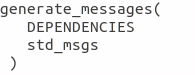
Modify generate_message by removing the # symbols to uncomment it.
Step 7
ROS message command-line tool — rosmsg
Show the description of the new message created
ROS service is one to one two way transport, it is suitable for request/reply interactions. A ROS node(server) offers a service, while another ROS node(client) requests for the service. The server sends a response back to the client. Services are defined using srv files. srv files are just like msg files, except they contain two parts: a request and a response. Services also have types like topics.
Creating a ROS Service
Create a srv folder in your package folder. You created a new package call bio_data_package in the example above. Inside this newly created “srv” folder, create a srv file called full_name.srv. A srv file is used to describe a service, srv files are stored in the “srv” folder.
Copy the following command into the “full_name.srv” file. A sample is on github
A srv file has two parts separated by -, the first part is the request while the second part is the response.
Do the steps required in creating a ROS message, but instead of Step 5, do thhe following. Please don’t repeat all the steps if you have done them before.
Step 5(specific for ROS service)
Modify add_service_files by adding the “full_name.srv”, this enables CMake to reconfigure the project with the new srv file.
ROS service command-line tool — rossrv
Show the description of the new service created
ROS Services vs ROS Topic
Involves the communication between any two nodes
Involves the communication between Publishers and Subscribers
It is a two way transport
It is a one way transport
It is one to one
It is many to many
Involves a request/ reply pattern
Does not involves a Request/reply pattern
ROS Publisher and Subscriber
Publisher and subscriber is many to many but one way transport. A node sends out a message by publishing it to a given topic. The topic is a name that is used to identify the content of the message. A node that is interested in a certain kind of data will subscribe to the appropriate topic.
Creating a Publisher
A publisher is a node that publishes messages into a topic. Create a scripts folder in your package folder, we created a new package call bio_data_package in the example above, inside this newly created “script” created folder, create a python file called writer_pub.py
Copy the following code into the “writer_pub.py” file. Sample is on github
Creating a Subscriber
A subscriber is a node that gets messages from a topic. Create a python file called reader_sub.py in the “scripts” folder.
Copy the following code into the “reader_sub.py” file. A sample is on github
Modify the caktin_install_python() call in CMameLists.txt
roswtf is a tool for diagnosing issues with a running ROS file system. It evaluates ROS setup like environment variables, packages , stacks, launch files and configuration issues.
rqt_console is a tool that displays messages being published to rosout. These messages have different level of severity like debug, info, warn, error, fatal.
Terminal 2rosrun turtlesim turtlesim_node
Terminal 3rosrun turtlesim turtle
Now move the turtle to the wall
rqt _graph
This shows nodes and the topics the nodes are communicating on.
rqt _plot
Display the scrolling time plot of data published on a topic
rqt
rqt contain most ROS GUI tools, you can select the on you want in the Plugib tab.
Other ROS concepts
ROS Launch — is used for starting and stopping multiple ros nodes. It is used to execute a ros program which is a .launch file.
ROS Stack — this contain several packages.
rosbag — published topics are saved as .bag file, rosbag command line tool is used to work with bag files.
Robot operating system is a dedicated software system for programming and controlling robots, including tools for programming, visualizing, directly interacting with hardware, and connecting robot communities around the world. In general, if you want to program and control a robot, using ROS software will make the execution much faster and less painful. And you don’t need to sit and rewrite things that others have already done, but there are things that you want to rewrite are not capable. Like Lidar or Radar driver.
ROS runs on Ubuntu, so to use ROS first you must install Linux. For those who do not know how to install Linux and ros, I have this link for you:
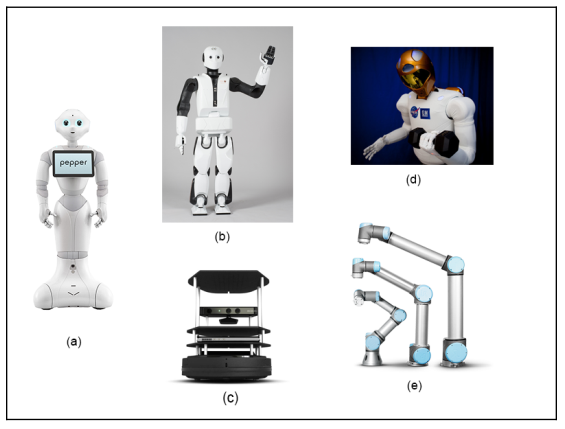
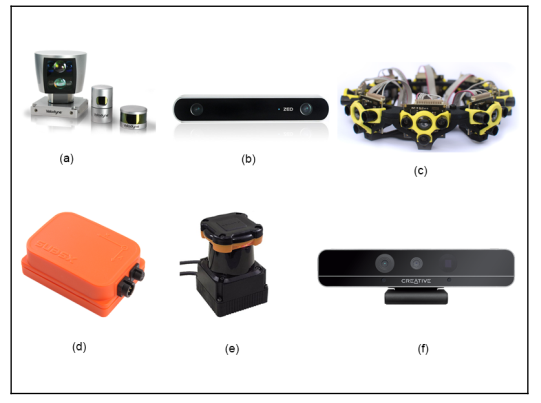
The robots and sensors supported by ROS:
The above are supported robots, starting from Pepper (a), REEM-C (b), Turtlebot (c), Robotnaut (d) and Universal robot (e). In addition, the sensors supported by ROS include LIDAR, SICK laser lms1xx, lms2xx, Hokuyo, Kinect-v2, Velodyne .., for more details, you can see the picture below.
Basic understanding of how ROS work:
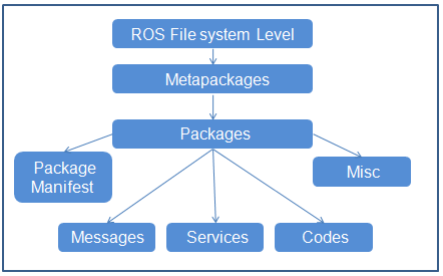
Basically ROS files are laid out and behave like this, top down in the following order, metapackages, packages, packages manifest, Misc, messages, Services, codes:
In that package (Metapackages) is a group of packages (packages) related to each other. For example, in ROS there is a total package called Navigation, this package contains all packages related to the movement of the robot, including body movement, wheels, related algorithms such as Kalman, Particle filter. … When we install the master package, it means all the sub-packages in it are also installed.
Packages (Packages), here I translate them as packages for easy understanding, the concept of packages is very important, we can say that the package is the most basic atoms that make up ROS. In one package includes, ROSnode, datasets, configuration files, source files, all bundled in one “package”. However, although there are many things in one package, but to work, we only need to care about 2 things in one package, which is the src folder, which contains our source code, and the Cmake.txt file, here is where we declare the libraries needed to execute (compile) code.
Interaction between nodes in ROS
ROS computation graph is a big picture of the interaction of nodes and topics with each other.
In the picture above, we can see that the Master is the nodes that connect all the remaining nodes.
Nodes: ROS nodes are simply the process of using the ROS API to communicate with each other. A robot may have many nodes to perform its communication. For example, a self-driving robot will have the following nodes, node that reads data from Laser scanner, Kinect camera, localization and mapping, node sends speed command to the steering wheel system.
Master: ROS master acts as an intermediate node connecting between different nodes. Master covers information about all nodes running in the ROS environment. It will swap the details of one button with the other to establish a connection between them. After exchanging information, communication will begin between the two ROS nodes. When you run a ROS program, ros_master always must run it first. You can run ros master by -> terminal-> roscore.
Message: ROS nodes can communicate with each other by sending and receiving data in the form of ROS mesage. ROS message is a data structure used by ROS nodes to exchange data. It is like a protocol, format the information sent to the nodes, such as string, float, int …
Topic: One of the methods for communicating and exchanging messages between two nodes is called ROS Topic. ROS Topic is like a message channel, in which data is exchanged by ROS message. Each topic will have a different name depending on what information it will be in charge of providing. One Node will publish information for a Topic and another node can read from the Topic by subcrible to it. Just like you want to watch your videos, you must subcrible your channel. If you want to see which topics you are running on, the command is rostopic list, if you want to see a certain topic see what nodes are publishing or subcrible on it. Then the command is rostopic info / terntopic. If you want to see if there is anything in that topic, type rostopic echo / terntopic.
Service: Service is a different type of communication method from Topic. Topic uses a publish or subcrible interaction, but in the service, it interacts in a request – response fashion. This is exactly like the network side. One node will act as a server, there is a permanent server run and when the Node client sends a service request to the server. The server will perform the service and send the result to the client. The client node must wait until the server responds with the result. The server is especially useful when we need to execute something that takes a long time to process, so we leave it on the server, when we need it we call.
ROS, or the Robot Operating System, is not an operating system in the traditional sense. It is a software framework and ecosystem that helps engineers build modular robot applications. ROS became popular because robotics systems are naturally complex, and ROS provides a common structure for connecting sensors, algorithms, visualization tools, and control logic.
Why ROS Exists
A real robot is made of many components: camera drivers, motor controllers, localization, mapping, planning, perception, logging, simulation, and more. Building all of that from scratch in a tightly coupled application quickly becomes unmanageable. ROS encourages a distributed architecture where components communicate through well-defined interfaces.
Core Concepts
Nodes
A node is a running process that performs one specific task. For example, one node may read LiDAR data, another may estimate odometry, and another may visualize the robot state.
Topics
Topics support asynchronous publish/subscribe communication. A LiDAR node may publish scan data, and multiple subscribers may consume it at the same time.
Services
Services are request/response interactions. They are useful for operations such as resetting a subsystem or requesting a map snapshot.
Actions
Actions are useful for longer-running tasks that need progress feedback, such as navigation to a goal.
TF
TF manages coordinate transforms between frames such as map, odom, base_link, and camera frames. Without TF, multi-sensor robot systems become extremely difficult to reason about.
A Simple Example
Imagine a mobile robot using ROS:
A camera node publishes images.
A LiDAR node publishes laser scans.
An odometry node estimates motion.
A SLAM node subscribes to scans and odometry to build a map.
A planner uses the map and goal position to generate a path.
A controller node sends wheel commands.
Each part can be inspected, restarted, replaced, or improved independently. That modularity is one of ROS's biggest strengths.
Tools Engineers Use Often
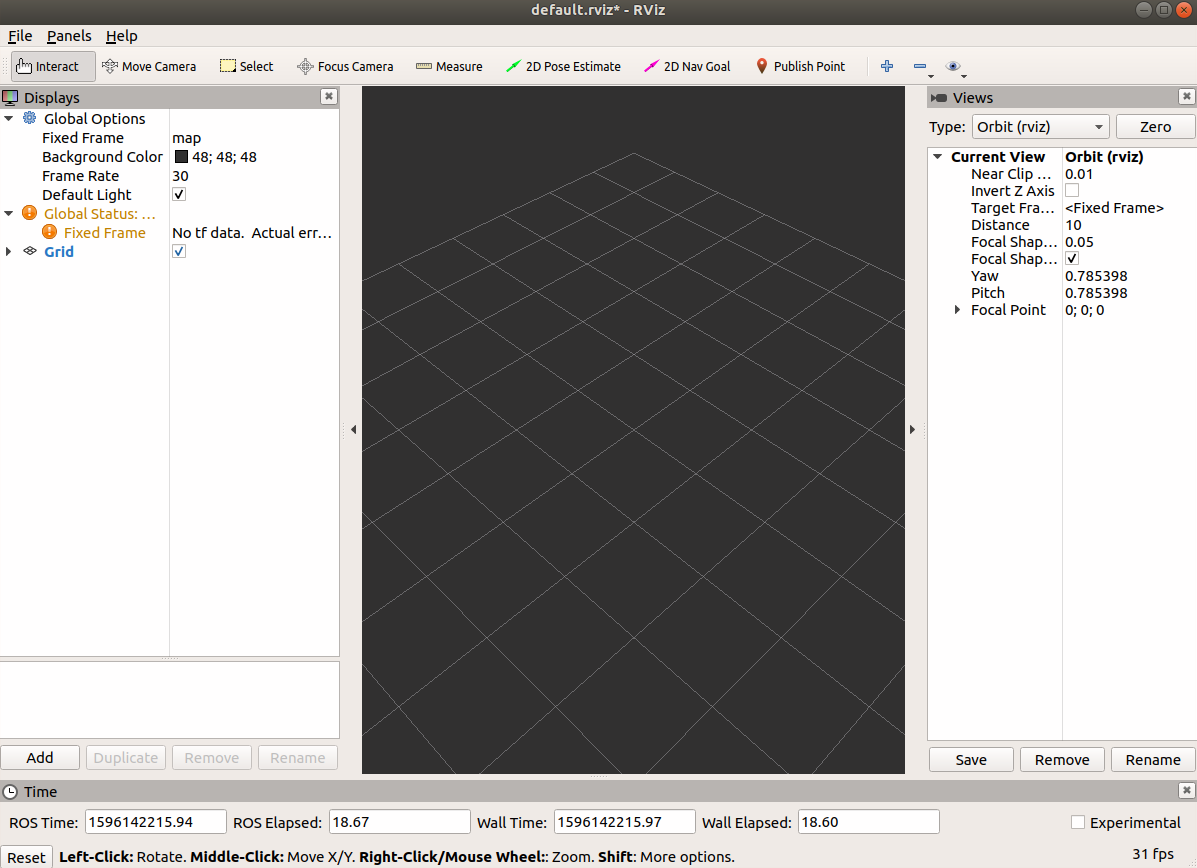
RViz for visualization
rosbag for recording and replaying data
rqt tools for debugging graphs and parameters
Gazebo or other simulators for testing
ROS 1 vs ROS 2
ROS 2 improves communication, security, real-time support, and multi-machine deployment by building on DDS. For new commercial or production-oriented systems, ROS 2 is often the better long-term choice, though ROS 1 remains important historically and in many research environments.
Final Thoughts
ROS matters because it reduces integration cost. It does not solve robotics for you, but it gives you a language and structure for connecting the parts. That is why it remains one of the most influential frameworks in modern robotics.