Data types basics

Python | Set 3 (Strings, Lists, Tuples, Iterations)

Last Updated: 20-10-2020

In the previous article, we read about the basics of Python. Now, we continue with some more python concepts.

Strings in Python 
A string is a sequence of characters. It can be declared in python by using double-quotes. Strings are immutable, i.e., they cannot be changed.

Assigning string to a variable
 a = "This is a string"
 print (a) 

Lists in Python 
Lists are one of the most powerful tools in python. They are just like the arrays declared in other languages. But the most powerful thing is that list need not be always homogeneous. A single list can contain strings, integers, as well as objects. Lists can also be used for implementing stacks and queues. Lists are mutable, i.e., they can be altered once declared.

# Declaring a list 
L = [1, "a" , "string" , 1+2] 
print L 
L.append(6) 
print L 
L.pop() 
print L 
print L[1] 

The output is :  

[1, 'a', 'string', 3]
[1, 'a', 'string', 3, 6]
[1, 'a', 'string', 3]
a


Tuples in Python 
A tuple is a sequence of immutable Python objects. Tuples are just like lists with the exception that tuples cannot be changed once declared. Tuples are usually faster than lists.

Example

Create a Tuple:

thistuple = ("apple", "banana", "cherry")
print(thistuple)

Python json basics

Introduction of JSON in Python :
The full-form of JSON is JavaScript Object Notation. It means that a script (executable) file which is made of text in a programming language, is used to store and transfer the data. Python supports JSON through a built-in package called json. To use this feature, we import the json package in Python script. The text in JSON is done through quoted string which contains value in key-value mapping within { }. It is similar to the dictionary in Python. JSON shows an API similar to users of Standard Library marshal and pickle modules and Python natively supports JSON features.

Python program showing
 use of json package
 import json 
 {key:value mapping}
 a ={"name":"John", 
 "age":31, 
     "Salary":25000} 
 conversion to JSON done by dumps() function
 b = json.dumps(a) 
 printing the output
 print(b) 

Output:

{"age": 31, "Salary": 25000, "name": "John"}

As you can see, JSON supports primitive types, like strings and numbers, as well as nested lists, tuples and objects.

Python program showing that
 json support different primitive
 types
 import json 
 list conversion to Array
 print(json.dumps(['Welcome', "to", "GeeksforGeeks"])) 
 tuple conversion to Array
 print(json.dumps(("Welcome", "to", "GeeksforGeeks"))) 
 string conversion to String
 print(json.dumps("Hi")) 
 int conversion to Number
 print(json.dumps(123)) 
 float conversion to Number
 print(json.dumps(23.572)) 
 Boolean conversion to their respective values
 print(json.dumps(True)) 
 print(json.dumps(False)) 
 None value to null
 print(json.dumps(None)) 

Output:

["Welcome", "to", "GeeksforGeeks"]
["Welcome", "to", "GeeksforGeeks"]
"Hi"
123
23.572
true
false
null

Control flow basics

Python if else

There comes situations in real life when we need to make some decisions and based on these decisions, we decide what should we do next. Similar situations arises in programming also where we need to make some decisions and based on these decisions we will execute the next block of code.

Decision making statements in programming languages decides the direction of flow of program execution. Decision making statements available in python are:

  • if statement
  • if..else statements
  • nested if statements
  • if-elif ladder
  • Short Hand if statement
  • Short Hand if-else statement

if statement

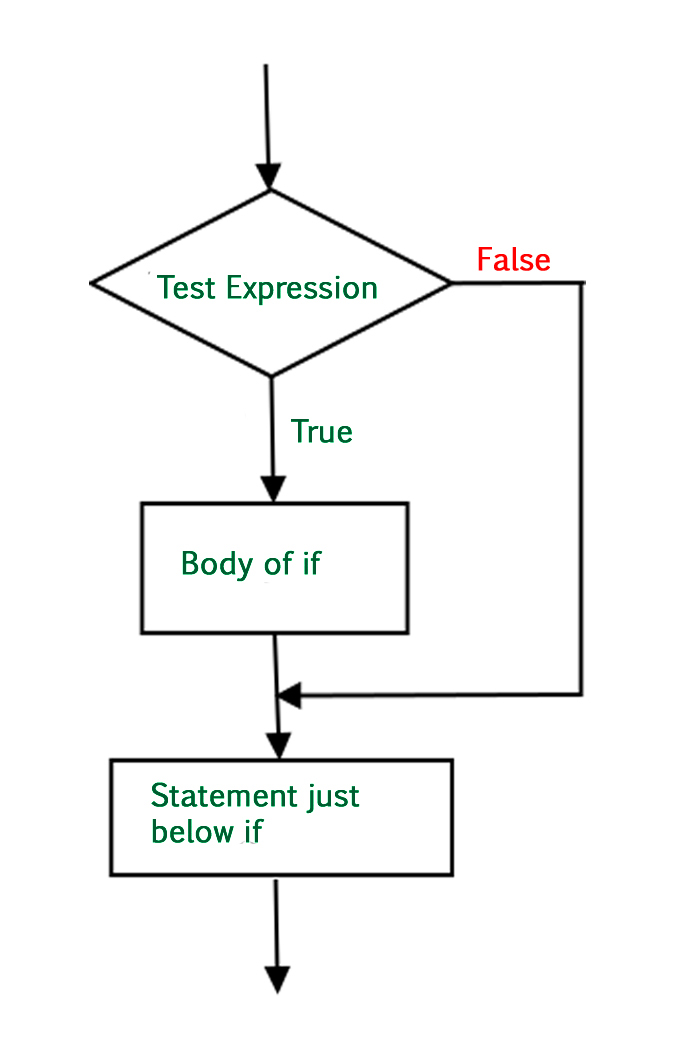
if statement is the most simple decision making statement. It is used to decide whether a certain statement or block of statements will be executed or not i.e if a certain condition is true then a block of statement is executed otherwise not.

Here, condition after evaluation will be either true or false. if statement accepts boolean values – if the value is true then it will execute the block of statements below it otherwise not. We can use condition with bracket ‘(‘ ‘)’ also.

As we know, python uses indentation to identify a block. So the block under an if statement will be identified as shown in the below example:

if condition:               # Statements to execute if    # condition is true
if-statement-in-java

if- else

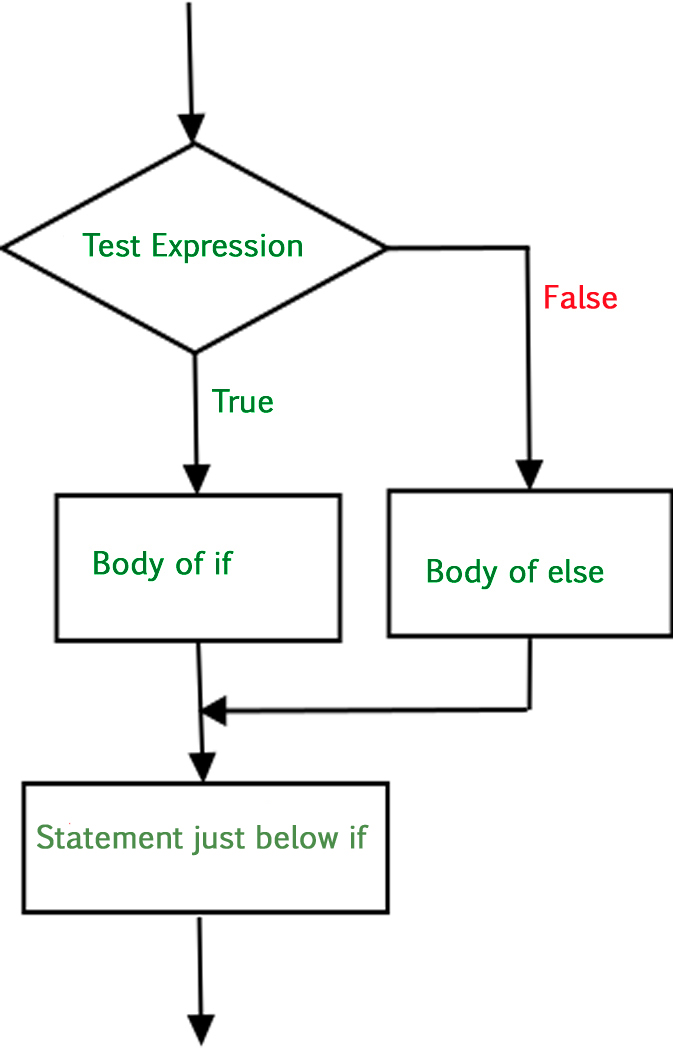
The if statement alone tells us that if a condition is true it will execute a block of statements and if the condition is false it won’t. But what if we want to do something else if the condition is false. Here comes the else statement. We can use the else statement with if statement to execute a block of code when the condition is false.
Syntax:

if (condition):
    # Executes this block if
    # condition is true
else:
    # Executes this block if
    # condition is false

Flow Chart:-

Python csv basics

Working with csv files in Python

csv3

This article explains how to load and parse a CSV file in Python.

First of all, what is a CSV ?
CSV (Comma Separated Values) is a simple file format used to store tabular data, such as a spreadsheet or database. A CSV file stores tabular data (numbers and text) in plain text. Each line of the file is a data record. Each record consists of one or more fields, separated by commas. The use of the comma as a field separator is the source of the name for this file format.

For working CSV files in python, there is an inbuilt module called csv.

Reading a CSV file

# importing csv module 
import csv 

# csv file name 
filename = "aapl.csv"

# initializing the titles and rows list 
fields = [] 
rows = [] 

# reading csv file 
with open(filename, 'r') as csvfile: 
	# creating a csv reader object 
	csvreader = csv.reader(csvfile) 
	
	# extracting field names through first row 
	fields = next(csvreader) 

	# extracting each data row one by one 
	for row in csvreader: 
		rows.append(row) 

	# get total number of rows 
	print("Total no. of rows: %d"%(csvreader.line_num)) 

# printing the field names 
print('Field names are:' + ', '.join(field for field in fields)) 

# printing first 5 rows 
print('\nFirst 5 rows are:\n') 
for row in rows[:5]: 
	# parsing each column of a row 
	for col in row: 
		print("%10s"%col), 
	print('\n') 

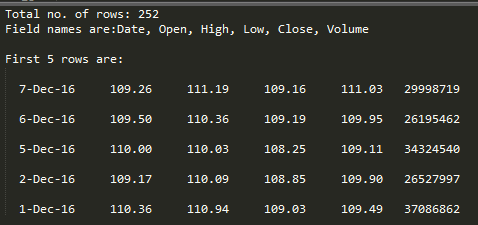
The output of above program looks like this:

csv1

The above example uses a CSV file aapl.csv which can be downloaded from here.
Run this program with the aapl.csv file in same directory.

Let us try to understand this piece of code.

  • with open(filename, ‘r’) as csvfile: csvreader = csv.reader(csvfile)Here, we first open the CSV file in READ mode. The file object is named as csvfile. The file object is converted to csv.reader object. We save the csv.reader object as csvreader.
  • fields = csvreader.next()csvreader is an iterable object. Hence, .next() method returns the current row and advances the iterator to the next row. Since the first row of our csv file contains the headers (or field names), we save them in a list called fields.
  • for row in csvreader: rows.append(row)Now, we iterate through remaining rows using a for loop. Each row is appended to a list called rows. If you try to print each row, one can find that row is nothing but a list containing all the field values.
  • print(“Total no. of rows: %d”%(csvreader.line_num))csvreader.line_num is nothing but a counter which returns the number of rows which have been iterated.

Writing to a CSV file

# importing the csv module 
import csv 

# field names 
fields = ['Name', 'Branch', 'Year', 'CGPA'] 

# data rows of csv file 
rows = [ ['Nikhil', 'COE', '2', '9.0'], 
		['Sanchit', 'COE', '2', '9.1'], 
		['Aditya', 'IT', '2', '9.3'], 
		['Sagar', 'SE', '1', '9.5'], 
		['Prateek', 'MCE', '3', '7.8'], 
		['Sahil', 'EP', '2', '9.1']] 

# name of csv file 
filename = "university_records.csv"

# writing to csv file 
with open(filename, 'w') as csvfile: 
	# creating a csv writer object 
	csvwriter = csv.writer(csvfile) 
	
	# writing the fields 
	csvwriter.writerow(fields) 
	
	# writing the data rows 
	csvwriter.writerows(rows)

Let us try to understand the above code in pieces.

  • fields and rows have been already defined. fields is a list containing all the field names. rows is a list of lists. Each row is a list containing the field values of that row.
  • with open(filename, ‘w’) as csvfile: csvwriter = csv.writer(csvfile)Here, we first open the CSV file in WRITE mode. The file object is named as csvfile. The file object is converted to csv.writer object. We save the csv.writer object as csvwriter.
  • csvwriter.writerow(fields)Now we use writerow method to write the first row which is nothing but the field names.
  • csvwriter.writerows(rows)We use writerows method to write multiple rows at once.

Writing a dictionary to a CSV file

# importing the csv module 
import csv 

# my data rows as dictionary objects 
mydict =[{'branch': 'COE', 'cgpa': '9.0', 'name': 'Nikhil', 'year': '2'}, 
		{'branch': 'COE', 'cgpa': '9.1', 'name': 'Sanchit', 'year': '2'}, 
		{'branch': 'IT', 'cgpa': '9.3', 'name': 'Aditya', 'year': '2'}, 
		{'branch': 'SE', 'cgpa': '9.5', 'name': 'Sagar', 'year': '1'}, 
		{'branch': 'MCE', 'cgpa': '7.8', 'name': 'Prateek', 'year': '3'}, 
		{'branch': 'EP', 'cgpa': '9.1', 'name': 'Sahil', 'year': '2'}] 

# field names 
fields = ['name', 'branch', 'year', 'cgpa'] 

# name of csv file 
filename = "university_records.csv"

# writing to csv file 
with open(filename, 'w') as csvfile: 
	# creating a csv dict writer object 
	writer = csv.DictWriter(csvfile, fieldnames = fields) 
	
	# writing headers (field names) 
	writer.writeheader() 
	
	# writing data rows 
	writer.writerows(mydict) 

In this example, we write a dictionary mydict to a CSV file.

  • with open(filename, ‘w’) as csvfile: writer = csv.DictWriter(csvfile, fieldnames = fields)Here, the file object (csvfile) is converted to a DictWriter object.
    Here, we specify the fieldnames as an argument.
  • writer.writeheader()writeheader method simply writes the first row of your csv file using the pre-specified fieldnames.
  • writer.writerows(mydict)writerows method simply writes all the rows but in each row, it writes only the values(not keys).

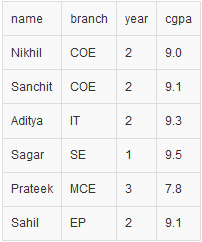
So, in the end, our CSV file looks like this:

csv2

Important Points:

  • In csv modules, an optional dialect parameter can be given which is used to define a set of parameters specific to a particular CSV format. By default, csv module uses excel dialect which makes them compatible with excel spreadsheets. You can define your own dialect using register_dialect method.
    Here is an example:
     csv.register_dialect(
    'mydialect',
    delimiter = ',',
    quotechar = '"',
    doublequote = True,
    skipinitialspace = True,
    lineterminator = '\r\n',
    quoting = csv.QUOTE_MINIMAL)

Now, while defining a csv.reader or csv.writer object, we can specify the dialect like
this:

csvreader = csv.reader(csvfile, dialect='mydialect')
  • Now, consider that a CSV file looks like this in plain-text:
    We notice that the delimiter is not a comma but a semi-colon. Also, the rows are separated by two newlines instead of one. In such cases, we can specify the delimiter and line terminator as follows:csvreader = csv.reader(csvfile, delimiter = ';', lineterminator = '\n\n')

Functions basics

Functions in Python

Last Updated: 11-09-2018

A function is a set of statements that take inputs, do some specific computation and produces output. The idea is to put some commonly or repeatedly done task together and make a function, so that instead of writing the same code again and again for different inputs, we can call the function.
Python provides built-in functions like print(), etc. but we can also create your own functions. These functions are called user-defined functions.

# A simple Python function to check 
# whether x is even or odd 
def evenOdd( x ): 
if (x % 2 == 0): 
print "even"
else: 
print "odd"
 
# Driver code 
evenOdd(2) 
evenOdd(3) 

Output:

even
odd

Pass by Reference or pass by value?
One important thing to note is, in Python every variable name is a reference. When we pass a variable to a function, a new reference to the object is created. Parameter passing in Python is same as reference passing in Java.

# Here x is a new reference to same list lst 
def myFun(x): 
x[0] = 20
 
# Driver Code (Note that lst is modified 
# after function call. 
lst = [10, 11, 12, 13, 14, 15]  
myFun(lst); 
print(lst) 

Output:

[20, 11, 12, 13, 14, 15]

Python oop basics

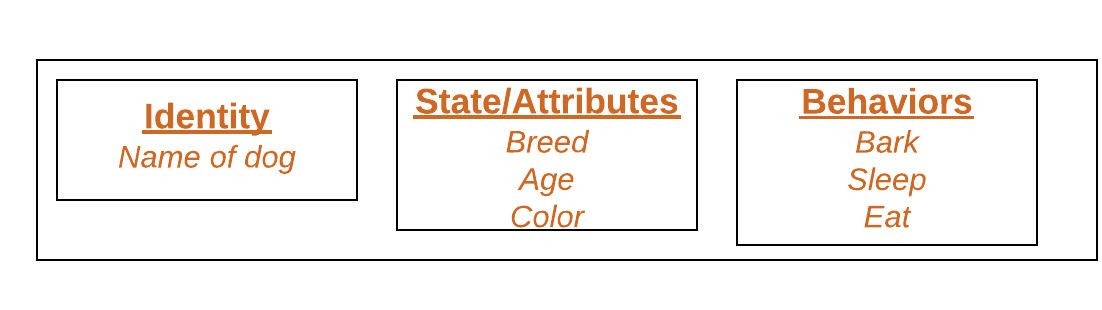
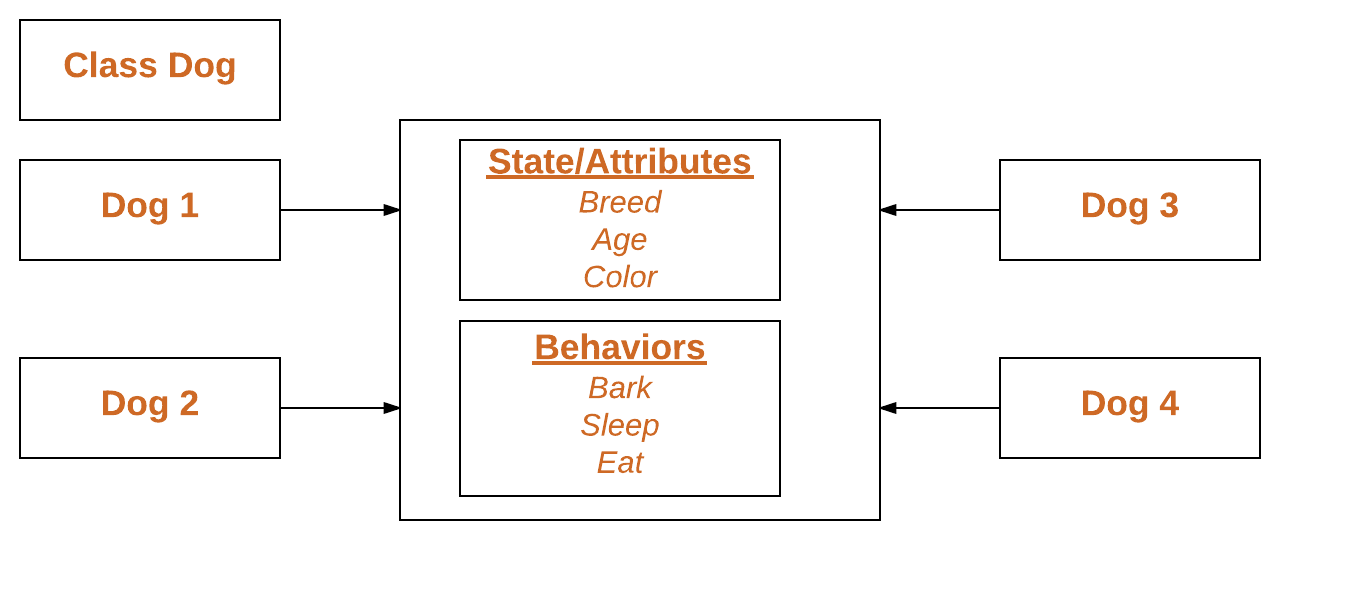
A class is a user-defined blueprint or prototype from which objects are created. Classes provide a means of bundling data and functionality together. Creating a new class creates a new type of object, allowing new instances of that type to be made. Each class instance can have attributes attached to it for maintaining its state. Class instances can also have methods (defined by its class) for modifying its state.
To understand the need for creating a class let’s consider an example, let’s say you wanted to track the number of dogs which may have different attributes like breed, age. If a list is used, the first element could be the dog’s breed while the second element could represent its age. Let’s suppose there are 100 different dogs, then how would you know which element is supposed to be which? What if you wanted to add other properties to these dogs? This lacks organization and it’s the exact need for classes.
Class creates a user-defined data structure, which holds its own data members and member functions, which can be accessed and used by creating an instance of that class. A class is like a blueprint for an object.
Some points on Python class:
Classes are created by keyword class.
Attributes are the variables that belong to class.
Attributes are always public and can be accessed using dot (.) operator. Eg.: Myclass.Myattribute


<strong>Class Definition Syntax:</strong> class ClassName:     
# Statement-1     
.     .     .     
# Statement-N 
<strong>Defining a class –</strong>

python class

Declaring Objects (Also called instantiating a class)
When an object of a class is created, the class is said to be instantiated. All the instances share the attributes and the behavior of the class. But the values of those attributes, i.e. the state are unique for each object. A single class may have any number of instances.
Example:

python declaring an object

Declaring an object


# Python program to
# demonstrate instantiating
# a class


classDog: 

# A simple class
# attribute
attr1 ="mamal"
attr2 ="dog"

# A sample method  
deffun(self): 
print("I'm a", self.attr1)
print("I'm a", self.attr2)

# Driver code
# Object instantiation
Rodger =Dog()

# Accessing class attributes
# and method through objects
print(Rodger.attr1)
Rodger.fun()

Output:
mamal I’m a mamal I’m a dog
In the above example, an object is created which is basically a dog named Rodger. This class only has two class attributes that tell us that Rodger is a dog and a mammal.
The self
Class methods must have an extra first parameter in method definition. We do not give a value for this parameter when we call the method, Python provides it.
If we have a method which takes no arguments, then we still have to have one argument.
This is similar to this pointer in C++ and this reference in Java.
When we call a method of this object as myobject.method(arg1, arg2), this is automatically converted by Python into MyClass.method(myobject, arg1, arg2) – this is all the special self is about.
__init__ method:
The __init__ method is similar to constructors in C++ and Java. Constructors are used to initialize the object’s state. Like methods, a constructor also contains a collection of statements(i.e. instructions) that are executed at the time of Object creation. It is run as soon as an object of a class is instantiated. The method is useful to do any initialization you want to do with your object.

# A Sample class with init method 
classPerson: 
# init method or constructor  
def__init__(self, name): 
self.name =name 
# Sample Method  
defsay_hi(self): 
print('Hello, my name is', self.name)
p =Person('Nikhil') 
p.say_hi() 

 
Output:
Hello, my name is Nikhil
Class and Instance Variables
Instance variables are for data unique to each instance and class variables are for attributes and methods shared by all instances of the class. Instance variables are variables whose value is assigned inside a constructor or method with self whereas class variables are variables whose value is assigned in the class.
Defining instance varibale using constructor.

# Python program to show that the variables with a value  
# assigned in the class declaration, are class variables and 
# variables inside methods and constructors are instance 
# variables. 

# Class for Dog 
classDog: 

# Class Variable 
animal ='dog'

# The init method or constructor 
def__init__(self, breed, color): 

# Instance Variable     
self.breed =breed
self.color =color        

# Objects of Dog class 
Rodger =Dog("Pug", "brown") 
Buzo =Dog("Bulldog", "black") 

print('Rodger details:')   
print('Rodger is a', Rodger.animal) 
print('Breed: ', Rodger.breed)
print('Color: ', Rodger.color)

print('\nBuzo details:')   
print('Buzo is a', Buzo.animal) 
print('Breed: ', Buzo.breed)
print('Color: ', Buzo.color)

# Class variables can be accessed using class 
# name also 
print("\nAccessing class variable using class name")
print(Dog.animal)        

Output:
Rodger details: Rodger is a dog Breed: Pug Color: brown Buzo details: Buzo is a dog Breed: Bulldog Color: black Accessing class variable using class name dog
Defining instance variable using the normal method.

# Python program to show that we can create  
# instance variables inside methods 

# Class for Dog 
classDog: 

# Class Variable 
animal ='dog'

# The init method or constructor 
def__init__(self, breed): 

# Instance Variable 
self.breed =breed             

# Adds an instance variable  
defsetColor(self, color): 
self.color =color 

# Retrieves instance variable     
defgetColor(self):     
returnself.color    

# Driver Code 
Rodger =Dog("pug") 
Rodger.setColor("brown") 
print(Rodger.getColor())  
Output:
brown

Exception handling in c++ and python

Exception handling exists in both C++ and Python, but the style and ergonomics are different. Understanding those differences helps engineers write cleaner and more predictable code when working across multiple languages.

The Shared Idea

In both languages, exceptions represent runtime problems that interrupt the normal flow of execution. Instead of returning error codes everywhere, a function can raise an exception and let another part of the program decide how to respond.

Python Example

def divide(a, b):
    if b == 0:
        raise ValueError("Division by zero")
    return a / b

try:
    print(divide(10, 0))
except ValueError as exc:
    print(exc)

C++ Example

#include <iostream>
#include <stdexcept>
using namespace std;

int divide(int a, int b) {
    if (b == 0) {
        throw runtime_error("Division by zero");
    }
    return a / b;
}

int main() {
    try {
        cout << divide(10, 0) << endl;
    } catch (const exception& e) {
        cout << e.what() << endl;
    }
}

The Practical Difference

Python makes exception handling feel lightweight and natural for many application tasks. C++ gives more control, but also requires more discipline around object lifetime, destructors, and performance-sensitive design.

Good Practices in Both Languages

  • Do not hide important failures silently.
  • Raise or throw meaningful exception types.
  • Catch errors where you can actually recover or add useful context.
  • Keep normal control flow separate from exceptional failure flow.

Final Thoughts

Exception handling is not about making code look advanced. It is about making failure understandable and manageable. Whether you write in C++ or Python, good error handling is part of writing reliable software.

File handling basics

Python too supports file handling and allows users to handle files i.e., to read and write files, along with many other file handling options, to operate on files. The concept of file handling has stretched over various other languages, but the implementation is either complicated or lengthy, but alike other concepts of Python, this concept here is also easy and short. Python treats file differently as text or binary and this is important. Each line of code includes a sequence of characters and they form text file. Each line of a file is terminated with a special character, called the EOL or End of Line characters like comma {,} or newline character. It ends the current line and tells the interpreter a new one has begun. Let’s start with Reading and Writing files.

Working of open() function

We use open () function in Python to open a file in read or write mode. As explained above, open ( ) will return a file object. To return a file object we use open() function along with two arguments, that accepts file name and the mode, whether to read or write. So, the syntax being: open(filename, mode). There are three kinds of mode, that Python provides and how files can be opened:

  •  r “, for reading.
  •  w “, for writing.
  •  a “, for appending.
  •  r+ “, for both reading and writing

One must keep in mind that the mode argument is not mandatory. If not passed, then Python will assume it to be “ r ” by default. Let’s look at this program and try to analyze how the read mode works:

#a file named "thanh", will be opened with the reading mode.
 file = open('thanh.txt', 'r') 
 This will print every line one by one in the file
 for each in file: 
     print (each) 

Working of read() mode

There is more than one way to read a file in Python. If you need to extract a string that contains all characters in the file then we can use file.read(). The full code would work like this:

#Python code to illustrate read() mode
 file = open("file.text", "r") 
 print file.read() 

Creating a file using write() mode

Let’s see how to create a file and how write mode works:
To manipulate the file, write the following in your Python environment:

#Python code to create a file
 file = open('geek.txt','w') 
 file.write("This is the write command") 
 file.write("It allows us to write in a particular file") 
 file.close() 

Python regex basics

Regular Expression in Python with Examples | Set 1

Last Updated: 19-10-2020

Module Regular Expressions(RE) specifies a set of strings(pattern) that matches it. 
To understand the RE analogy, MetaCharacters are useful, important and will be used in functions of module re. 
There are a total of 14 metacharacters and will be discussed as they follow into functions: 

\   Used to drop the special meaning of character
    following it (discussed below)
[]  Represent a character class
^   Matches the beginning
$   Matches the end
.   Matches any character except newline
?   Matches zero or one occurrence.
|   Means OR (Matches with any of the characters
    separated by it.
*   Any number of occurrences (including 0 occurrences)
+   One or more occurrences
{}  Indicate number of occurrences of a preceding RE 
    to match.
()  Enclose a group of REs


  • Function compile() 
    Regular expressions are compiled into pattern objects, which have methods for various operations such as searching for pattern matches or performing string substitutions. 
     
#Module Regular Expression is imported using <strong>import</strong>().
 import re 
# compile() creates regular expression character class [a-e],
# which is equivalent to [abcde].
# class [abcde] will match with string with 'a', 'b', 'c', 'd', 'e'.
 p = re.compile('[a-e]') 
# findall() searches for the Regular Expression and return a list upon finding
 print(p.findall("Aye, said Mr. Gibenson Stark")) 

Output: 

['e', 'a', 'd', 'b', 'e', 'a']


Understanding the Output: 
First occurrence is ‘e’ in “Aye” and not ‘A’, as it being Case Sensitive. 
Next Occurrence is ‘a’ in “said”, then ‘d’ in “said”, followed by ‘b’ and ‘e’ in “Gibenson”, the Last ‘a’ matches with “Stark”.
Metacharacter backslash ‘\’ has a very important role as it signals various sequences. If the backslash is to be used without its special meaning as metacharacter, use’\\’

\d   Matches any decimal digit, this is equivalent
     to the set class [0-9].
\D   Matches any non-digit character.
\s   Matches any whitespace character.
\S   Matches any non-whitespace character
\w   Matches any alphanumeric character, this is
     equivalent to the class [a-zA-Z0-9_].
\W   Matches any non-alphanumeric character. 

Python collections basics

Counter is a container included in the collections module. Now you all must be wondering what is a container. Don’t worry first let’s discuss about the container.

What is Container?

Containers are objects that hold objects. They provide a way to access the contained objects and iterate over them. Examples of built in containers are Tuple, list, and dictionary. Others are included in Collections module.

A Counter is a subclass of dict. Therefore it is an unordered collection where elements and their respective count are stored as a dictionary. This is equivalent to a bag or multiset of other languages.

Syntax :

class collections.Counter([iterable-or-mapping])

Initialization :
The constructor of counter can be called in any one of the following ways :

With sequence of itemsWith dictionary containing keys and countsWith keyword arguments mapping string names to counts.

OrderedDict in Python

An OrderedDict is a dictionary subclass that remembers the order that keys were first inserted. The only difference between dict() and OrderedDict() is that:

OrderedDict preserves the order in which the keys are inserted. A regular dict doesn’t track the insertion order, and iterating it gives the values in an arbitrary order. By contrast, the order the items are inserted is remembered by OrderedDict.

A Python program to demonstrate working of OrderedDict
 from collections import OrderedDict 
 print("This is a Dict:\n") 
 d = {} 
 d['a'] = 1
 d['b'] = 2
 d['c'] = 3
 d['d'] = 4
 for key, value in d.items(): 
     print(key, value) 
 print("\nThis is an Ordered Dict:\n") 
 od = OrderedDict() 
 od['a'] = 1
 od['b'] = 2
 od['c'] = 3
 od['d'] = 4
 for key, value in od.items(): 
     print(key, value) 

Output:

This is a Dict:
('a', 1)
('c', 3)
('b', 2)
('d', 4)

This is an Ordered Dict:
('a', 1)
('b', 2)
('c', 3)
('d', 4)

Important Points:

  1. Key value Change: If the value of a certain key is changed, the position of the key remains unchanged in OrderedDict.
A Python program to demonstrate working of key
 value change in OrderedDict
 from collections import OrderedDict 
 print("Before:\n") 
 od = OrderedDict() 
 od['a'] = 1
 od['b'] = 2
 od['c'] = 3
 od['d'] = 4
 for key, value in od.items(): 
     print(key, value) 
 print("\nAfter:\n") 
 od['c'] = 5
 for key, value in od.items(): 
     print(key, value) 
Before: ('a', 1) ('b', 2) ('c', 3) ('d', 4) 
After: ('a', 1) ('b', 2) ('c', 5) ('d', 4)

Other Considerations:

  • Ordered dict in Python version 2.7 consumes more memory than normal dict. This is due to the underlying Doubly Linked List implementation for keeping the order. In Python 2.7 Ordered Dict is not dict subclass, it’s a specialized container from collections module.
  • Starting from Python 3.7, insertion order of Python dictionaries is guaranteed.
  • Ordered Dict can be used as a stack with the help of popitem function. Try implementing LRU cache with Ordered Dict.