C++ functions that matter

Functions are one of the most important building blocks in C++. They help us organize logic, reduce duplication, and make code easier to understand. Without functions, even small programs become long, repetitive, and difficult to maintain.

What a Function Does

A function groups a piece of logic under a meaningful name. Instead of rewriting the same steps repeatedly, you define the logic once and call it whenever you need it.

#include <iostream>
using namespace std;

int add(int a, int b) {
    return a + b;
}

int main() {
    cout << add(2, 3) << endl;
    return 0;
}

Why Functions Improve Code Quality

  • They reduce repeated code.
  • They make programs easier to test.
  • They improve readability when names are clear.
  • They let you separate high-level intent from implementation detail.

Parameters and Return Values

Parameters let a function receive input. The return value sends a result back to the caller. Together, they make functions flexible and reusable.

Pass by Value vs Pass by Reference

In C++, this distinction matters for both performance and correctness.

  • Pass by value copies the argument.
  • Pass by reference lets the function work directly with the original object.
void increment(int& value) {
    value++;
}

Function Overloading

C++ allows multiple functions with the same name as long as their parameter lists differ. This is called function overloading.

int multiply(int a, int b) {
    return a * b;
}

double multiply(double a, double b) {
    return a * b;
}

Final Thoughts

Good C++ code depends heavily on good function design. Clear function boundaries make larger programs easier to reason about, and that matters whether you are writing a small utility or a large production system.

C++ strings basics

String Class in C++

There is no native “string” data type in C++ but its <string> library class provides a string object that emulates a string data type. To make this available to a program, the library must be added with an #include <string> directive at the start of the program.

#include<iostream>
#include<string.h>using namespace std;
int main()
{
char str[50];
int len;
cout << "Enter an array or string : ":
gets(str);
len = strlen(str);
cout << "Length of the string is : " << len;
return 0;
}

Like the <iostream> class library, the <string> library is part of the std namespace that is used by the C++ standard library classes. That means that a string object can be referred to as std::string, or more simply as string when using namespace std; again the directive must be at the start of the program.

Initializing Strings

A string “variable” can be declared in the same way as other variables. The declaration may optionally initialized the variable using the = assignment operator, or it may be initialized later in the programAdditionally a string variable may be initialized by including a text string between parentheses after the variable name.

Text strings in C++ must always be enclosed with double quotes(“”).
Single quotes (‘’) are only used for character values of the char data type.

Any numeric values that are assigned to a string variable, are no longer a numeric data type, so attempting to add string values of “4” and “5” with the addition operator(+) would add up to “45” instead of 9.

Converting Strings to other Data Types

Arithmetic cannot be performed on numeric values assigned to string variables until they are converted to a numeric data type. Luckily, there is a C++ <sstream> library provides a “stringstream” object that acts as an intermediary to convert strings to other data types.

Other features of a string variable can be revealed by calling its size()capacity(), and empty() functions. Written below is short summary of other features.

  • string variable can be emptied by assigning it an empty string (=“”) or by calling its clear() function.
  • Multiple string values can be concatenated by the + operator
  • string can be can be appended to another string by the += operator or by calling its append() function.
  • string can be compared to another string by the == operator or by calling its append() function.
  • string can be assigned to a string variable using the = operator or by calling its assign() function.
  • The swap() function swaps the values of two string variables.
  • Substrings of a string can be sought with the find() function, or specialized functions such as find_first_of(), and a character retrieved from a specified index position by the at() function.

Next we will be focusing more on control structure of the flow such as while loops, do-while loops, and for loops in addition to using the switch case for complex conditional tests.

C++ arrays basics

What’s in an Array?

An array is a variable that can store multiple items of data unlike a regular variable that stores one pierce of data. Just like any variable, arrays must be declared before they can be accessed.

Initializing Arrays

You can initialize a simple array of built-in types, like integers (int) or characters (char), when you first declare the array. After the array name, put an equal sign and a list of comma separated values enclosed in the braces.

int nums[10] = { 0, 10, 20, 30, 40, 50, 60 ,70, 80, 90 }; 

This declared nums to be an array of 10 integers. Remember that the data are stored sequentially in array are elements that are numbered starting at zero. So nums[0] equals to 0, nums[1] equals to 10, and so on.

Arrays can be created for any data type but each element may only contain data of the same data type.

Inserting and Printing Elements

int mike[5] = {19, 10, 8, 17, 9}// change 4th element to 9
mike[3] = 9;// take input from the user and insert in third element
cin >> mike[2];// take input from the user and insert in (i+1)th element
cin >> mike[i];// print first element of the array
cout << mike[0];// print ith element of the array
cout >> mike[i-1];

Character Arrays

An array of characters can be used to store a string of text if the final elements contains the special \0 null character. For example:

char name[5] = {'p', 'n', 'o', 'p', '\0'};

Because this character-by-character approach is difficult to type and admits too many opportunities for error, C++ enables a shorthand form of string initialization using a literal:

char name[] = "pnop";

This form of initialization doesn’t require the null character; the compiler adds it automatically. The string “pnop” is 5 bytes including null.

Multidimensial Arrays

Collectively elements in an array is known as an index. Arrays can have more than one index. Arrays are suitable for data that consists of a known number of elements like a chessboard or coordinates which would be good examples in need of a two dimensional array.

For example:

int coordinates[2][3] = {{1,2,3} , {4,5,6}};

A three-dimensional array has three subscripts:

int cube[5,13,8];

Run the program below to see the output.

https://repl.it/join/hxlyjcst-thanhnguyen91

C-Style Character String

C++ supports a wide range of functions that can manipulate null-terminated strings. The header file <cstring> defines several functions to manipulate C strings and arrays.

╔═════════════════╦════════════════════════════════════════════╗
║ Keyword ║ Functions and Purpose ║
╠═════════════════╬════════════════════════════════════════════╣
║ strcpy(s1,s2) ║ copies string s2 into string s1. ║ ╠═════════════════╬════════════════════════════════════════════╣
║ strcat(s1,s2) ║ concatenates string s2 onto the end of ║
║ ║ string s1. ║
╠═════════════════╬════════════════════════════════════════════╣
║ strlen(s1) ║ Returns the length of string s1; ║ ╠═════════════════╬════════════════════════════════════════════╣
║ strcmp(s1,s2) ║ Returns 0 if s1 and s2 are the same; ║
║ ║ less than 0 if s1<s2; greater than 0 if ║ ║ ║ if s1>s2. ║
╠═════════════════╬════════════════════════════════════════════╣
║ strchr(s1,ch) ║ Returns a pointer to the first occurrence ║ ║ ║ of character ch in string s1. ║
╠═════════════════╬════════════════════════════════════════════╣
║ strstr(s1,s2) ║ Returns a pointer to the first string s2 ║
║ ║ in string s1. ║
╚═════════════════╩════════════════════════════════════════════╝

The header file <cstring> defines several functions to manipulate C strings and arrays.

C++ operators basics

Operators are the foundation of any programming language. Thus the functionality of C/C++ programming language is incomplete without the use of operators. We can define operators as symbols that help us to perform specific mathematical and logical computations on operands. In other words, we can say that an operator operates the operands.
For example, consider the below statement:

c = a + b;

Here, ‘+’ is the operator known as addition operator and ‘a’ and ‘b’ are operands. The addition operator tells the compiler to add both of the operands ‘a’ and ‘b’.

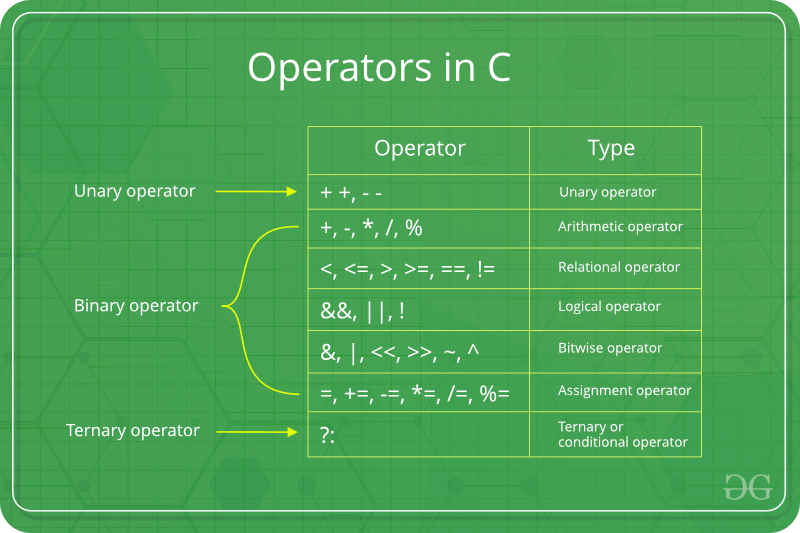
C/C++ has many built-in operator types and they are classified as follows:

  1. Arithmetic Operators: These are the operators used to perform arithmetic/mathematical operations on operands. Examples: (+, -, *, /, %,++,–). Arithmetic operator are of two types:
    1. Unary Operators: Operators that operates or works with a single operand are unary operators. For example: (++ , –)
    2. Binary Operators: Operators that operates or works with two operands are binary operators. For example: (+ , – , * , /)
    To learn Arithmetic Operators in details visit this link.
  2. Relational Operators: These are used for comparison of the values of two operands. For example, checking if one operand is equal to the other operand or not, an operand is greater than the other operand or not etc. Some of the relational operators are (==, >= , <= ). To learn about each of these operators in details go to this link.
  3. Logical Operators:  Logical Operators are used to combine two or more conditions/constraints or to complement the evaluation of the original condition in consideration. The result of the operation of a logical operator is a boolean value either true or false. For example, the logical AND represented as ‘&&’ operator in C or C++ returns true when both the conditions under consideration are satisfied. Otherwise it returns false. Therfore, a && b returns true when both a and b are true (i.e. non-zero). To learn about different logical operators in details please visit this link.
  4. Bitwise Operators: The Bitwise operators is used to perform bit-level operations on the operands. The operators are first converted to bit-level and then the calculation is performed on the operands. The mathematical operations such as addition, subtraction, multiplication etc. can be performed at bit-level for faster processing. For example, the bitwise AND represented as & operator in C or C++ takes two numbers as operands and does AND on every bit of two numbers. The result of AND is 1 only if both bits are 1. To learn bitwise operators in details, visit this link.
  5. Assignment Operators: Assignment operators are used to assign value to a variable. The left side operand of the assignment operator is a variable and right side operand of the assignment operator is a value. The value on the right side must be of the same data-type of variable on the left side otherwise the compiler will raise an error.
    Different types of assignment operators are shown below:
    1. “=”: This is the simplest assignment operator. This operator is used to assign the value on the right to the variable on the left.
      For example:a = 10; b = 20; ch = ‘y’;
    2. “+=”: This operator is combination of ‘+’ and ‘=’ operators. This operator first adds the current value of the variable on left to the value on right and then assigns the result to the variable on the left.
      Example:(a += b) can be written as (a = a + b) If initially value stored in a is 5. Then (a += 6) = 11.
    3. “-=”: This operator is combination of ‘-‘ and ‘=’ operators. This operator first subtracts the value on right from the current value of the variable on left and then assigns the result to the variable on the left.
      Example:(a -= b) can be written as (a = a – b) If initially value stored in a is 8. Then (a -= 6) = 2.
    4. “*=”: This operator is combination of ‘*’ and ‘=’ operators. This operator first multiplies the current value of the variable on left to the value on right and then assigns the result to the variable on the left.
      Example:(a *= b) can be written as (a = a * b) If initially value stored in a is 5. Then (a *= 6) = 30.
    5. “/=”: This operator is combination of ‘/’ and ‘=’ operators. This operator first divides the current value of the variable on left by the value on right and then assigns the result to the variable on the left.
      Example:(a /= b) can be written as (a = a / b) If initially value stored in a is 6. Then (a /= 2) = 3.
  6. Other Operators: Apart from the above operators there are some other operators available in C or C++ used to perform some specific task. Some of them are discussed here:
    1. sizeof operator: sizeof is a much used in the C/C++ programming language. It is a compile time unary operator which can be used to compute the size of its operand. The result of sizeof is of unsigned integral type which is usually denoted by size_t. Basically, sizeof operator is used to compute the size of the variable. To learn about sizeof operator in details you may visit this link.
    2. Comma Operator: The comma operator (represented by the token ,) is a binary operator that evaluates its first operand and discards the result, it then evaluates the second operand and returns this value (and type). The comma operator has the lowest precedence of any C operator. Comma acts as both operator and separator. To learn about comma in details visit this link.
    3. Conditional Operator: Conditional operator is of the form Expression1 ? Expression2 : Expression3 . Here, Expression1 is the condition to be evaluated. If the condition(Expression1) is True then we will execute and return the result of Expression2 otherwise if the condition(Expression1) is false then we will execute and return the result of Expression3. We may replace the use of if..else statements by conditional operators. To learn about conditional operators in details, visit this link.

Operator precedence chart

The below table describes the precedence order and associativity of operators in C / C++ . Precedence of operator decreases from top to bottom.

OPERATORDESCRIPTIONASSOCIATIVITY
()Parentheses (function call)left-to-right
[]Brackets (array subscript)
.Member selection via object name
->Member selection via pointer
++/–Postfix increment/decrement
++/–Prefix increment/decrementright-to-left
+/-Unary plus/minus
!~Logical negation/bitwise complement
(type)Cast (convert value to temporary value of type)
*Dereference
&Address (of operand)
sizeofDetermine size in bytes on this implementation
*,/,%Multiplication/division/modulusleft-to-right
+/-Addition/subtractionleft-to-right
<< , >>Bitwise shift left, Bitwise shift rightleft-to-right
< , <=Relational less than/less than or equal toleft-to-right
> , >=Relational greater than/greater than or equal toleft-to-right
== , !=Relational is equal to/is not equal toleft-to-right
&Bitwise ANDleft-to-right
^Bitwise exclusive ORleft-to-right
|Bitwise inclusive ORleft-to-right
&&Logical ANDleft-to-right
||Logical ORleft-to-right
?:Ternary conditionalright-to-left
=Assignmentright-to-left
+= , -=Addition/subtraction assignment
*= , /=Multiplication/division assignment
%= , &=Modulus/bitwise AND assignment
^= , |=Bitwise exclusive/inclusive OR assignment
<>=Bitwise shift left/right assignment
,expression separatorleft-to-right

C++ basic input and output

In C, we could use the function freopen() to redirect an existing FILE pointer to another stream. The prototype for freopen() is given as

FILE * freopen ( const char * filename, const char * mode, FILE * stream );

For Example to redirect the stdout to say a textfile, we could write

freopen ("text_file.txt", "w", stdout);

While this method is still supported in C++, this article discusses another way to redirect I/O streams.

C++ being an object-oriented programming language gives us the ability to not only define our own streams but also redirect standard streams. Thus in C++, a stream is an object whose behavior is defined by a class. Thus anything that behaves like a stream is also a stream.

Streams Objects in C++ are mainly of three types :

  • istream : Stream object of this type can only perform input operations from the stream
  • ostream : These objects can only be used for output operations.
  • iostream : Can be used for both input and output operations

All these classes, as well as file stream classes, derive from the classes: ios and streambuf. Thus filestream and IO stream objects behave similarly.

All stream objects also have an associated data member of class streambuf. Simply put streambuf object is the buffer for the stream. When we read data from a stream, we don’t read it directly from the source, but instead, we read it from the buffer which is linked to the source. Similarly, output operations are first performed on the buffer, and then the buffer is flushed (written to the physical device) when needed.

C++ allows us to set the stream buffer for any stream. So the task of redirecting the stream simply reduces to changing the stream buffer associated with the stream. Thus the to redirect a Stream A to Stream B we need to do

  1. Get the stream buffer of A and store it somewhere
  2. Set the stream buffer of A to the stream buffer of B
  3. If needed reset the stream buffer of A to its previous stream buffer

We can use the function ios::rdbuf() to perform two opeations.

1) stream_object.rdbuf(): Returns pointer to the stream buffer of stream_object
2) stream_object.rdbuf(streambuf * p): Sets the stream buffer to the object pointed by p

Industrial robots in practice

Industrial robots are built for repeatability, precision, and productivity. They are common in manufacturing because they can perform structured tasks for long periods with consistent quality.

What an Industrial Robot Usually Looks Like

Many industrial robots are multi-joint robotic arms. They use motors, gear systems, controllers, and sensors to move a tool through space. That tool may be a gripper, a welding head, a camera, or a painting nozzle.

Common Applications

  • Welding: repeatable movement along a fixed path.
  • Pick and place: moving parts from one station to another.
  • Painting: smooth, controlled trajectories with good coverage.
  • Assembly: inserting or fastening components.
  • Inspection: using cameras or sensors for quality control.

Why Robots Are Useful

  • They reduce variation in repetitive processes.
  • They improve throughput.
  • They can work in environments that are dangerous or tiring for humans.
  • They make process timing easier to predict.

A Practical Engineering View

Using a robot well is not only about programming motion. It also involves cell layout, safety design, cycle time analysis, tooling, calibration, and maintenance. In many factories, the real challenge is system integration, not only robot control.

Example Workflow

  1. A conveyor brings a part into a fixed position.
  2. A vision system checks orientation.
  3. The robot picks the part with a gripper.
  4. It places the part in the next station with millimeter-level repeatability.
  5. A PLC coordinates timing with the rest of the line.

Final Thoughts

Industrial robots are one of the clearest examples of engineering value in practice. They combine mechanics, electronics, control, and software into systems that solve real production problems every day.

Humanoid robots basics

Changing the Face of Education, Here and NAO.

According to inventor and artist Leonardo Da Vinci ‘Learning Never Exhausts the Mind’ and over the past decade here at SoftBank Robotics we have found that to be consistently true.

NAO History

Image for post

In 2004 Aldebaran Robotics (Now SoftBank Robotics) launched project NAO which over time has come to revolutionize the way humans and robots interact with each other. NAO is a 58cm tall humanoid robot that is continuously evolving to help support humans in all their endeavors.

Capabilities

NAO’s abilities range from facial recognition, learning from past conversations to automated movement. NAO has already shown his more advanced capabilities through concierging at hotels, aided researchers in over 70 different institutions.

In Education

Image for post

Most recently, NAO has been put to use in multiple South Australian schools; there NAO supports teachers, challenges students and is changing the way they interact. Monica Williams, a researcher from The Association of Independent Schools of South Australia noted that “What surprised the director was the depth of the students’ understanding and that once the teachers opened up to working with the students on the robot they continually saw things that surprised all of us as to what students were capable of”. Additionally, these schools found that both boys and girls were equally captivated by NAO and even began learning how to code for NAO using Python, an industry standard. Similarly, with the help of Choreographe and multiple licenses provided for schools, students can work with a virtual NAO as they take turns working with the actual NAO which encourages each student to learn at their own pace.

NAO has also been hard at work in the special education field, supporting students in developing skills like turn taking, spontaneous communication and social interaction with NAO and others.

Through the years, NAO has proven that whether you are a teacher wanting to empower your students, a hotel in need of a concierge or a student who could use a helping hand, NAO will be there for you, with capabilities that surprise and engage people.

NAO is more than just a robot, NAO can connect with real people and has the ability to become a core part of a community. Like us, NAO will keep developing and learning and if his time in Australia shows us anything, it is that NAO’s mind is far from exhausted.

Ansible and chef basics

Up till now, we have looked in Terraform for infrastructure provisioning and initial setup using provisioners. Now let’s look at ansible which is an open source automation platform. Ansible does configuration management, application deployment, along with infrastructure orchestration. Ansible is procedural rather than declarative. In ansible, we define what we want to do and ansible go through each and every step for that. In terraform, we specify what state we want to achieve and it makes sure we are at that state by creating, modifying or destroying needed resources. Ansible doesn’t manage any state so we need to define how we want to keep track of created resources using tags or other properties while terraform keeps the state of infrastructure so we don’t need to worry about duplicate resource creation. Personally, I recommend terraform for provisioning the infrastructure, and Ansible for configuring the software as terraform is much more intuitive for infrastructure orchestration.

Once upon a time, managing servers reliably and efficiently was a challenge. System administrators managed server by hand, installing software manually, changing configuration and managing services on servers. As managed servers grew and managed services become more complex, scaling manual process was time-consuming and hard. Then came Ansible which is helpful in creating the group of machines, define how to configure them, what action to be taken on them. All these configurations and actions can be triggered from a central location which can be your local system (named controller machine). Ansible uses SSH to connect to remote hosts and do the setup, no software needed to be installed beforehand on a remote host. It’s simple, agentless, powerful and flexible. It uses YAML in form of ansible playbook. Playbook is a file where automation is defined through tasks. A task is a single step to be performed like installing a package.

Ansible works by connecting to remote hosts (using SSH) defined in inventory file, which contains information about servers to be managed. Ansible then executes defined modules or tasks inside a playbook. Execution of playbook which is called the play. We can use predefined organised playbook called roles, which are used for sharing and reusing a provisioning.

Let’s have a look at some of the terminology used in ansible:

  1. Controller Machine: Machine where Ansible is installed
  2. Inventory: Information regarding servers to be managed
  3. Playbook: Automation is defined using tasks defined in YAML format
  4. Task: Procedure to be executed
  5. Module: Predefined commands executed directly on remote hosts
  6. Play: Execution of a playbook
  7. Role: a Pre-defined way for organizing playbooks
  8. Handlers: Tasks with unique names that will only be executed if notified by another task

As I am using Mac OS, so will be installing pip first using easy_install and then ansible using pip. Please look here to install for other platforms.

sudo easy_install pipsudo pip install ansible

Once above command executed, run command below to make sure that ansible is installed properly.

ansible --version

The output should be something like below.

ansible 2.5.3
config file = None
configured module search path = [u'/Users/mitesh/.ansible/plugins/modules', u'/usr/share/ansible/plugins/modules']
ansible python module location = /Library/Python/2.7/site-packages/ansible
executable location = /usr/local/bin/ansible
python version = 2.7.10 (default, Oct 6 2017, 22:29:07) [GCC 4.2.1 Compatible Apple LLVM 9.0.0 (clang-900.0.31)]

Ansible reads the ssh keys form ~/.ssh/id_rsa. We need to make sure we have public key setup on all remote hosts as we already done using terraform while creation of a remote EC2 instance.

For running ansible command, we need inventory file which is expected to be at a specified path: “/etc/ansible/hosts”. We can change its path using ansible config file (ansible.cfg file) in ansible workspace and define inventory file path there. We need to define username which we are going to use during ssh in ansible config file.

File: ansible.cfg
[defaults]
inventory = ./inventory
remote_user = ec2-user

Create an inventory file and add the IP address (dummy)of a remote host.

File: inventory
[all]
18.191.176.209[server]
18.191.176.209

Once this is done, let’s execute below command to ping all given remote host.

ansible all -m ping

Ansible executes ping command to a remote host and gives below output:

18.191.176.209 | SUCCESS => {
"changed": false,
"ping": "pong"
}

We can even create groups in the inventory file and execute ansible commands by replacing all with a group name. In below example, the server is our group name specified in the inventory file.

ansible server -m ping

Let’s look at playbooks to execute a series of actions. We need to make sure we define playbooks as idempotent so that they can run more than once without having any side effects. Ansible executes playbook in a sequential manner from top to bottom.

Sample playbook is like:

---
- hosts: [hosts]
tasks:
- [first task]
- [second task]

We are going to create a directory on our remote node using playbook for all hosts. Below mentioned playbook will create test directory in /home/ec2-user path.

---
- hosts: all
tasks:
— name: Creates directory
file: path=/home/ec2-user/test state=directory

When we execute above playbook using command “ansible-playbook playbook.yml” we get below result. In this, the first result is gathering facts. This happens as ansible executes a special module named “setup” before executing any task. This module connects to a remote host and gathers all kinds of information like IP address, disk space, CPU etc. Once this is done, our create directory task is executed to create the test directory.

PLAY [all] ***************************************************************************************************************************************************TASK [Gathering Facts] ***************************************************************************************************************************************
ok: [18.191.176.209]TASK [Creates directory] *************************************************************************************************************************************
changed: [18.191.176.209]PLAY RECAP ***************************************************************************************************************************************************
18.191.176.209 : ok=2 changed=1 unreachable=0 failed=0

There are many modules and commands available to be executed on remote hosts. With ansible, we can do a server setup, software installation and lot more tasks.

Terraform basics

Introduction to Terraform

Welcome to the intro guide to Terraform! This guide is the best place to start with Terraform. We cover what Terraform is, what problems it can solve, how it compares to existing software, and contains a quick start for using Terraform.

If you are already familiar with the basics of Terraform, the documentation provides a better reference guide for all available features as well as internals.

What is Terraform?

Terraform is a tool for building, changing, and versioning infrastructure safely and efficiently. Terraform can manage existing and popular service providers as well as custom in-house solutions.

Configuration files describe to Terraform the components needed to run a single application or your entire datacenter. Terraform generates an execution plan describing what it will do to reach the desired state, and then executes it to build the described infrastructure. As the configuration changes, Terraform is able to determine what changed and create incremental execution plans which can be applied.

The infrastructure Terraform can manage includes low-level components such as compute instances, storage, and networking, as well as high-level components such as DNS entries, SaaS features, etc…

Examples work best to showcase Terraform. Please see the use cases.

The key features of Terraform are:

Infrastructure as Code

Infrastructure is described using a high-level configuration syntax. This allows a blueprint of your datacenter to be versioned and treated as you would any other code. Additionally, infrastructure can be shared and re-used.

Execution Plans

Terraform has a “planning” step where it generates an execution plan. The execution plan shows what Terraform will do when you call apply. This lets you avoid any surprises when Terraform manipulates infrastructure.

Resource Graph

Terraform builds a graph of all your resources, and parallelizes the creation and modification of any non-dependent resources. Because of this, Terraform builds infrastructure as efficiently as possible, and operators get insight into dependencies in their infrastructure.

Change Automation

Complex changesets can be applied to your infrastructure with minimal human interaction. With the previously mentioned execution plan and resource graph, you know exactly what Terraform will change and in what order, avoiding many possible human errors.

Programming an autonomous vehicle

Programming an autonomous vehicle is not about writing one large script that makes a car drive by itself. It is about building a structured software stack where perception, localization, prediction, planning, and control work together in real time.

Start with the System, Not the Hype

If you want to build autonomous vehicle software, start by understanding the major layers of the system:

  • Perception: detect and track the environment.
  • Localization: estimate where the ego vehicle is.
  • Prediction: forecast what other agents might do.
  • Planning: choose the vehicle's future path and behavior.
  • Control: execute that path using steering, throttle, and brake.

A Good Learning Path

1. Learn in Simulation First

Simulators are ideal because they let you repeat experiments safely. Tools such as CARLA, Gazebo, or simulator environments from online courses are very useful for early learning.

2. Implement Small Modules

Do not try to build the full stack at once. Start with one module at a time:

  • lane detection,
  • PID steering control,
  • basic object detection,
  • pure pursuit path tracking,
  • simple occupancy-grid planning.

3. Connect the Modules

The hard part is not only making each module work. It is making them exchange the right information at the right time and with the right assumptions.

A Practical Example Project

A very good starter project is lane following in simulation:

  1. Use a front camera image.
  2. Detect lane boundaries with computer vision or a learned model.
  3. Estimate the lane center relative to the ego vehicle.
  4. Use a controller to generate steering commands.
  5. Evaluate stability, overshoot, and robustness under noise.

This teaches perception, estimation, and control in one compact workflow.

Languages and Tools

  • Python for rapid prototyping and ML workflows
  • C++ for performance-critical components
  • ROS or ROS 2 for modular robotics software
  • OpenCV for computer vision
  • NumPy / PyTorch / TensorFlow for numerical and learning tasks

Final Thoughts

The best way to program an autonomous vehicle is to build understanding module by module, then integrate carefully. Real autonomy is a systems engineering discipline, and the engineers who succeed in it are usually the ones who respect both theory and integration detail.