C++ constructors and destructors

What is constructor? 
A constructor is a member function of a class which initializes objects of a class. In C++, Constructor is automatically called when object(instance of class) create. It is special member function of the class.
How constructors are different from a normal member function?

A constructor is different from normal functions in following ways: 

  • Constructor has same name as the class itself
  • Constructors don’t have return type
  • A constructor is automatically called when an object is created.
  • If we do not specify a constructor, C++ compiler generates a default constructor for us (expects no parameters and has an empty body).

Let us understand the types of constructors in C++ by taking a real-world example. Suppose you went to a shop to buy a marker. When you want to buy a marker, what are the options? The first one you go to a shop and say give me a marker. So just saying give me a marker mean that you did not set which brand name and which color, you didn’t mention anything just say you want a marker. So when we said just I want a marker so whatever the frequently sold marker is there in the market or in his shop he will simply hand over that. And this is what a default constructor is! The second method you go to a shop and say I want a marker a red in color and XYZ brand. So you are mentioning this and he will give you that marker. So in this case you have given the parameters. And this is what a parameterized constructor is! Then the third one you go to a shop and say I want a marker like this(a physical marker on your hand). So the shopkeeper will see that marker. Okay, and he will give a new marker for you. So copy of that marker. And that’s what copy constructor is!
Types of Constructors

  1. Default Constructors: Default constructor is the constructor which doesn’t take any argument. It has no parameters.

// Cpp program to illustrate the
// concept of Constructors

include using namespace std; class construct { public: int a, b; // Default Constructor construct() { a = 10; b = 20; } }; int main() { // Default constructor called automatically // when the object is created

C++ basic input and output

In C, we could use the function freopen() to redirect an existing FILE pointer to another stream. The prototype for freopen() is given as

FILE * freopen ( const char * filename, const char * mode, FILE * stream );

For Example to redirect the stdout to say a textfile, we could write

freopen ("text_file.txt", "w", stdout);

While this method is still supported in C++, this article discusses another way to redirect I/O streams.

C++ being an object-oriented programming language gives us the ability to not only define our own streams but also redirect standard streams. Thus in C++, a stream is an object whose behavior is defined by a class. Thus anything that behaves like a stream is also a stream.

Streams Objects in C++ are mainly of three types :

  • istream : Stream object of this type can only perform input operations from the stream
  • ostream : These objects can only be used for output operations.
  • iostream : Can be used for both input and output operations

All these classes, as well as file stream classes, derive from the classes: ios and streambuf. Thus filestream and IO stream objects behave similarly.

All stream objects also have an associated data member of class streambuf. Simply put streambuf object is the buffer for the stream. When we read data from a stream, we don’t read it directly from the source, but instead, we read it from the buffer which is linked to the source. Similarly, output operations are first performed on the buffer, and then the buffer is flushed (written to the physical device) when needed.

C++ allows us to set the stream buffer for any stream. So the task of redirecting the stream simply reduces to changing the stream buffer associated with the stream. Thus the to redirect a Stream A to Stream B we need to do

  1. Get the stream buffer of A and store it somewhere
  2. Set the stream buffer of A to the stream buffer of B
  3. If needed reset the stream buffer of A to its previous stream buffer

We can use the function ios::rdbuf() to perform two opeations.

1) stream_object.rdbuf(): Returns pointer to the stream buffer of stream_object
2) stream_object.rdbuf(streambuf * p): Sets the stream buffer to the object pointed by p

C++ operators basics

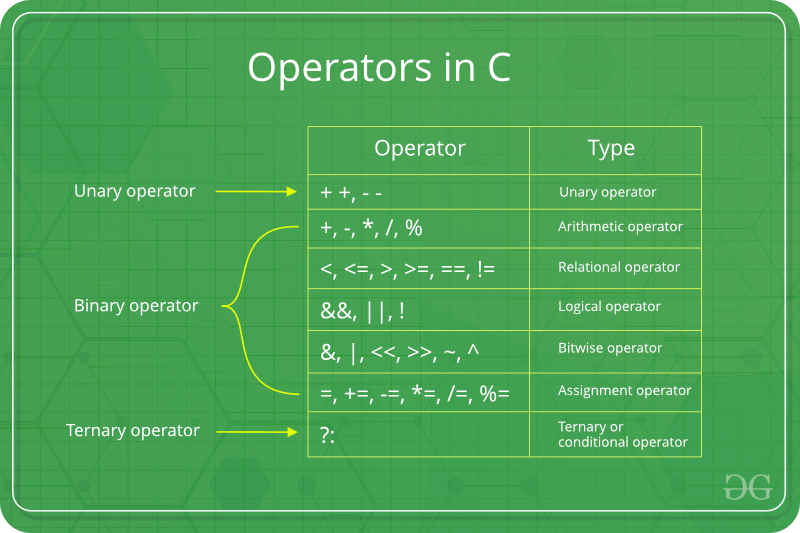
Operators are the foundation of any programming language. Thus the functionality of C/C++ programming language is incomplete without the use of operators. We can define operators as symbols that help us to perform specific mathematical and logical computations on operands. In other words, we can say that an operator operates the operands.
For example, consider the below statement:

c = a + b;

Here, ‘+’ is the operator known as addition operator and ‘a’ and ‘b’ are operands. The addition operator tells the compiler to add both of the operands ‘a’ and ‘b’.

C/C++ has many built-in operator types and they are classified as follows:

  1. Arithmetic Operators: These are the operators used to perform arithmetic/mathematical operations on operands. Examples: (+, -, *, /, %,++,–). Arithmetic operator are of two types:
    1. Unary Operators: Operators that operates or works with a single operand are unary operators. For example: (++ , –)
    2. Binary Operators: Operators that operates or works with two operands are binary operators. For example: (+ , – , * , /)
    To learn Arithmetic Operators in details visit this link.
  2. Relational Operators: These are used for comparison of the values of two operands. For example, checking if one operand is equal to the other operand or not, an operand is greater than the other operand or not etc. Some of the relational operators are (==, >= , <= ). To learn about each of these operators in details go to this link.
  3. Logical Operators:  Logical Operators are used to combine two or more conditions/constraints or to complement the evaluation of the original condition in consideration. The result of the operation of a logical operator is a boolean value either true or false. For example, the logical AND represented as ‘&&’ operator in C or C++ returns true when both the conditions under consideration are satisfied. Otherwise it returns false. Therfore, a && b returns true when both a and b are true (i.e. non-zero). To learn about different logical operators in details please visit this link.
  4. Bitwise Operators: The Bitwise operators is used to perform bit-level operations on the operands. The operators are first converted to bit-level and then the calculation is performed on the operands. The mathematical operations such as addition, subtraction, multiplication etc. can be performed at bit-level for faster processing. For example, the bitwise AND represented as & operator in C or C++ takes two numbers as operands and does AND on every bit of two numbers. The result of AND is 1 only if both bits are 1. To learn bitwise operators in details, visit this link.
  5. Assignment Operators: Assignment operators are used to assign value to a variable. The left side operand of the assignment operator is a variable and right side operand of the assignment operator is a value. The value on the right side must be of the same data-type of variable on the left side otherwise the compiler will raise an error.
    Different types of assignment operators are shown below:
    1. “=”: This is the simplest assignment operator. This operator is used to assign the value on the right to the variable on the left.
      For example:a = 10; b = 20; ch = ‘y’;
    2. “+=”: This operator is combination of ‘+’ and ‘=’ operators. This operator first adds the current value of the variable on left to the value on right and then assigns the result to the variable on the left.
      Example:(a += b) can be written as (a = a + b) If initially value stored in a is 5. Then (a += 6) = 11.
    3. “-=”: This operator is combination of ‘-‘ and ‘=’ operators. This operator first subtracts the value on right from the current value of the variable on left and then assigns the result to the variable on the left.
      Example:(a -= b) can be written as (a = a – b) If initially value stored in a is 8. Then (a -= 6) = 2.
    4. “*=”: This operator is combination of ‘*’ and ‘=’ operators. This operator first multiplies the current value of the variable on left to the value on right and then assigns the result to the variable on the left.
      Example:(a *= b) can be written as (a = a * b) If initially value stored in a is 5. Then (a *= 6) = 30.
    5. “/=”: This operator is combination of ‘/’ and ‘=’ operators. This operator first divides the current value of the variable on left by the value on right and then assigns the result to the variable on the left.
      Example:(a /= b) can be written as (a = a / b) If initially value stored in a is 6. Then (a /= 2) = 3.
  6. Other Operators: Apart from the above operators there are some other operators available in C or C++ used to perform some specific task. Some of them are discussed here:
    1. sizeof operator: sizeof is a much used in the C/C++ programming language. It is a compile time unary operator which can be used to compute the size of its operand. The result of sizeof is of unsigned integral type which is usually denoted by size_t. Basically, sizeof operator is used to compute the size of the variable. To learn about sizeof operator in details you may visit this link.
    2. Comma Operator: The comma operator (represented by the token ,) is a binary operator that evaluates its first operand and discards the result, it then evaluates the second operand and returns this value (and type). The comma operator has the lowest precedence of any C operator. Comma acts as both operator and separator. To learn about comma in details visit this link.
    3. Conditional Operator: Conditional operator is of the form Expression1 ? Expression2 : Expression3 . Here, Expression1 is the condition to be evaluated. If the condition(Expression1) is True then we will execute and return the result of Expression2 otherwise if the condition(Expression1) is false then we will execute and return the result of Expression3. We may replace the use of if..else statements by conditional operators. To learn about conditional operators in details, visit this link.

Operator precedence chart

The below table describes the precedence order and associativity of operators in C / C++ . Precedence of operator decreases from top to bottom.

OPERATORDESCRIPTIONASSOCIATIVITY
()Parentheses (function call)left-to-right
[]Brackets (array subscript)
.Member selection via object name
->Member selection via pointer
++/–Postfix increment/decrement
++/–Prefix increment/decrementright-to-left
+/-Unary plus/minus
!~Logical negation/bitwise complement
(type)Cast (convert value to temporary value of type)
*Dereference
&Address (of operand)
sizeofDetermine size in bytes on this implementation
*,/,%Multiplication/division/modulusleft-to-right
+/-Addition/subtractionleft-to-right
<< , >>Bitwise shift left, Bitwise shift rightleft-to-right
< , <=Relational less than/less than or equal toleft-to-right
> , >=Relational greater than/greater than or equal toleft-to-right
== , !=Relational is equal to/is not equal toleft-to-right
&Bitwise ANDleft-to-right
^Bitwise exclusive ORleft-to-right
|Bitwise inclusive ORleft-to-right
&&Logical ANDleft-to-right
||Logical ORleft-to-right
?:Ternary conditionalright-to-left
=Assignmentright-to-left
+= , -=Addition/subtraction assignment
*= , /=Multiplication/division assignment
%= , &=Modulus/bitwise AND assignment
^= , |=Bitwise exclusive/inclusive OR assignment
<>=Bitwise shift left/right assignment
,expression separatorleft-to-right

C++ arrays basics

What’s in an Array?

An array is a variable that can store multiple items of data unlike a regular variable that stores one pierce of data. Just like any variable, arrays must be declared before they can be accessed.

Initializing Arrays

You can initialize a simple array of built-in types, like integers (int) or characters (char), when you first declare the array. After the array name, put an equal sign and a list of comma separated values enclosed in the braces.

int nums[10] = { 0, 10, 20, 30, 40, 50, 60 ,70, 80, 90 }; 

This declared nums to be an array of 10 integers. Remember that the data are stored sequentially in array are elements that are numbered starting at zero. So nums[0] equals to 0, nums[1] equals to 10, and so on.

Arrays can be created for any data type but each element may only contain data of the same data type.

Inserting and Printing Elements

int mike[5] = {19, 10, 8, 17, 9}// change 4th element to 9
mike[3] = 9;// take input from the user and insert in third element
cin >> mike[2];// take input from the user and insert in (i+1)th element
cin >> mike[i];// print first element of the array
cout << mike[0];// print ith element of the array
cout >> mike[i-1];

Character Arrays

An array of characters can be used to store a string of text if the final elements contains the special \0 null character. For example:

char name[5] = {'p', 'n', 'o', 'p', '\0'};

Because this character-by-character approach is difficult to type and admits too many opportunities for error, C++ enables a shorthand form of string initialization using a literal:

char name[] = "pnop";

This form of initialization doesn’t require the null character; the compiler adds it automatically. The string “pnop” is 5 bytes including null.

Multidimensial Arrays

Collectively elements in an array is known as an index. Arrays can have more than one index. Arrays are suitable for data that consists of a known number of elements like a chessboard or coordinates which would be good examples in need of a two dimensional array.

For example:

int coordinates[2][3] = {{1,2,3} , {4,5,6}};

A three-dimensional array has three subscripts:

int cube[5,13,8];

Run the program below to see the output.

https://repl.it/join/hxlyjcst-thanhnguyen91

C-Style Character String

C++ supports a wide range of functions that can manipulate null-terminated strings. The header file <cstring> defines several functions to manipulate C strings and arrays.

╔═════════════════╦════════════════════════════════════════════╗
║ Keyword ║ Functions and Purpose ║
╠═════════════════╬════════════════════════════════════════════╣
║ strcpy(s1,s2) ║ copies string s2 into string s1. ║ ╠═════════════════╬════════════════════════════════════════════╣
║ strcat(s1,s2) ║ concatenates string s2 onto the end of ║
║ ║ string s1. ║
╠═════════════════╬════════════════════════════════════════════╣
║ strlen(s1) ║ Returns the length of string s1; ║ ╠═════════════════╬════════════════════════════════════════════╣
║ strcmp(s1,s2) ║ Returns 0 if s1 and s2 are the same; ║
║ ║ less than 0 if s1<s2; greater than 0 if ║ ║ ║ if s1>s2. ║
╠═════════════════╬════════════════════════════════════════════╣
║ strchr(s1,ch) ║ Returns a pointer to the first occurrence ║ ║ ║ of character ch in string s1. ║
╠═════════════════╬════════════════════════════════════════════╣
║ strstr(s1,s2) ║ Returns a pointer to the first string s2 ║
║ ║ in string s1. ║
╚═════════════════╩════════════════════════════════════════════╝

The header file <cstring> defines several functions to manipulate C strings and arrays.

C++ strings basics

String Class in C++

There is no native “string” data type in C++ but its <string> library class provides a string object that emulates a string data type. To make this available to a program, the library must be added with an #include <string> directive at the start of the program.

#include<iostream>
#include<string.h>using namespace std;
int main()
{
char str[50];
int len;
cout << "Enter an array or string : ":
gets(str);
len = strlen(str);
cout << "Length of the string is : " << len;
return 0;
}

Like the <iostream> class library, the <string> library is part of the std namespace that is used by the C++ standard library classes. That means that a string object can be referred to as std::string, or more simply as string when using namespace std; again the directive must be at the start of the program.

Initializing Strings

A string “variable” can be declared in the same way as other variables. The declaration may optionally initialized the variable using the = assignment operator, or it may be initialized later in the programAdditionally a string variable may be initialized by including a text string between parentheses after the variable name.

Text strings in C++ must always be enclosed with double quotes(“”).
Single quotes (‘’) are only used for character values of the char data type.

Any numeric values that are assigned to a string variable, are no longer a numeric data type, so attempting to add string values of “4” and “5” with the addition operator(+) would add up to “45” instead of 9.

Converting Strings to other Data Types

Arithmetic cannot be performed on numeric values assigned to string variables until they are converted to a numeric data type. Luckily, there is a C++ <sstream> library provides a “stringstream” object that acts as an intermediary to convert strings to other data types.

Other features of a string variable can be revealed by calling its size()capacity(), and empty() functions. Written below is short summary of other features.

  • string variable can be emptied by assigning it an empty string (=“”) or by calling its clear() function.
  • Multiple string values can be concatenated by the + operator
  • string can be can be appended to another string by the += operator or by calling its append() function.
  • string can be compared to another string by the == operator or by calling its append() function.
  • string can be assigned to a string variable using the = operator or by calling its assign() function.
  • The swap() function swaps the values of two string variables.
  • Substrings of a string can be sought with the find() function, or specialized functions such as find_first_of(), and a character retrieved from a specified index position by the at() function.

Next we will be focusing more on control structure of the flow such as while loops, do-while loops, and for loops in addition to using the switch case for complex conditional tests.

C++ functions that matter

Functions are one of the most important building blocks in C++. They help us organize logic, reduce duplication, and make code easier to understand. Without functions, even small programs become long, repetitive, and difficult to maintain.

What a Function Does

A function groups a piece of logic under a meaningful name. Instead of rewriting the same steps repeatedly, you define the logic once and call it whenever you need it.

#include <iostream>
using namespace std;

int add(int a, int b) {
    return a + b;
}

int main() {
    cout << add(2, 3) << endl;
    return 0;
}

Why Functions Improve Code Quality

  • They reduce repeated code.
  • They make programs easier to test.
  • They improve readability when names are clear.
  • They let you separate high-level intent from implementation detail.

Parameters and Return Values

Parameters let a function receive input. The return value sends a result back to the caller. Together, they make functions flexible and reusable.

Pass by Value vs Pass by Reference

In C++, this distinction matters for both performance and correctness.

  • Pass by value copies the argument.
  • Pass by reference lets the function work directly with the original object.
void increment(int& value) {
    value++;
}

Function Overloading

C++ allows multiple functions with the same name as long as their parameter lists differ. This is called function overloading.

int multiply(int a, int b) {
    return a * b;
}

double multiply(double a, double b) {
    return a * b;
}

Final Thoughts

Good C++ code depends heavily on good function design. Clear function boundaries make larger programs easier to reason about, and that matters whether you are writing a small utility or a large production system.

C++ basics

C++ is a general-purpose programming language that was developed as an enhancement of the C language to include object-oriented paradigm. It is an imperative and a compiled language. 
 

C++ is a middle-level language rendering it the advantage of programming low-level (drivers, kernels) and even higher-level applications (games, GUI, desktop apps etc.). The basic syntax and code structure of both C and C++ are the same. 

Some of the features & key-points to note about the programming language are as follows:

  • Simple: It is a simple language in the sense that programs can be broken down into logical units and parts, has a rich libray support and a variety of data-types.
  • Machine Independent but Platform Dependent: A C++ executable is not platform-independent (compiled programs on Linux won’t run on Windows), however they are machine independent.
  • Mid-level language: It is a mid-level language as we can do both systems-programming (drivers, kernels, networking etc.) and build large-scale user applications (Media Players, Photoshop, Game Engines etc.)
  • Rich library support: Has a rich library support (Both standard ~ built-in data structures, algorithms etc.) as well 3rd party libraries (e.g. Boost libraries) for fast and rapid development.
  • Speed of execution: C++ programs excel in execution speed. Since, it is a compiled language, and also hugely procedural. Newer languages have extra in-built default features such as grabage-collection, dynamic typing etc. which slow the execution of the program overall. Since there is no additional processing overhead like this in C++, it is blazing fast.
  • Pointer and direct Memory-Access: C++ provides pointer support which aids users to directly manipulate storage address. This helps in doing low-level programming (where one might need to have explicit control on the storage of variables).
  • Object-Oriented: One of the strongest points of the language which sets it apart from C. Object-Oriented support helps C++ to make maintainable and extensible programs. i.e. Large-scale applications can be built. Procedural code becomes difficult to maintain as code-size grows.
  • Compiled Language: C++ is a compiled language, contributing to its speed.

Applications of C++: 
C++ finds varied usage in applications such as:

  • Operating Systems & Systems Programming. e.g. Linux-based OS (Ubuntu etc.)
  • Browsers (Chrome & Firefox)
  • Graphics & Game engines (Photoshop, Blender, Unreal-Engine)
  • Database Engines (MySQL, MongoDB, Redis etc.)
  • Cloud/Distributed Systems

Some interesting facts about C++: 
Here are some awesome facts about C++ that may interest you:

  1. The name of C++ signifies the evolutionary nature of the changes from C. “++” is the C increment operator.
  2. C++ is one of the predominant languages for the development of all kind of technical and commercial software.
  3. C++ introduces Object-Oriented Programming, not present in C. Like other things, C++ supports the four primary features of OOP: encapsulation, polymorphism, abstraction, and inheritance.
  4. C++ got the OOP features from Simula67 Programming language.
  5. A function is a minimum requirement for a C++ program to run.(at least main() function)

Rated as one of the most sought after skills in the industry, own the basics of coding with our C++ STL Course and master the very concepts by intense problem-solving.

Python for engineers

Python is one of the most practical languages you can learn as an engineer. It is easy to read, productive for day-to-day work, and flexible enough for automation, backend services, machine learning, testing, and DevOps tasks.

Why Python Is So Useful

  • It has simple syntax, so you can focus on the problem instead of fighting the language.
  • It has a huge ecosystem for web, data, AI, testing, and scripting.
  • It is excellent for glue code between services, files, APIs, and command-line tools.

A Small Example

The following script reads a log file and counts how many lines contain the word ERROR.

from pathlib import Path

log_path = Path("app.log")
error_count = 0

for line in log_path.read_text().splitlines():
    if "ERROR" in line:
        error_count += 1

print(f"Found {error_count} error lines")

This is a good example of why Python is popular. The code is short, readable, and immediately useful.

Common Use Cases

1. Automation

Python is great for repetitive tasks such as renaming files, processing CSV data, calling REST APIs, or sending reports by email.

import requests

response = requests.get("https://api.github.com")
print(response.status_code)

2. Data Processing

You can parse text, clean records, and transform data before loading it into another system.

3. Backend Development

Frameworks like Flask, FastAPI, and Django make Python a strong option for internal tools and web services.

4. Machine Learning

Libraries such as NumPy, pandas, scikit-learn, PyTorch, and TensorFlow make Python a default choice in many AI workflows.

Tips for Writing Better Python

  • Use virtual environments to keep dependencies isolated.
  • Write small functions with clear names.
  • Handle exceptions only where you can act on them.
  • Use type hints when they improve readability.
  • Add tests for scripts that affect production systems.

Final Thoughts

If you want one language that helps with automation, prototyping, and real production work, Python is hard to beat. It is not only beginner-friendly. It is genuinely powerful for experienced engineers as well.

Which programming language should you learn

Programming languages and computer coding have made life simpler for us. Whether it’s automobiles, banks, home appliances, or hospitals, every aspect of our lives depends on codes. No wonder, coding is one of the core skills required by most well-paying jobs today. Coding skills are especially of value in the IT, data analytics, research, web designing, and engineering segments. 

So, which programming languages will continue to be in demand in 2020 and beyond? How many languages should you know to pursue your dream career? We will attempt to answer these tricky questions in this post. 

The ever-growing list of programming languages and protocols can make it tough for programmers and developers to pick any one language that’s most suitable for their jobs or project at hand. Ideally, every programmer should have knowledge of a language that’s close to the system (C, Go, or C++), a language that’s object-oriented (Java or Python), a functional programming language (Scala), and a powerful scripting language (Python and JavaScript). 

Whether you are aiming at joining a Fortune 500 firm or desire to pursue a work-from-home career in programming, it’s important to know what’s hot in the industry. Here are a few programming languages we recommend for coders who want to make it big in 2020. 
 
Job hunting? Sign up for alerts about the latest openings in tech from our Jobs Board
 

1.  Python

 
Python continues to be one of the best programming languages every developer should learn this year. The language is easy-to-learn and offers a clean and well-structured code, making it powerful enough to build a decent web application. 

Python can be used for web and desktop applications, GUI-based desktop applications, machine learning, data science, and network servers. The programming language enjoys immense community support and offers several open-source libraries, frameworks, and modules that make application development a cakewalk.

For instance, Python offers Django and Flask, popular libraries for web development and TensorFlow, Keras, and SciPy for data science applications. 

Though Python has been around for a while, it makes sense to learn this language in 2020 as it can help you get a job or a freelance project quickly, thereby accelerating your career growth. 
 

2.  Kotlin


Kotlin is a general-purpose programming language with type inference. It is designed to be completely interoperable with Java. Moreover, from the time Android announced it as its first language, Kotlin offers features that developers ask for. It effortlessly combines object-oriented and functional programming features within it.

kotlin

(Image: Source)

The effortless interoperation between Java and Kotlin makes Android development faster and enjoyable. Since Kotlin addresses the major issues surfaced in Java, several Java apps are rewritten in Kotlin. For instance, brands like Coursera and Pinterest have already moved to Kotlin due to strong tooling support.  

As most businesses move to Kotlin, Google is bound to promote this language more than Java. Hence, Kotlin has a strong future in the Android app development ecosystem.

Kotlin is an easy-to-learn, open-source, and swift language for Android app development that removes any adoption-related barriers. You can use it for Android development, web development, desktop development, and server-side development. Therefore, it’s a must-learn language for programmers and Android app developers in 2020. 
 

3.  Java

 
Java is celebrating its 24th birthday this year and has been one of the most popular programming languages used for developing server-side applications. Java is a practical choice for  developing Android apps as it can be used to create highly functional programs and platforms. 

This object-oriented programming language does not require a specific hardware infrastructure, is easily manageable, and has a good level of security. Moreover, it is easier to learn Java in comparison to languages such as C and C++. No wonder, nearly 90 percent of Fortune 500 firms rely on Java for their desktop applications and backend development projects. 

java

Despite its industry age, the Java is incredibly stable and not heading for retirement anytime soon. This makes Java one of the most desirable languages among programmers in 2020. 
 

4.  JavaScript/ NodeJS

 
JavaScript (also known as NodeJS) is a popular language among developers who need to work on server-side and client-side programming. It is compatible with several other programming languages, allowing you to create animations, set up buttons, and manage multimedia. 

Owing to its high speed and regular annual updates, JavaScript is an ultimate hit in the IT domain. Reputed firms like Netflix, Uber, PayPal, and several startups use JavaScript to create dynamic web pages that are secure and fast. In fact, the 2018 Developer Skills Report by HackerRank shares that JavaScript is the top programming skill required by companies today. 

(Image Credit: Source)

JavaScript is omnipresent in today’s digital environment. Hence, learning this language makes complete sense. 
 

5.  TypeScript

 
TypeScript, a superset of JavaScript is an object-oriented language that was introduced to extend the capabilities of JS. The language makes it easy for developers to write and maintain codes. TypeScript offers a complete description of each component of the code and can be used for developing large applications with a strict syntax and fewer errors. 

Further, it is well-structured and easy to learn. Its extended toolbox makes application development quick. Owing to the benefits it offers, TypeScript is expected to supercede JS in 2020, making it one of the most sought-after programming languages in the future. 
 

6.  Go

 
Go is fairly a new system-level programming language that has a focused vocabulary and simple scoping rules. It blends the best aspects of functional programming and object-oriented styles. Go is the fastest-growing language on Github, meant to replace languages like Java and C++. 

Stack Overflow survey reveals that Go is the fifth most preferred language among developers today. This is because, Go solves issues like slow compilation and execution in large distributed software systems. 

(Image Credit: Source)

This speed advantage has made Go a critical component of cloud infrastructure. So, if you are planning to work in a serverless ecosystem, Go is the language for you. 
 

7.  Swift

 
Swift is a general-purpose compiled programming language developed by Apple that offers developers a simple and cohesive syntax. It is deeply influenced by Python and Ruby that’s fast, secure, and easy-to-learn. Owning to its versatility and practical applications, Swift has replaced Objective-C as the main language for Apple-related applications. 

Further, since Swift is promoted by Apple, its popularity and community support is increasing. In fact, a study of the top 110 apps on the app store showed that 42 percent of apps are already using Swift. 

swift

(Image Credit: Source)

Coders with little or zero experience can use Swift Playgrounds to learn the language, experiment with complex codes, and work on native iOS and macOS apps. Swift is the premiere coding language that helps developers create iOS apps within a short time. The programming language opens several opportunities for new programmers, allowing them to make it big in the world of app development. 

There is a giant market out there for iOS and you definitely want to be a part of it. If you are eyeing this burgeoning market, Swift is the language you should learn in 2020. 
 
Summing Up
 
Nearly all coders have an insatiable thirst for learning new languages. However, knowing which languages are gaining popularity and can ensure a better career growth will help you prioritize learning them first. Use the information shared in this post to make an informed decision in this matter. 

And more than programming language is nowadays programmer should understand about system administrator, Linux command, Docker, monitoring and testing, because these are very important for your carrier.

Authors:
Truong Thanh Nguyen/ Github: thanh118
Software Developer/ DevOps (Autonomous Driving and Machine Learning)Follow 100 follower · 16 following ·

Frankfurt am Main, Germany
master-engineer.com
@T12Thanh

Understanding pointers in c and c++

Pointers

In earlier chapters, variables have been explained as locations in the computer’s memory which can be accessed by their identifier (their name). This way, the program does not need to care about the physical address of the data in memory; it simply uses the identifier whenever it needs to refer to the variable.

For a C++ program, the memory of a computer is like a succession of memory cells, each one byte in size, and each with a unique address. These single-byte memory cells are ordered in a way that allows data representations larger than one byte to occupy memory cells that have consecutive addresses.

This way, each cell can be easily located in the memory by means of its unique address. For example, the memory cell with the address 1776 always follows immediately after the cell with address 1775 and precedes the one with 1777, and is exactly one thousand cells after 776 and exactly one thousand cells before 2776.

When a variable is declared, the memory needed to store its value is assigned a specific location in memory (its memory address). Generally, C++ programs do not actively decide the exact memory addresses where its variables are stored. Fortunately, that task is left to the environment where the program is run – generally, an operating system that decides the particular memory locations on runtime. However, it may be useful for a program to be able to obtain the address of a variable during runtime in order to access data cells that are at a certain position relative to it.

Address-of operator (&)

The address of a variable can be obtained by preceding the name of a variable with an ampersand sign (&), known as address-of operator. For example:

 
foo = &myvar;

This would assign the address of variable myvar to foo; by preceding the name of the variable myvar with the address-of operator (&), we are no longer assigning the content of the variable itself to foo, but its address.

The actual address of a variable in memory cannot be known before runtime, but let’s assume, in order to help clarify some concepts, that myvar is placed during runtime in the memory address 1776.

In this case, consider the following code fragment:

1
2
3
myvar = 25;
foo = &myvar;
bar = myvar;

The values contained in each variable after the execution of this are shown in the following diagram:
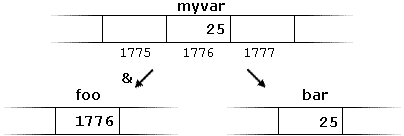
First, we have assigned the value 25 to myvar (a variable whose address in memory we assumed to be 1776).

The second statement assigns foo the address of myvar, which we have assumed to be 1776.

Finally, the third statement, assigns the value contained in myvar to bar. This is a standard assignment operation, as already done many times in earlier chapters.

The main difference between the second and third statements is the appearance of the address-of operator (&).

The variable that stores the address of another variable (like foo in the previous example) is what in C++ is called a pointer. Pointers are a very powerful feature of the language that has many uses in lower level programming. A bit later, we will see how to declare and use pointers.

Dereference operator (*)

As just seen, a variable which stores the address of another variable is called a pointer. Pointers are said to “point to” the variable whose address they store.

An interesting property of pointers is that they can be used to access the variable they point to directly. This is done by preceding the pointer name with the dereference operator (*). The operator itself can be read as “value pointed to by”.

Therefore, following with the values of the previous example, the following statement:

 
baz = *foo;

This could be read as: “baz equal to value pointed to by foo“, and the statement would actually assign the value 25 to baz, since foo is 1776, and the value pointed to by 1776 (following the example above) would be 25.
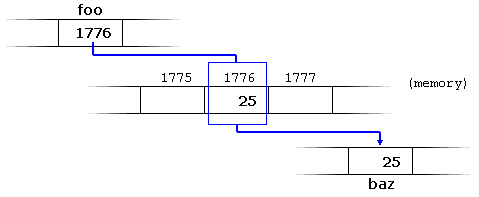

It is important to clearly differentiate that foo refers to the value 1776, while *foo (with an asterisk * preceding the identifier) refers to the value stored at address 1776, which in this case is 25. Notice the difference of including or not including the dereference operator (I have added an explanatory comment of how each of these two expressions could be read):

1
2
baz = foo;   // baz equal to foo (1776)
baz = *foo;  // baz equal to value pointed to by foo (25)  

The reference and dereference operators are thus complementary:

  • & is the address-of operator, and can be read simply as “address of”
  • * is the dereference operator, and can be read as “value pointed to by”

Thus, they have sort of opposite meanings: An address obtained with & can be dereferenced with *.

Earlier, we performed the following two assignment operations:

1
2
myvar = 25;
foo = &myvar;

Right after these two statements, all of the following expressions would give true as result:

1
2
3
4
myvar == 25
&myvar == 1776
foo == 1776
*foo == 25

The first expression is quite clear, considering that the assignment operation performed on myvar was myvar=25. The second one uses the address-of operator (&), which returns the address of myvar, which we assumed it to have a value of 1776. The third one is somewhat obvious, since the second expression was true and the assignment operation performed on foo was foo=&myvar. The fourth expression uses the dereference operator (*) that can be read as “value pointed to by”, and the value pointed to by foo is indeed 25.

So, after all that, you may also infer that for as long as the address pointed to by foo remains unchanged, the following expression will also be true:

 
*foo == myvar

Declaring pointers

Due to the ability of a pointer to directly refer to the value that it points to, a pointer has different properties when it points to a char than when it points to an int or a float. Once dereferenced, the type needs to be known. And for that, the declaration of a pointer needs to include the data type the pointer is going to point to.

The declaration of pointers follows this syntax:

type * name;

where type is the data type pointed to by the pointer. This type is not the type of the pointer itself, but the type of the data the pointer points to. For example:

1
2
3
int * number;
char * character;
double * decimals;

These are three declarations of pointers. Each one is intended to point to a different data type, but, in fact, all of them are pointers and all of them are likely going to occupy the same amount of space in memory (the size in memory of a pointer depends on the platform where the program runs). Nevertheless, the data to which they point to do not occupy the same amount of space nor are of the same type: the first one points to an int, the second one to a char, and the last one to a double. Therefore, although these three example variables are all of them pointers, they actually have different types: int*char*, and double* respectively, depending on the type they point to.

Note that the asterisk (*) used when declaring a pointer only means that it is a pointer (it is part of its type compound specifier), and should not be confused with the dereference operator seen a bit earlier, but which is also written with an asterisk (*). They are simply two different things represented with the same sign.

Let’s see an example on pointers:

1
2
3
4
5
6
7
8
9
10
11
12
13
14
15
16
17
// my first pointer
#include <iostream>
using namespace std;

int main ()
{
  int firstvalue, secondvalue;
  int * mypointer;

  mypointer = &firstvalue;
  *mypointer = 10;
  mypointer = &secondvalue;
  *mypointer = 20;
  cout << "firstvalue is " << firstvalue << '\n';
  cout << "secondvalue is " << secondvalue << '\n';
  return 0;
}
firstvalue is 10
secondvalue is 20

Notice that even though neither firstvalue nor secondvalue are directly set any value in the program, both end up with a value set indirectly through the use of mypointer. This is how it happens:

First, mypointer is assigned the address of firstvalue using the address-of operator (&). Then, the value pointed to by mypointer is assigned a value of 10. Because, at this moment, mypointer is pointing to the memory location of firstvalue, this in fact modifies the value of firstvalue.

In order to demonstrate that a pointer may point to different variables during its lifetime in a program, the example repeats the process with secondvalue and that same pointer, mypointer.

Here is an example a little bit more elaborated:

1
2
3
4
5
6
7
8
9
10
11
12
13
14
15
16
17
18
19
20
// more pointers
#include <iostream>
using namespace std;

int main ()
{
  int firstvalue = 5, secondvalue = 15;
  int * p1, * p2;

  p1 = &firstvalue;  // p1 = address of firstvalue
  p2 = &secondvalue; // p2 = address of secondvalue
  *p1 = 10;          // value pointed to by p1 = 10
  *p2 = *p1;         // value pointed to by p2 = value pointed to by p1
  p1 = p2;           // p1 = p2 (value of pointer is copied)
  *p1 = 20;          // value pointed to by p1 = 20
  
  cout << "firstvalue is " << firstvalue << '\n';
  cout << "secondvalue is " << secondvalue << '\n';
  return 0;
}
firstvalue is 10
secondvalue is 20

Each assignment operation includes a comment on how each line could be read: i.e., replacing ampersands (&) by “address of”, and asterisks (*) by “value pointed to by”.

Notice that there are expressions with pointers p1 and p2, both with and without the dereference operator (*). The meaning of an expression using the dereference operator (*) is very different from one that does not. When this operator precedes the pointer name, the expression refers to the value being pointed, while when a pointer name appears without this operator, it refers to the value of the pointer itself (i.e., the address of what the pointer is pointing to).

Another thing that may call your attention is the line:

 
int * p1, * p2;

This declares the two pointers used in the previous example. But notice that there is an asterisk (*) for each pointer, in order for both to have type int* (pointer to int). This is required due to the precedence rules. Note that if, instead, the code was:

 
int * p1, p2;

p1 would indeed be of type int*, but p2 would be of type int. Spaces do not matter at all for this purpose. But anyway, simply remembering to put one asterisk per pointer is enough for most pointer users interested in declaring multiple pointers per statement. Or even better: use a different statement for each variable.

Pointers and arrays

The concept of arrays is related to that of pointers. In fact, arrays work very much like pointers to their first elements, and, actually, an array can always be implicitly converted to the pointer of the proper type. For example, consider these two declarations:

1
2
int myarray [20];
int * mypointer;

The following assignment operation would be valid:

 
mypointer = myarray;

After that, mypointer and myarray would be equivalent and would have very similar properties. The main difference being that mypointer can be assigned a different address, whereas myarray can never be assigned anything, and will always represent the same block of 20 elements of type int. Therefore, the following assignment would not be valid:

 
myarray = mypointer;

Let’s see an example that mixes arrays and pointers:

1
2
3
4
5
6
7
8
9
10
11
12
13
14
15
16
17
// more pointers
#include <iostream>
using namespace std;

int main ()
{
  int numbers[5];
  int * p;
  p = numbers;  *p = 10;
  p++;  *p = 20;
  p = &numbers[2];  *p = 30;
  p = numbers + 3;  *p = 40;
  p = numbers;  *(p+4) = 50;
  for (int n=0; n<5; n++)
    cout << numbers[n] << ", ";
  return 0;
}
10, 20, 30, 40, 50,

Pointers and arrays support the same set of operations, with the same meaning for both. The main difference being that pointers can be assigned new addresses, while arrays cannot.

In the chapter about arrays, brackets ([]) were explained as specifying the index of an element of the array. Well, in fact these brackets are a dereferencing operator known as offset operator. They dereference the variable they follow just as * does, but they also add the number between brackets to the address being dereferenced. For example:

1
2
a[5] = 0;       // a [offset of 5] = 0
*(a+5) = 0;     // pointed to by (a+5) = 0  

These two expressions are equivalent and valid, not only if a is a pointer, but also if a is an array. Remember that if an array, its name can be used just like a pointer to its first element.

Pointer initialization

Pointers can be initialized to point to specific locations at the very moment they are defined:

1
2
int myvar;
int * myptr = &myvar;

The resulting state of variables after this code is the same as after:

1
2
3
int myvar;
int * myptr;
myptr = &myvar;

When pointers are initialized, what is initialized is the address they point to (i.e., myptr), never the value being pointed (i.e., *myptr). Therefore, the code above shall not be confused with:

1
2
3
int myvar;
int * myptr;
*myptr = &myvar;

Which anyway would not make much sense (and is not valid code).

The asterisk (*) in the pointer declaration (line 2) only indicates that it is a pointer, it is not the dereference operator (as in line 3). Both things just happen to use the same sign: *. As always, spaces are not relevant, and never change the meaning of an expression.

Pointers can be initialized either to the address of a variable (such as in the case above), or to the value of another pointer (or array):

1
2
3
int myvar;
int *foo = &myvar;
int *bar = foo;

Pointer arithmetics

To conduct arithmetical operations on pointers is a little different than to conduct them on regular integer types. To begin with, only addition and subtraction operations are allowed; the others make no sense in the world of pointers. But both addition and subtraction have a slightly different behavior with pointers, according to the size of the data type to which they point.

When fundamental data types were introduced, we saw that types have different sizes. For example: char always has a size of 1 byte, short is generally larger than that, and int and long are even larger; the exact size of these being dependent on the system. For example, let’s imagine that in a given system, char takes 1 byte, short takes 2 bytes, and long takes 4.

Suppose now that we define three pointers in this compiler:

1
2
3
char *mychar;
short *myshort;
long *mylong;

and that we know that they point to the memory locations 10002000, and 3000, respectively.

Therefore, if we write:

1
2
3
++mychar;
++myshort;
++mylong;

mychar, as one would expect, would contain the value 1001. But not so obviously, myshort would contain the value 2002, and mylong would contain 3004, even though they have each been incremented only once. The reason is that, when adding one to a pointer, the pointer is made to point to the following element of the same type, and, therefore, the size in bytes of the type it points to is added to the pointer.


This is applicable both when adding and subtracting any number to a pointer. It would happen exactly the same if we wrote:

1
2
3
mychar = mychar + 1;
myshort = myshort + 1;
mylong = mylong + 1;

Regarding the increment (++) and decrement (--) operators, they both can be used as either prefix or suffix of an expression, with a slight difference in behavior: as a prefix, the increment happens before the expression is evaluated, and as a suffix, the increment happens after the expression is evaluated. This also applies to expressions incrementing and decrementing pointers, which can become part of more complicated expressions that also include dereference operators (*). Remembering operator precedence rules, we can recall that postfix operators, such as increment and decrement, have higher precedence than prefix operators, such as the dereference operator (*). Therefore, the following expression:

 
*p++

is equivalent to *(p++). And what it does is to increase the value of p (so it now points to the next element), but because ++ is used as postfix, the whole expression is evaluated as the value pointed originally by the pointer (the address it pointed to before being incremented).

Essentially, these are the four possible combinations of the dereference operator with both the prefix and suffix versions of the increment operator (the same being applicable also to the decrement operator):

1
2
3
4
*p++   // same as *(p++): increment pointer, and dereference unincremented address
*++p   // same as *(++p): increment pointer, and dereference incremented address
++*p   // same as ++(*p): dereference pointer, and increment the value it points to
(*p)++ // dereference pointer, and post-increment the value it points to 

A typical -but not so simple- statement involving these operators is:

 
*p++ = *q++;

Because ++ has a higher precedence than *, both p and q are incremented, but because both increment operators (++) are used as postfix and not prefix, the value assigned to *p is *q before both p and q are incremented. And then both are incremented. It would be roughly equivalent to:

1
2
3
*p = *q;
++p;
++q;

Like always, parentheses reduce confusion by adding legibility to expressions.

Pointers and const

Pointers can be used to access a variable by its address, and this access may include modifying the value pointed. But it is also possible to declare pointers that can access the pointed value to read it, but not to modify it. For this, it is enough with qualifying the type pointed to by the pointer as const. For example:

1
2
3
4
5
int x;
int y = 10;
const int * p = &y;
x = *p;          // ok: reading p
*p = x;          // error: modifying p, which is const-qualified 

Here p points to a variable, but points to it in a const-qualified manner, meaning that it can read the value pointed, but it cannot modify it. Note also, that the expression &y is of type int*, but this is assigned to a pointer of type const int*. This is allowed: a pointer to non-const can be implicitly converted to a pointer to const. But not the other way around! As a safety feature, pointers to const are not implicitly convertible to pointers to non-const.

One of the use cases of pointers to const elements is as function parameters: a function that takes a pointer to non-const as parameter can modify the value passed as argument, while a function that takes a pointer to const as parameter cannot.

1
2
3
4
5
6
7
8
9
10
11
12
13
14
15
16
17
18
19
20
21
22
23
24
25
26
27
28
29
// pointers as arguments:
#include <iostream>
using namespace std;

void increment_all (int* start, int* stop)
{
  int * current = start;
  while (current != stop) {
    ++(*current);  // increment value pointed
    ++current;     // increment pointer
  }
}

void print_all (const int* start, const int* stop)
{
  const int * current = start;
  while (current != stop) {
    cout << *current << '\n';
    ++current;     // increment pointer
  }
}

int main ()
{
  int numbers[] = {10,20,30};
  increment_all (numbers,numbers+3);
  print_all (numbers,numbers+3);
  return 0;
}
11
21
31

Note that print_all uses pointers that point to constant elements. These pointers point to constant content they cannot modify, but they are not constant themselves: i.e., the pointers can still be incremented or assigned different addresses, although they cannot modify the content they point to.

And this is where a second dimension to constness is added to pointers: Pointers can also be themselves const. And this is specified by appending const to the pointed type (after the asterisk):

1
2
3
4
5
int x;
      int *       p1 = &x;  // non-const pointer to non-const int
const int *       p2 = &x;  // non-const pointer to const int
      int * const p3 = &x;  // const pointer to non-const int
const int * const p4 = &x;  // const pointer to const int 

The syntax with const and pointers is definitely tricky, and recognizing the cases that best suit each use tends to require some experience. In any case, it is important to get constness with pointers (and references) right sooner rather than later, but you should not worry too much about grasping everything if this is the first time you are exposed to the mix of const and pointers. More use cases will show up in coming chapters.

To add a little bit more confusion to the syntax of const with pointers, the const qualifier can either precede or follow the pointed type, with the exact same meaning:

1
2
const int * p2a = &x;  //      non-const pointer to const int
int const * p2b = &x;  // also non-const pointer to const int 

As with the spaces surrounding the asterisk, the order of const in this case is simply a matter of style. This chapter uses a prefix const, as for historical reasons this seems to be more extended, but both are exactly equivalent. The merits of each style are still intensely debated on the internet.

Pointers and string literals

As pointed earlier, string literals are arrays containing null-terminated character sequences. In earlier sections, string literals have been used to be directly inserted into cout, to initialize strings and to initialize arrays of characters.

But they can also be accessed directly. String literals are arrays of the proper array type to contain all its characters plus the terminating null-character, with each of the elements being of type const char (as literals, they can never be modified). For example:

 
const char * foo = "hello"; 

This declares an array with the literal representation for "hello", and then a pointer to its first element is assigned to foo. If we imagine that "hello" is stored at the memory locations that start at address 1702, we can represent the previous declaration as:


Note that here foo is a pointer and contains the value 1702, and not 'h', nor "hello", although 1702 indeed is the address of both of these.

The pointer foo points to a sequence of characters. And because pointers and arrays behave essentially in the same way in expressions, foo can be used to access the characters in the same way arrays of null-terminated character sequences are. For example:

1
2
*(foo+4)
foo[4]

Both expressions have a value of 'o' (the fifth element of the array).

Pointers to pointers

C++ allows the use of pointers that point to pointers, that these, in its turn, point to data (or even to other pointers). The syntax simply requires an asterisk (*) for each level of indirection in the declaration of the pointer:

1
2
3
4
5
6
char a;
char * b;
char ** c;
a = 'z';
b = &a;
c = &b;

This, assuming the randomly chosen memory locations for each variable of 72308092, and 10502, could be represented as:
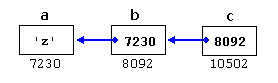

With the value of each variable represented inside its corresponding cell, and their respective addresses in memory represented by the value under them.

The new thing in this example is variable c, which is a pointer to a pointer, and can be used in three different levels of indirection, each one of them would correspond to a different value:

  • c is of type char** and a value of 8092
  • *c is of type char* and a value of 7230
  • **c is of type char and a value of 'z'

void pointers

The void type of pointer is a special type of pointer. In C++, void represents the absence of type. Therefore, void pointers are pointers that point to a value that has no type (and thus also an undetermined length and undetermined dereferencing properties).

This gives void pointers a great flexibility, by being able to point to any data type, from an integer value or a float to a string of characters. In exchange, they have a great limitation: the data pointed to by them cannot be directly dereferenced (which is logical, since we have no type to dereference to), and for that reason, any address in a void pointer needs to be transformed into some other pointer type that points to a concrete data type before being dereferenced.

One of its possible uses may be to pass generic parameters to a function. For example:

1
2
3
4
5
6
7
8
9
10
11
12
13
14
15
16
17
18
19
20
21
// increaser
#include <iostream>
using namespace std;

void increase (void* data, int psize)
{
  if ( psize == sizeof(char) )
  { char* pchar; pchar=(char*)data; ++(*pchar); }
  else if (psize == sizeof(int) )
  { int* pint; pint=(int*)data; ++(*pint); }
}

int main ()
{
  char a = 'x';
  int b = 1602;
  increase (&a,sizeof(a));
  increase (&b,sizeof(b));
  cout << a << ", " << b << '\n';
  return 0;
}
y, 1603

sizeof is an operator integrated in the C++ language that returns the size in bytes of its argument. For non-dynamic data types, this value is a constant. Therefore, for example, sizeof(char) is 1, because char has always a size of one byte.

Invalid pointers and null pointers

In principle, pointers are meant to point to valid addresses, such as the address of a variable or the address of an element in an array. But pointers can actually point to any address, including addresses that do not refer to any valid element. Typical examples of this are uninitialized pointers and pointers to nonexistent elements of an array:

1
2
3
4
int * p;               // uninitialized pointer (local variable)

int myarray[10];
int * q = myarray+20;  // element out of bounds 

Neither p nor q point to addresses known to contain a value, but none of the above statements causes an error. In C++, pointers are allowed to take any address value, no matter whether there actually is something at that address or not. What can cause an error is to dereference such a pointer (i.e., actually accessing the value they point to). Accessing such a pointer causes undefined behavior, ranging from an error during runtime to accessing some random value.

But, sometimes, a pointer really needs to explicitly point to nowhere, and not just an invalid address. For such cases, there exists a special value that any pointer type can take: the null pointer value. This value can be expressed in C++ in two ways: either with an integer value of zero, or with the nullptr keyword:

1
2
int * p = 0;
int * q = nullptr;

Here, both p and q are null pointers, meaning that they explicitly point to nowhere, and they both actually compare equal: all null pointers compare equal to other null pointers. It is also quite usual to see the defined constant NULL be used in older code to refer to the null pointer value:

 
int * r = NULL;

NULL is defined in several headers of the standard library, and is defined as an alias of some null pointer constant value (such as 0 or nullptr).

Do not confuse null pointers with void pointers! A null pointer is a value that any pointer can take to represent that it is pointing to “nowhere”, while a void pointer is a type of pointer that can point to somewhere without a specific type. One refers to the value stored in the pointer, and the other to the type of data it points to.

Pointers to functions

C++ allows operations with pointers to functions. The typical use of this is for passing a function as an argument to another function. Pointers to functions are declared with the same syntax as a regular function declaration, except that the name of the function is enclosed between parentheses () and an asterisk (*) is inserted before the name:

1
2
3
4
5
6
7
8
9
10
11
12
13
14
15
16
17
18
19
20
21
22
23
24
25
26
27
// pointer to functions
#include <iostream>
using namespace std;

int addition (int a, int b)
{ return (a+b); }

int subtraction (int a, int b)
{ return (a-b); }

int operation (int x, int y, int (*functocall)(int,int))
{
  int g;
  g = (*functocall)(x,y);
  return (g);
}

int main ()
{
  int m,n;
  int (*minus)(int,int) = subtraction;

  m = operation (7, 5, addition);
  n = operation (20, m, minus);
  cout <<n;
  return 0;
}
8

In the example above, minus is a pointer to a function that has two parameters of type int. It is directly initialized to point to the function subtraction:

 
int (* minus)(int,int) = subtraction;