Convolution networks basics

Understanding of Convolutional Neural Network (CNN) — Deep Learning

In neural networks, Convolutional neural network (ConvNets or CNNs) is one of the main categories to do images recognition, images classifications. Objects detections, recognition faces etc., are some of the areas where CNNs are widely used.

CNN image classifications takes an input image, process it and classify it under certain categories (Eg., Dog, Cat, Tiger, Lion). Computers sees an input image as array of pixels and it depends on the image resolution. Based on the image resolution, it will see h x w x d( h = Height, w = Width, d = Dimension ). Eg., An image of 6 x 6 x 3 array of matrix of RGB (3 refers to RGB values) and an image of 4 x 4 x 1 array of matrix of grayscale image.
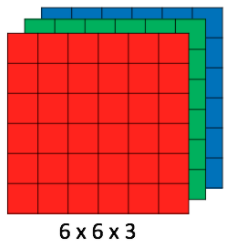
Image for post
Figure 1 : Array of RGB Matrix

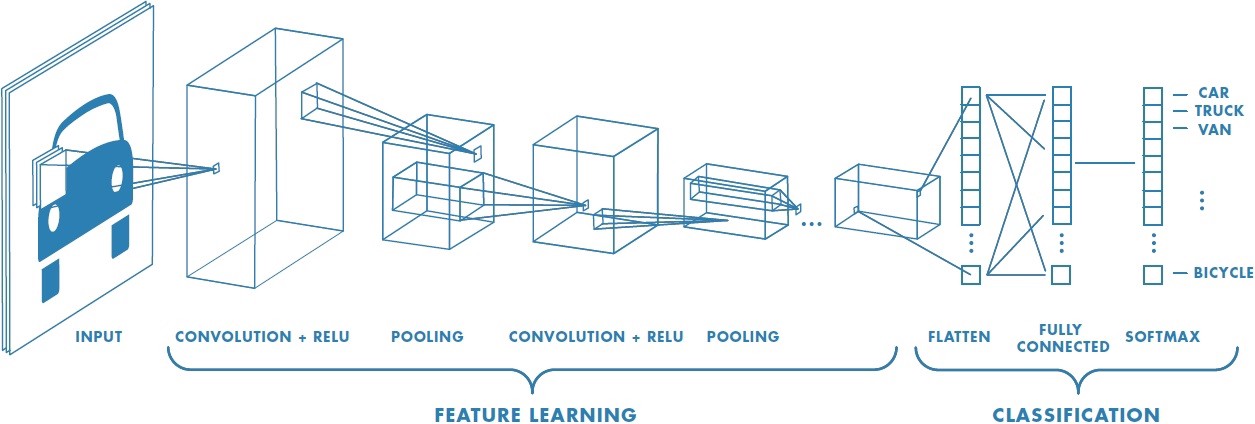
Technically, deep learning CNN models to train and test, each input image will pass it through a series of convolution layers with filters (Kernals), Pooling, fully connected layers (FC) and apply Softmax function to classify an object with probabilistic values between 0 and 1. The below figure is a complete flow of CNN to process an input image and classifies the objects based on values.
Image for post
Figure 2 : Neural network with many convolutional layers

Convolution Layer

Convolution is the first layer to extract features from an input image. Convolution preserves the relationship between pixels by learning image features using small squares of input data. It is a mathematical operation that takes two inputs such as image matrix and a filter or kernel.

Image for post
Figure 3: Image matrix multiplies kernel or filter matrix

Consider a 5 x 5 whose image pixel values are 0, 1 and filter matrix 3 x 3 as shown in below

Image for post
Figure 4: Image matrix multiplies kernel or filter matrix

Then the convolution of 5 x 5 image matrix multiplies with 3 x 3 filter matrix which is called “Feature Map” as output shown in below

Image for post
Figure 5: 3 x 3 Output matrix

Convolution of an image with different filters can perform operations such as edge detection, blur and sharpen by applying filters. The below example shows various convolution image after applying different types of filters (Kernels).

Image for post
Figure 7 : Some common filters

Strides

Stride is the number of pixels shifts over the input matrix. When the stride is 1 then we move the filters to 1 pixel at a time. When the stride is 2 then we move the filters to 2 pixels at a time and so on. The below figure shows convolution would work with a stride of 2.

Image for post
Figure 6 : Stride of 2 pixels

Padding

Sometimes filter does not fit perfectly fit the input image. We have two options:

  • Pad the picture with zeros (zero-padding) so that it fits
  • Drop the part of the image where the filter did not fit. This is called valid padding which keeps only valid part of the image.

Non Linearity (ReLU)

ReLU stands for Rectified Linear Unit for a non-linear operation. The output is ƒ(x) = max(0,x).

Why ReLU is important : ReLU’s purpose is to introduce non-linearity in our ConvNet. Since, the real world data would want our ConvNet to learn would be non-negative linear values.

Image for post
Figure 7 : ReLU operation

There are other non linear functions such as tanh or sigmoid that can also be used instead of ReLU. Most of the data scientists use ReLU since performance wise ReLU is better than the other two.

Pooling Layer

Pooling layers section would reduce the number of parameters when the images are too large. Spatial pooling also called subsampling or downsampling which reduces the dimensionality of each map but retains important information. Spatial pooling can be of different types:

  • Max Pooling
  • Average Pooling
  • Sum Pooling

Max pooling takes the largest element from the rectified feature map. Taking the largest element could also take the average pooling. Sum of all elements in the feature map call as sum pooling.

Image for post
Figure 8 : Max Pooling

Fully Connected Layer

The layer we call as FC layer, we flattened our matrix into vector and feed it into a fully connected layer like a neural network.
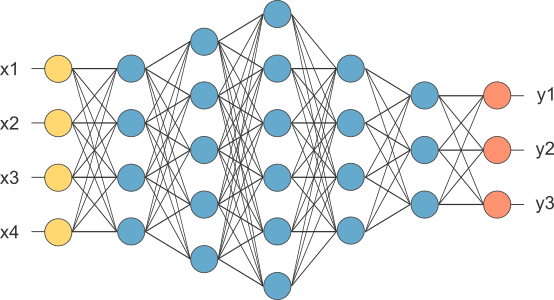
Image for post
Figure 9 : After pooling layer, flattened as FC layer

In the above diagram, the feature map matrix will be converted as vector (x1, x2, x3, …). With the fully connected layers, we combined these features together to create a model. Finally, we have an activation function such as softmax or sigmoid to classify the outputs as cat, dog, car, truck etc.,

Image for post
Figure 10 : Complete CNN architecture

Summary

  • Provide input image into convolution layer
  • Choose parameters, apply filters with strides, padding if requires. Perform convolution on the image and apply ReLU activation to the matrix.
  • Perform pooling to reduce dimensionality size
  • Add as many convolutional layers until satisfied
  • Flatten the output and feed into a fully connected layer (FC Layer)
  • Output the class using an activation function (Logistic Regression with cost functions) and classifies images.

In the next post, I would like to talk about some popular CNN architectures such as AlexNet, VGGNet, GoogLeNet, and ResNet.
Tensorflow basics

Throughout this lesson, you’ll apply your knowledge of neural networks on real datasets using TensorFlow (link for China), an open source Deep Learning library created by Google.

You’ll use TensorFlow to classify images from the notMNIST dataset – a dataset of images of English letters from A to J. You can see a few example images below.

Your goal is to automatically detect the letter based on the image in the dataset. You’ll be working on your own computer for this lab, so, first things first, install TensorFlow!

Install

OS X, Linux, Windows

Prerequisites

Intro to TensorFlow requires Python 3.4 or higher and Anaconda. If you don’t meet all of these requirements, please install the appropriate package(s).

Install TensorFlow

You’re going to use an Anaconda environment for this class. If you’re unfamiliar with Anaconda environments, check out the official documentation. More information, tips, and troubleshooting for installing tensorflow on Windows can be found here.

Note: If you’ve already created the environment for Term 1, you shouldn’t need to do so again here!

Run the following commands to setup your environment:

conda create --name=IntroToTensorFlow python=3 anaconda
source activate IntroToTensorFlow
conda install -c conda-forge tensorflow

That’s it! You have a working environment with TensorFlow. Test it out with the code in the Hello, world! section below.

Docker on Windows

Docker instructions were offered prior to the availability of a stable Windows installation via pip or Anaconda. Please try Anaconda first, Docker instructions have been retained as an alternative to an installation via Anaconda.

Install Docker

Download and install Docker from the official Docker website.

Run the Docker Container

Run the command below to start a jupyter notebook server with TensorFlow:

docker run -it -p 8888:8888 gcr.io/tensorflow/tensorflow

Users in China should use the b.gcr.io/tensorflow/tensorflow instead of gcr.io/tensorflow/tensorflow

You can access the jupyter notebook at localhost:8888. The server includes 3 examples of TensorFlow notebooks, but you can create a new notebook to test all your code.

Hello, world!

Try running the following code in your Python console to make sure you have TensorFlow properly installed. The console will print “Hello, world!” if TensorFlow is installed. Don’t worry about understanding what it does. You’ll learn about it in the next section.

import tensorflow as tf

# Create TensorFlow object called tensor
hello_constant = tf.constant('Hello World!')

with tf.Session() as sess:
    # Run the tf.constant operation in the session
    output = sess.run(hello_constant)
    print(output)


Errors

If you’re getting the error tensorflow.python.framework.errors.InvalidArgumentError: Placeholder:0 is both fed and fetched, you’re running an older version of TensorFlow. Uninstall TensorFlow, and reinstall it using the instructions above. For more solutions, check out the Common Problems section.

TensorFlow Math

Getting the input is great, but now you need to use it. You’re going to use basic math functions that everyone knows and loves – add, subtract, multiply, and divide – with tensors. (There’s many more math functions you can check out in the documentation.)

Addition

x = tf.add(5, 2)  # 7

You’ll start with the add function. The tf.add() function does exactly what you expect it to do. It takes in two numbers, two tensors, or one of each, and returns their sum as a tensor.

Subtraction and Multiplication

Here’s an example with subtraction and multiplication.

x = tf.subtract(10, 4) # 6
y = tf.multiply(2, 5)  # 10

The x tensor will evaluate to 6, because 10 - 4 = 6. The y tensor will evaluate to 10, because 2 * 5 = 10. That was easy!

Converting types

It may be necessary to convert between types to make certain operators work together. For example, if you tried the following, it would fail with an exception:

tf.subtract(tf.constant(2.0),tf.constant(1))  # Fails with ValueError: Tensor conversion requested dtype float32 for Tensor with dtype int32: 

That’s because the constant 1 is an integer but the constant 2.0 is a floating point value and subtract expects them to match.

In cases like these, you can either make sure your data is all of the same type, or you can cast a value to another type. In this case, converting the 2.0 to an integer before subtracting, like so, will give the correct result:

tf.subtract(tf.cast(tf.constant(2.0), tf.int32), tf.constant(1))   # 1

Quiz

Let’s apply what you learned to convert an algorithm to TensorFlow. The code below is a simple algorithm using division and subtraction. Convert the following algorithm in regular Python to TensorFlow and print the results of the session. You can use tf.constant() for the values 102, and 1.

Neural networks basics

Perhaps the hottest topic in the world right now is artificial intelligence. When people talk about this, they often talk about machine learning, and specifically, neural networks.

Now, neural networks should be familiar with you. If you put your hands like this, left and right, do it, then between your hands is a big neural network called your brain with something like 10 to 11 neurons, is crazy. What people have done in the last decades kind of abstracted this big mass in your brain into a basis set of equations that emulate a network of artificial neurons. Then people have invented ways to train these systems based on data.

So, rather than instructing a machine with rules like a piece of software, these neural networks are trained based on data.

So, you’re going to learn the very basics for now, perception, backpropagation, terminology that doesn’t make sense yet, but by the end of this unit, you should be able to write and code and train your own neural network.

That’s is so fun!

A Note on Deep Learning

The following lessons contain introductory and intermediate material on neural networks, building a neural network from scratch, using TensorFlow, and Convolutional Neural Networks:

  • Neural Networks
  • TensorFlow
  • Deep Neural Networks
  • Convolutional Neural Networks

Linear to Logistic Regression

Linear regression helps predict values on a continuous spectrum, like predicting what the price of a house will be.

How about classifying data among discrete classes?

Here are examples of classification tasks:

  • Determining whether a patient has cancer
  • Identifying the species of a fish
  • Figuring out who’s talking on a conference call

Classification problems are important for self-driving cars. Self-driving cars might need to classify whether an object crossing the road is a car, pedestrian, and a bicycle. Or they might need to identify which type of traffic sign is coming up, or what a stop light is indicating.

In the next video, Luis will demonstrate a classification algorithm called “logistic regression”. He’ll use logistic regression to predict whether a student will be accepted to a university.

Linear regression leads to logistic regression and ultimately neural networks, a more advanced classification tool.

QuiZ:

So let’s say we’re studying the housing market and our task is to predict the price of a house given its size. So we have a small house that costs $70,000 and a big house that costs $160,000.

We’d like to estimate the price of these medium-sized house over here. So how do we do it?

Well, first we put them in a grid where the x-axis represents the size of the house in square feet and the y-axis represents the price of the house. And to help us out, we have collected some previous data in the form of these blue dots.

These are other houses that we’ve looked at and we’ve recorded their prices with respect to their size. And here we can see the small house is priced at $70,000 and the big one at $160,000.

Now it’s time for a small quiz.

What do you think is the best estimate for the price of the medium house given this data?

Would it be $80,000, $120,000 or $190,000?

Yes you are right: The answer is 120,000. But how we do that?

Well to help us out, we can see that these points can form a line. And we can draw the line that best fits this data. Now on this line, we can see that our best guess for the price of the house is this point here over the line which corresponds to $120000.

So if you said $120000, that is correct.

This method is known as linear regression. You can think of linear regression as a painter who would look at your data and draw the best fitting line through it. And you may ask, “How do we find this line?”

Well, that’s what the rest of the section will be about.

Linear to Logistic Regression

Linear regression helps predict values on a continuous spectrum, like predicting what the price of a house will be.

How about classifying data among discrete classes?

Here are examples of classification tasks:

  • Determining whether a patient has cancer
  • Identifying the species of a fish
  • Figuring out who’s talking on a conference call

Classification problems are important for self-driving cars. Self-driving cars might need to classify whether an object crossing the road is a car, pedestrian, and a bicycle. Or they might need to identify which type of traffic sign is coming up, or what a stop light is indicating.

In the next video, I will demonstrate a classification algorithm called “logistic regression”. I’ll use logistic regression to predict whether a student will be accepted to a university.

Linear regression leads to logistic regression and ultimately neural networks, a more advanced classification tool.

Problem:

So, let’s start with one classification example.

Let’s say we are the admissions office at a university and our job is to accept or reject students. So, in order to evaluate students, we have two pieces of information, the results of a test and their grades in school.

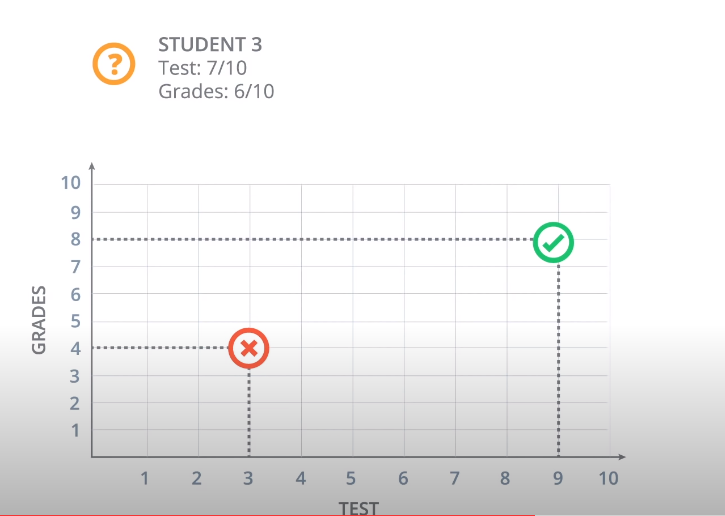
So, let’s take a look at some sample students. We’ll start with Student 1 who got 9 out of 10 in the test and 8 out of 10 in the grades. That student did quite well and got accepted. Then we have Student 2 who got 3 out of 10 in the test and 4 out of 10 in the grades, and that student got rejected.

And now, we have a new Student 3 who got 7 out of 10 in the test and 6 out of 10 in the grades, and we’re wondering if the student gets accepted or not. So, our first way to find this out is to plot students in a graph with the horizontal axis corresponding to the score on the test and the vertical axis corresponding to the grades, and the students would fit here.

The students who got three and four gets located in the point with coordinates (3,4), and the student who got nine and eight gets located in the point with coordinates (9,8).

And now we’ll do what we do in most of our algorithms, which is to look at the previous data.

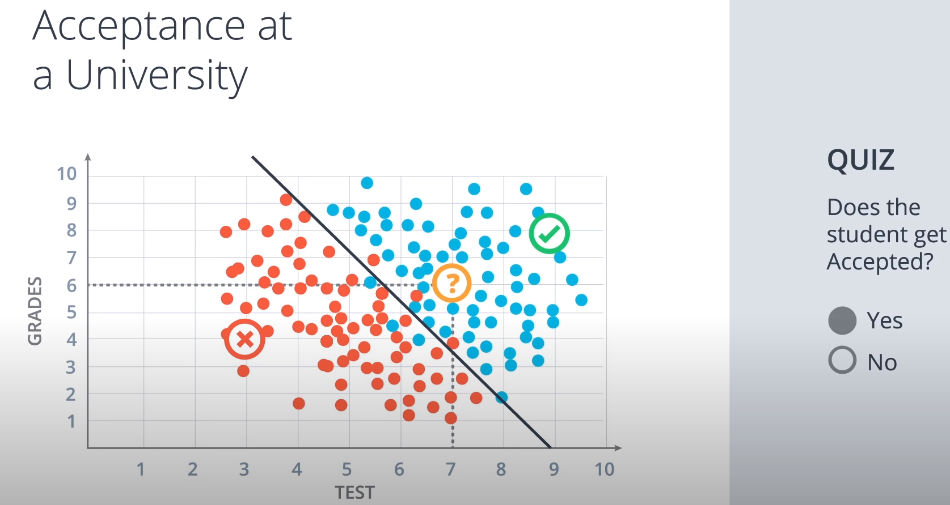
This is how the previous data looks. These are all the previous students who got accepted or rejected.

The blue points correspond to students that got accepted, and the red points to students that got rejected.

So we can see in this diagram that the students would did well in the test and grades are more likely to get accepted, and the students who did poorly in both are more likely to get rejected.

So let’s start with a quiz.

The quiz says, does the Student 3 get accepted or rejected?

What do you think?

The answer is: Student 3 is pass.

Correct. Well, it seems that this data can be nicely separated by a line which is this line over here,

and it seems that most students over the line get accepted and most students under the line get rejected.

So this line is going to be our model. The model makes a couple of mistakes since there area few blue points that are under the line and a few red points over the line. But we’re not going to care about those. I will say that it’s safe to predict that if a point is over the line the student gets accepted and if it’s under the line then the student gets rejected.

So based on this model we’ll look at the new student that we see that they are over here at the point 7:6 which is above the line. So we can assume with some confidence that the student gets accepted. so if you answered yes, that’s the correct answer.

And now a question arises. The question is, how do we find this line?

So we can kind of eyeball it. But the computer can’t. We’ll dedicate the rest of the session to show you algorithms that will find this line, not only for this example, but for much more general and complicated cases. But we will talk about that in my next post. See you later!

Computer vision in practice

Computer vision is no longer just a research topic for image classification demos. In robotics, autonomous driving, industrial inspection, and smart infrastructure, it has become a practical engineering discipline. The real question is not whether a model can recognize an object in a clean dataset. The real question is whether the full vision stack can keep working when calibration drifts, lighting changes, motion blur appears, and the system still has to make a decision in real time.

That is why modern computer vision should be understood as a pipeline, not as a single neural network. A production-grade vision system usually combines geometry, calibration, image preprocessing, feature extraction, learning-based perception, tracking, and sensor fusion.

Pinhole camera model diagram
Projection geometry still matters in practical vision systems. Source: Wikimedia Commons, Pinhole camera model technical version.svg.

Why advanced computer vision matters

A camera gives dense information, but raw pixels do not help a robot or vehicle by themselves. A useful system must convert pixels into structured understanding. Depending on the task, that may mean lane boundaries, traffic-light state, object boxes, semantic masks, depth estimates, keypoints, optical flow, or an updated vehicle pose.

In autonomous systems, advanced computer vision usually supports tasks such as:

  • object detection and classification
  • semantic and instance segmentation
  • depth estimation and 3D scene understanding
  • lane and road-boundary estimation
  • visual odometry, SLAM, and relocalization
  • sensor fusion with radar, LiDAR, IMU, and maps

Each of these tasks looks different on paper, but they share the same foundation: image geometry, stable calibration, robust preprocessing, and the ability to reason over time rather than over one frame only.

The foundation: calibration and geometry

Before discussing neural networks, it is worth remembering that a camera is still a geometric sensor. If the system does not know its intrinsics, distortion coefficients, and mounting relationship to the vehicle or robot frame, the rest of the pipeline becomes less trustworthy.

In practice, advanced computer vision often starts with:

  • intrinsics such as focal lengths and optical center
  • distortion coefficients for radial and tangential distortion
  • extrinsics between cameras and the body frame
  • synchronization across sensors and compute nodes

This is one reason OpenCV calibration tools remain important even in deep-learning pipelines. If the image geometry is inconsistent, depth, stitching, epipolar constraints, and multi-camera fusion all degrade.

import cv2 as cv
import numpy as np

frame = cv.imread("road_scene.jpg")
camera_matrix = np.array([
    [fx, 0, cx],
    [0, fy, cy],
    [0,  0,  1],
], dtype=np.float32)
dist_coeffs = np.array([k1, k2, p1, p2, k3], dtype=np.float32)

undistorted = cv.undistort(frame, camera_matrix, dist_coeffs)

That single undistortion step can reduce downstream errors in lane fitting, feature tracking, and multi-camera alignment.

The practical computer vision pipeline

A useful way to think about advanced computer vision is as a layered pipeline:

  1. Capture: acquire synchronized frames with known timing.
  2. Calibrate and rectify: correct distortion and align geometry.
  3. Preprocess: resize, normalize, denoise, or convert color spaces.
  4. Perceive: detect objects, segment classes, estimate flow or depth.
  5. Track: stabilize detections over time and estimate motion.
  6. Fuse: combine vision with radar, LiDAR, IMU, odometry, or maps.
  7. Decide: pass structured outputs to planning or control.

This layered view matters because many real failures come from the interfaces between stages, not from the model headline itself. A detector can be accurate in isolation and still fail in production if calibration is stale or the timestamps are misaligned.

What “advanced” really means in modern vision

In day-to-day engineering, advanced computer vision usually means combining several levels of reasoning instead of relying on one handcrafted trick.

1. Detection

Detection predicts what objects are present and where they are. This is the world of YOLO-style real-time detectors and larger transformer-based detectors. For many systems, detection is the first semantic layer that turns pixels into entities: vehicles, pedestrians, bikes, cones, or signs.

2. Segmentation

Segmentation goes beyond boxes. It asks which pixels belong to lanes, curb, sidewalk, road, sky, vehicle, or person. That matters when the system needs drivable-area estimation or precise free-space boundaries instead of only rough boxes.

3. Depth and geometry

Depth can come from stereo disparity, structure from motion, multi-view triangulation, or learned monocular depth models. In production systems, metric depth from vision alone is often less reliable than fused depth, but relative structure from vision remains extremely valuable.

4. Motion and tracking

A single frame can be ambiguous. Tracking over time makes vision more robust. This includes optical flow, keypoint tracking, re-identification, motion estimation, and multi-object tracking. In autonomous systems, temporal stability is often as important as per-frame accuracy.

Classical vision still matters

Deep learning dominates many benchmarks, but classical computer vision is still useful for real systems because it is interpretable, cheap, and often a strong debugging tool. Engineers still use:

  • thresholding and color filtering
  • edge detection and Hough transforms
  • homography and perspective transforms
  • feature matching and bundle adjustment
  • PnP, epipolar geometry, and triangulation
Lane detection pipeline diagram
Even simple pipelines show how multiple image-processing stages work together before a final decision is made. Source: Wikimedia Commons, Lane Detection Algorithm.svg.

These methods are especially helpful when building baselines, validating learned models, or narrowing down whether a failure is caused by geometry, data quality, or the network itself.

Where advanced vision becomes difficult

Real-world scenes are messy. A system may work well in daytime testing and fail in heavy glare, rain, or crowded urban environments. Some of the hardest problems are:

  • small or distant objects
  • occlusion between dynamic agents
  • weather and low light
  • domain shift between training data and deployment scenes
  • latency and compute limits on edge hardware
  • uncertainty that is not communicated clearly to planning

This is why advanced vision is rarely just about model accuracy. It is also about timing budgets, hardware constraints, calibration lifecycle, monitoring, and fallback behavior.

What good engineers watch closely

If you are reviewing a production vision system, these questions matter more than a flashy benchmark slide:

  • How often is calibration checked and refreshed?
  • How stable is performance across weather and lighting conditions?
  • What is the end-to-end latency from frame capture to output?
  • How is temporal consistency enforced?
  • Which failures are handled by fusion with other sensors?
  • How is uncertainty exposed to downstream planning or control?

Those questions usually reveal whether the vision stack is a research demo or an engineering system that can survive outside the lab.

Conclusion

Advanced computer vision is best understood as a full pipeline that converts raw pixels into reliable scene understanding. Calibration, geometry, preprocessing, learned perception, temporal tracking, and sensor fusion all matter. When those pieces work together, cameras become one of the richest sensors in robotics and autonomous driving. When they do not, even a strong model can become unreliable very quickly.

References

Canny edge detection in practice

Canny edge detection is one of those classic computer vision tools that still deserves attention. Even in an era dominated by deep learning, engineers keep returning to Canny because it is fast, interpretable, and useful for building baselines, debugging camera pipelines, and extracting geometric structure from images.

It is especially valuable when you want to highlight boundaries such as lane markings, road edges, object contours, or structural lines before running later stages of a pipeline.

Lane detection example using edge extraction
A simple lane pipeline often starts with edge extraction before fitting lines or estimating road structure. Source: Wikimedia Commons, Lane Detection Example.jpg.

Why Canny still matters

Most raw images contain far more information than a geometric pipeline needs. Canny helps reduce that image to a sparse set of likely boundaries. That makes it useful in applications such as:

  • lane detection prototypes
  • document and industrial inspection
  • line or contour extraction
  • preprocessing for feature-based pipelines
  • debugging lighting and contrast issues in camera systems

It is not a full perception system, but it is often a strong first step when the engineer wants structure rather than semantics.

How the algorithm works

Canny is a multi-stage edge detector. Its power comes from the fact that it does not simply compute gradients and stop there. It also tries to suppress noise and keep only meaningful, thin edges.

  1. Noise reduction: smooth the image, usually with a Gaussian filter.
  2. Gradient computation: estimate intensity changes, often with Sobel operators.
  3. Non-maximum suppression: keep only local maxima so the edge stays thin.
  4. Hysteresis thresholding: use lower and upper thresholds to decide which edges survive.

This last step is one reason Canny stays practical. Weak responses can still survive if they connect to strong edges, which often preserves useful line structure while discarding isolated noise.

What the thresholds really do

Most failures with Canny are not about the algorithm itself. They are about poor threshold choices.

  • If the thresholds are too low, noise floods the result.
  • If the thresholds are too high, meaningful boundaries disappear.
  • If the image is not smoothed well, texture and noise create unstable edges.

That is why Canny tuning is often scene-dependent. A bright daytime road scene may support different thresholds than a nighttime wet road.

import cv2 as cv

image = cv.imread("road.jpg", cv.IMREAD_GRAYSCALE)
blurred = cv.GaussianBlur(image, (5, 5), 0)
edges = cv.Canny(blurred, threshold1=50, threshold2=150)

That simple code hides an important practical truth: preprocessing usually matters as much as the call to cv.Canny() itself.

How engineers use Canny in lane detection

Canny became a familiar tool in beginner autonomous-driving projects because it works well as part of a classical lane-detection pipeline. A common sequence is:

  1. convert the image to grayscale
  2. blur to reduce noise
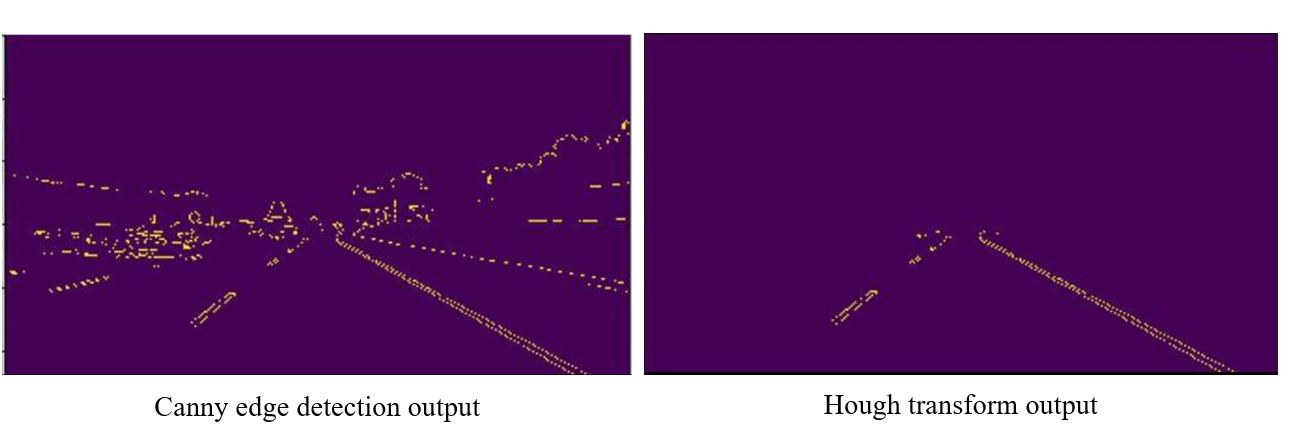
  3. run Canny to extract edges
  4. apply a region of interest mask
  5. fit candidate lane lines with a Hough transform
Lane detection pipeline diagram
Canny often plays the role of edge extractor inside a broader lane-detection pipeline. Source: Wikimedia Commons, Lane Detection Algorithm.svg.

This does not solve all real road cases, but it teaches the underlying geometry clearly and remains useful for debugging modern lane systems.

Where Canny is strong

  • fast and cheap to run
  • easy to interpret visually
  • good for highlighting sharp structure
  • useful in classical pipelines and for debugging learned models

Where Canny is weak

  • it does not understand semantics
  • it is sensitive to threshold selection
  • it struggles with shadows, glare, and heavy texture
  • it cannot decide whether an edge belongs to a lane, a crack, or a shadow by itself

That is why modern systems usually combine Canny-like geometric ideas with learning-based perception when the scene is complex.

A practical way to use it today

Even if your final product relies on neural networks, Canny still has value. I would use it for:

  • building a classical baseline quickly
  • validating whether the camera image quality is good enough for geometry
  • checking if calibration or blur is destroying useful structure
  • explaining perception stages to new engineers on the team

It is one of those rare classical methods that remains useful both educationally and operationally.

Conclusion

Canny edge detection still matters because it turns a noisy image into a much clearer geometric signal. It is not a semantic perception tool, but it remains valuable for lane-finding pipelines, contour extraction, debugging, and building intuition about how vision systems interpret structure. For many engineering teams, Canny is still one of the quickest ways to understand what the camera can and cannot see.

References

Region masking for lane detection

Region masking is one of the simplest ideas in computer vision, yet it solves a very practical problem: most of the pixels in an image are irrelevant to the task you care about. If you are trying to detect lane lines from a front-facing road camera, the sky, nearby buildings, dashboard reflections, and other distant objects often add noise instead of useful signal.

Region masking fixes that by keeping only the part of the image where lane structure is likely to appear. In other words, it tells the pipeline: “Look here first, and ignore the rest.”

Lane detection example
Lane-detection pipelines often restrict processing to a selected road region before extracting lines. Source: Wikimedia Commons, Lane Detection Example.jpg.

Why region masking matters

A road image contains too much information. Even after color filtering or edge detection, many edges have nothing to do with lanes. Guard rails, shadows, trees, cars, and building contours can all create strong gradients. If we let the algorithm examine the whole frame equally, false positives become much more likely.

Region masking narrows the search space. It reduces distracting edges, makes later stages more stable, and often improves speed because fewer pixels need to be processed.

This is why region masking appears so often in educational lane-detection projects: it is simple, visual, and immediately useful.

The basic idea

The most common approach is to define a polygon that covers the road area ahead of the ego vehicle. On a forward-facing camera, that polygon is often trapezoidal:

  • wide near the bottom of the image, where the road is close to the car
  • narrower near the horizon, where perspective makes the lane lines converge

Everything outside that polygon is masked out. The result is an image where only the expected lane region remains.

This is a simple example of a region of interest, or ROI. OpenCV uses the term ROI broadly for image subregions, and this is exactly the kind of focused subregion that helps classical lane pipelines stay practical.

How masking fits into the lane pipeline

In a classical lane-detection workflow, region masking usually happens after an early preprocessing step but before final line fitting:

  1. load and optionally undistort the image
  2. convert color space or grayscale
  3. apply color thresholding or Canny edge detection
  4. apply a polygon mask to keep the road region only
  5. run a Hough transform or another line-extraction method
  6. fit and smooth the final lane estimate

Notice what region masking does not do: it does not detect lanes by itself. It improves the conditions for the rest of the pipeline by removing clutter.

OpenCV implementation

In OpenCV, region masking is often implemented with a blank mask image plus a filled polygon. The polygon is painted white, then combined with the processed image using a bitwise operation.

import cv2 as cv
import numpy as np

image = cv.imread("road.jpg", cv.IMREAD_GRAYSCALE)
edges = cv.Canny(image, 50, 150)

height, width = edges.shape
mask = np.zeros_like(edges)

vertices = np.array([[
    (80, height),
    (width // 2 - 40, height // 2 + 40),
    (width // 2 + 40, height // 2 + 40),
    (width - 80, height),
]], dtype=np.int32)

cv.fillPoly(mask, vertices, 255)
masked_edges = cv.bitwise_and(edges, mask)

The key functions here are:

  • cv.fillPoly() to define the polygonal road area
  • cv.bitwise_and() to keep only the selected region

These are simple tools, but they remain useful in real engineering pipelines because they make the geometry explicit.

How to choose the region correctly

The mask shape should reflect the camera geometry and road setup. If the camera is fixed in a known position, the lane region will usually appear in a predictable part of the image. That makes a hard-coded trapezoid acceptable for a first prototype.

But in a production setting, several factors complicate that assumption:

  • camera pitch may change with acceleration or road slope
  • different vehicles may mount the camera at different heights
  • curves, merges, and hills can move the useful lane region
  • urban scenes do not always follow simple straight-road geometry

That is why static masks are best understood as a baseline. In stronger systems, the region may be adjusted dynamically using calibration, perspective transforms, prior lane estimates, or even learned drivable-area segmentation.

Why this still matters in modern systems

You might ask whether region masking still matters now that deep learning can segment lanes directly. The answer is yes, but in a different role.

Even in modern pipelines, region masking can still help:

  • build interpretable baselines before using neural networks
  • reduce noise in classical preprocessing steps
  • speed up geometric post-processing
  • debug whether a failure comes from image quality or model quality

When a team cannot tell whether the camera sees the lane clearly, a simple ROI-based pipeline is often a very good diagnostic tool.

Common failure modes

Region masking works well only when the chosen region aligns with reality. It can fail when:

  • the road curves sharply outside the predefined polygon
  • the horizon shifts because of hills or vehicle pitch
  • lane boundaries are partly hidden by traffic
  • the camera viewpoint changes between datasets
  • the useful road structure falls outside the selected mask

If the mask is too wide, it lets noise in. If it is too narrow, it removes the actual lane. Good masking is always a tradeoff between focus and flexibility.

A practical engineering checklist

If I were reviewing a lane pipeline that uses region masking, I would ask:

  • Is the ROI still valid after camera calibration or mounting changes?
  • Does the mask hold up on curves, hills, and merges?
  • Is the mask applied before or after the most noise-sensitive step?
  • Can the region adapt over time, or is it fixed forever?
  • Is there a fallback when the lane estimate leaves the masked area?

Those questions reveal whether the ROI is just a tutorial shortcut or a well-understood engineering choice.

Conclusion

Region masking is a small technique with a large practical impact. By focusing computation on the likely road area, it reduces false positives and makes lane-detection pipelines cleaner and more stable. It is not a full perception solution by itself, but it remains a valuable building block for classical lane detection, debugging, and understanding how road geometry interacts with camera vision.

References

Color selection basics

Finding Lane Lines on the Road

Which of the following features could be useful in the identification of lane lines on the road?

Answer : Color, shape, orientation, Position of the image.

Coding up a Color Selection

Let’s code up a simple color selection in Python.

No need to download or install anything, you can just follow along in the browser for now.

We’ll be working with the same image you saw previously.

Check out the code below. First, I import pyplot and image from matplotlib. I also import numpy for operating on the image.

import matplotlib.pyplot as plt
import matplotlib.image as mpimg
import numpy as np

I then read in an image and print out some stats. I’ll grab the x and y sizes and make a copy of the image to work with. NOTE: Always make a copy of arrays or other variables in Python. If instead, you say “a = b” then all changes you make to “a” will be reflected in “b” as well!

# Read in the image and print out some stats
image = mpimg.imread('test.jpg')
print('This image is: ',type(image), 
         'with dimensions:', image.shape)

# Grab the x and y size and make a copy of the image
ysize = image.shape[0]
xsize = image.shape[1]
# Note: always make a copy rather than simply using "="
color_select = np.copy(image)

Next I define a color threshold in the variables red_thresholdgreen_threshold, and blue_threshold and populate rgb_threshold with these values. This vector contains the minimum values for red, green, and blue (R,G,B) that I will allow in my selection.

# Define our color selection criteria
# Note: if you run this code, you'll find these are not sensible values!!
# But you'll get a chance to play with them soon in a quiz
red_threshold = 0
green_threshold = 0
blue_threshold = 0
rgb_threshold = [red_threshold, green_threshold, blue_threshold]

Next, I’ll select any pixels below the threshold and set them to zero.

After that, all pixels that meet my color criterion (those above the threshold) will be retained, and those that do not (below the threshold) will be blacked out.

# Identify pixels below the threshold
thresholds = (image[:,:,0] < rgb_threshold[0]) \
            | (image[:,:,1] < rgb_threshold[1]) \
            | (image[:,:,2] < rgb_threshold[2])
color_select[thresholds] = [0,0,0]

# Display the image                 
plt.imshow(color_select)
plt.show()

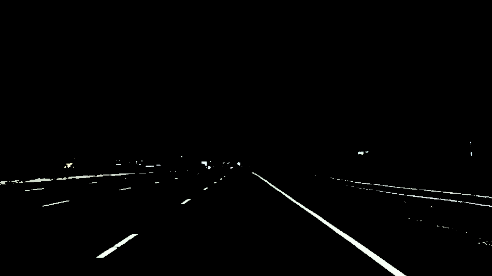
The result, color_select, is an image in which pixels that were above the threshold have been retained, and pixels below the threshold have been blacked out.

In the code snippet above, red_thresholdgreen_threshold and blue_threshold are all set to 0, which implies all pixels will be included in the selection.

In the next quiz, you will modify the values of red_thresholdgreen_threshold and blue_threshold until you retain as much of the lane lines as possible while dropping everything else. Your output image should look like the one below.

Camera perception in self-driving cars

Camera perception is one of the most important building blocks in a self-driving car. If radar tells us that something is there and LiDAR helps estimate geometry, the camera gives the system something equally valuable: semantic understanding. A camera can tell us what a traffic light means, what a road sign says, where lane markings curve, whether an object is a pedestrian or a bicycle, and whether a patch of road is drivable or blocked.

That is why modern autonomous-driving and ADAS systems still rely heavily on cameras, even when they also use radar, LiDAR, ultrasound, and maps. In practice, the camera is often the sensor that gives the richest visual context to the perception stack.

Stereo camera mounted behind a vehicle windshield
Camera modules mounted near the windshield are common in lane keeping, sign recognition, and driver-assistance systems. Source: Wikimedia Commons, Lane assist.jpg.

Why cameras matter so much

A self-driving vehicle does not just need distance. It needs meaning. The system must understand that a small red circle is a stop sign, that a green light means go, that a painted white line marks a lane boundary, and that a person at the curb may step into the road. These are tasks where cameras are especially strong because they capture texture, color, symbols, and shape in dense detail.

In real vehicles, cameras are used for tasks such as:

  • lane detection and lane geometry estimation
  • traffic-light and traffic-sign recognition
  • object detection and classification for cars, trucks, bikes, and pedestrians
  • free-space and drivable-area estimation
  • visual odometry, localization, and mapping
  • parking, surround view, blind-spot coverage, and driver monitoring

The practical advantage is cost and scalability. Cameras are relatively affordable, small, and information-rich, which is why many commercial ADAS platforms are camera-first or at least camera-centric. The limitation is that cameras are sensitive to bad lighting, glare, rain, fog, lens dirt, motion blur, and low texture. So the engineering question is not “camera or other sensors,” but rather “what should the camera do best, and what should be cross-checked by radar, LiDAR, or maps?”

How a camera sees the road

At the mathematical level, most automotive vision pipelines start with the pinhole camera model. A 3D point in the world is projected into a 2D pixel on the image plane. That sounds simple, but in practice you also need to account for lens distortion, focal length, principal point, camera pose, and synchronization with the rest of the vehicle.

Technical figure of the pinhole camera model
The pinhole camera model is the foundation for projection, calibration, and many vision algorithms. Source: Wikimedia Commons, Pinhole camera model technical version.svg.

Three ideas matter here:

  • Intrinsics: focal lengths and principal point that describe how the lens and sensor map light into pixels.
  • Extrinsics: the rotation and translation between the camera and the vehicle frame or world frame.
  • Distortion: radial and tangential effects that bend straight lines unless the image is calibrated and rectified.

If calibration is poor, the whole stack becomes less trustworthy. Lane boundaries drift. Distance estimates become unstable. Multi-camera stitching looks wrong. That is why calibration is not a side issue; it is a core safety and reliability issue.

A small OpenCV-style example for undistortion looks like this:

import cv2 as cv
import numpy as np

image = cv.imread("front_camera.jpg")
camera_matrix = np.array([
    [fx, 0, cx],
    [0, fy, cy],
    [0,  0,  1],
], dtype=np.float32)
dist_coeffs = np.array([k1, k2, p1, p2, k3], dtype=np.float32)

undistorted = cv.undistort(image, camera_matrix, dist_coeffs)

This does not solve perception by itself, but it gives the rest of the pipeline a cleaner and more geometrically meaningful image.

The practical camera pipeline in a self-driving car

Once the image is captured, the perception system usually follows a pipeline similar to this:

  1. Capture and synchronize. Frames must be time-aligned with other cameras, radar, IMU, wheel odometry, and vehicle state.
  2. Calibrate and rectify. Remove distortion and align the image to the vehicle geometry.
  3. Detect and segment. Use classical CV, deep learning, or both to extract lanes, drivable area, traffic lights, signs, and dynamic objects.
  4. Track over time. A single frame is noisy. Multi-frame tracking stabilizes detections and estimates motion.
  5. Estimate geometry. Recover depth from monocular cues, stereo disparity, multi-view triangulation, or fusion with radar/LiDAR.
  6. Fuse and decide. Combine camera output with other sensors and planning logic to support motion decisions.

This is the difference between a demo and a production system. A demo may detect a lane in one image. A production system must maintain stable, low-latency, safety-aware perception under changing weather, different roads, oncoming headlights, and partial occlusion.

What the camera is especially good at

Cameras are the strongest sensor when the system needs semantic detail. Here are the most important examples.

1. Lane understanding

Lane perception is more than finding two white lines. A useful system must estimate lane boundaries, lane center, curvature, merges, splits, missing paint, shadows, and construction zones. In older pipelines, engineers used color thresholding, edge detection, perspective transforms, and Hough lines. In modern systems, deep learning often handles lane segmentation or direct lane representation, but the classical ideas still matter because they explain the geometry and help with debugging.

Example of lane detection with edge and line extraction
A simple lane-detection example showing how edge detection and line fitting can isolate lane candidates. Source: Wikimedia Commons, Lane Detection Example.jpg.

In practice, lane perception supports downstream tasks such as lane keeping, trajectory generation, highway navigation, and safety envelopes around the vehicle.

2. Traffic lights and signs

This is where cameras become indispensable. Radar cannot tell whether a light is red or green. LiDAR does not naturally read sign text or arrow direction. Cameras can. That makes them essential for semantic compliance with traffic rules.

A robust traffic-light stack must handle small objects at distance, occlusion, backlighting, LED flicker, and confusing urban scenes. A robust sign-recognition stack must classify signs correctly, but also decide whether a sign applies to the ego lane.

3. Object classification

Knowing that “something exists” is not enough. The planner needs to know whether that object is a pedestrian, cyclist, car, truck, cone, stroller, or road debris. Cameras provide the appearance cues that make this possible.

This is also where temporal reasoning matters. A pedestrian at the sidewalk is not the same as a pedestrian stepping into the crosswalk. The camera gives the appearance; tracking across frames gives intent clues.

4. Visual odometry and localization

Cameras are also useful for localization. By matching features across frames and across maps, the system can estimate motion and refine its position. This becomes even more powerful in stereo or surround-view configurations, or when fused with IMU and map information.

Monocular, stereo, and surround-view setups

Not all camera systems are the same.

  • Monocular camera: cheapest and simplest, strong for classification and lane understanding, weaker for absolute depth unless combined with motion or learned depth cues.
  • Stereo camera: adds geometric depth through disparity, especially useful at short and medium range.
  • Surround-view multi-camera: provides near-360-degree coverage for parking, blind spots, intersections, and urban driving.
Diagram of stereo vision
Stereo vision estimates depth by measuring disparity between left and right images. Source: Wikimedia Commons, Stereovision.gif.

The key stereo idea is simple: a nearby object appears at different horizontal positions in the left and right image. That disparity can be converted to depth. In real systems, however, stereo only works well when calibration and rectification are correct, texture is sufficient, and weather or lighting does not destroy image quality.

Where cameras struggle

It is just as important to understand the limits of cameras.

  • Night and low light: semantic detail drops and noise rises.
  • Rain, fog, snow, glare: visibility degrades and the model sees less contrast.
  • Dirty or blocked lenses: perception can fail locally even if the rest of the system is healthy.
  • Motion blur and rolling shutter: fast motion distorts geometry.
  • Depth ambiguity: monocular vision is weak at absolute metric depth without additional assumptions or fusion.

That is why production systems rarely trust a camera alone for all situations. Camera-first makes sense for semantics and scale, but sensor fusion still matters for robustness.

Why camera-first still makes sense

Even with those weaknesses, cameras remain central because they match several practical engineering goals at once:

  • they capture dense visual information
  • they are cheaper and easier to scale than high-end active sensors
  • they support the semantic tasks that every road-legal system must solve
  • they fit both ADAS and higher-autonomy stacks

That is why many commercial systems use a camera-first or camera-centric architecture, then add radar, LiDAR, maps, and driver monitoring where the safety case demands it.

A practical engineering checklist

If you are building or evaluating a camera-based perception stack, these are the questions that matter most:

  • How stable is calibration over time, temperature, vibration, and mounting changes?
  • What happens under glare, nighttime, rain, and lens contamination?
  • How much latency exists from image capture to decision output?
  • Which tasks are vision-only, and which require fusion?
  • How is uncertainty represented and passed to planning?
  • Does the system fail gracefully when the image quality drops?

Those questions usually separate a classroom demo from an automotive-grade perception module.

Conclusion

The camera is not just a passive eye on a self-driving car. It is the main source of semantic road understanding. It tells the system what the world means, not just where something is. That makes cameras essential for lane understanding, traffic-light recognition, sign reading, object classification, localization, and many driver-assistance functions.

At the same time, good camera perception depends on careful calibration, stable geometry, robust learning models, temporal tracking, and realistic handling of bad-weather and low-light failures. In other words, the power of cameras in autonomous driving is real, but it only becomes useful when the full engineering pipeline around the camera is strong.

References

System integration for self-driving cars

Self-driving systems are often explained as separate modules: localization, perception, prediction, planning, and control. That modular view is useful, but it can also be misleading. A real autonomous-driving stack does not succeed because one block is excellent in isolation. It succeeds because the blocks exchange the right information, at the right time, with the right assumptions.

That is what system integration really means. It is the engineering discipline of connecting sensing, localization, maps, planning, control, and vehicle interfaces into one coherent pipeline that can operate safely under real-world timing and uncertainty constraints.

Why integration matters more than slideware

A strong perception model is not enough if localization drifts. A good planner is not enough if control cannot follow the trajectory. A precise controller is not enough if the vehicle interface delays commands or clips them unexpectedly. In practice, many failures appear at the boundaries between modules rather than inside a single algorithm.

That is why mature autonomous-driving projects place so much emphasis on interfaces, diagnostics, synchronization, fallback behavior, and system architecture.

The major building blocks

A practical self-driving stack usually contains these major layers:

  1. Sensing: cameras, LiDAR, radar, IMU, GNSS, wheel odometry, and vehicle-state signals.
  2. Localization: estimate current pose, velocity, and acceleration.
  3. Perception: detect lanes, objects, traffic lights, free space, and obstacles.
  4. Prediction: estimate how other agents may move next.
  5. Planning: choose a safe route, path, and trajectory.
  6. Control: convert the planned trajectory into steering, acceleration, and braking commands.
  7. Vehicle interface: deliver those commands safely to the actual platform.

These blocks are familiar, but the real work is in their coordination.

How information flows through the system

A useful integrated stack behaves like a pipeline with feedback, not like a row of isolated boxes.

sensors
    -> localization
    -> perception
    -> prediction
    -> planning
    -> control
    -> vehicle interface

diagnostics and state feedback
    -> monitor health, uncertainty, delays, and fallback modes

Autoware’s architecture documents make this dependency clear. Planning depends on information from localization, perception, and maps. Control depends on the reference trajectory from planning. Localization itself may depend on LiDAR maps, IMU data, and vehicle velocity. If any upstream information is stale or unstable, the downstream behavior degrades.

Localization is not just a coordinate estimate

In an integrated system, localization must provide more than a rough pose. It must provide:

  • pose in the map frame
  • velocity and acceleration estimates
  • covariance or confidence information
  • timestamps that align with the rest of the pipeline

That information is consumed directly by planning and control. If localization lags behind reality or reports unstable motion, planning may generate a trajectory that is already outdated.

Perception must produce planning-ready outputs

Perception often gets too much attention as a standalone benchmark problem. But in a vehicle stack, the most important question is not whether perception is impressive in a paper. It is whether it produces the exact outputs planning needs.

For example, planning may need:

  • detected objects with stable tracks
  • obstacle information for emergency stopping
  • occupancy information for occluded regions
  • traffic-light recognition tied to the relevant route

This is one reason Autoware’s documentation describes planning inputs very carefully: the planner relies on structured, timely, route-relevant environment information, not on generic detections alone.

Planning and control are tightly linked

Planning produces a trajectory, but that trajectory is only useful if control can execute it. Control modules need trajectories that are smooth, physically feasible, and consistent with the actual vehicle model. If the planner outputs unrealistic curvature or aggressive accelerations, the controller either fails or compensates in ways that create instability.

Autoware’s control design documents highlight exactly this relationship: control follows the reference trajectory from planning and converts it into target steering, speed, and acceleration commands. That is a clean architectural separation, but it still requires the planner and controller to agree on timing, kinematics, and limits.

What system integration usually includes

In practice, system integration is not only about software wiring. It includes:

  • message contracts and interface definitions
  • coordinate frames and transforms
  • sensor synchronization
  • health monitoring and diagnostics
  • latency budgeting
  • fallback and degradation strategies
  • vehicle-specific adaptation layers

That last point matters. A generic autonomy stack often outputs abstract commands such as target speed, acceleration, and steering angle. A vehicle-specific adapter then maps those commands to the actual hardware interface. This is another place where integration quality matters enormously.

Common integration failures

Some of the most important failures in autonomous systems are integration failures, not algorithmic failures:

  • timestamps from different sensors do not align
  • map and vehicle frames are inconsistent
  • perception outputs are too noisy for planning
  • control receives trajectories it cannot track smoothly
  • diagnostics do not catch degraded modules quickly enough
  • vehicle adapters change behavior relative to what higher layers expect

These problems can make a technically strong stack behave unpredictably in the field.

What a good integrated stack looks like

A well-integrated self-driving stack tends to have these qualities:

  • clear interfaces between modules
  • consistent coordinate frames and timing
  • explicit uncertainty and diagnostics
  • modular components that can still be validated end-to-end
  • graceful degradation when one sensor or module weakens

In other words, good system integration does not remove modularity. It makes modularity usable in a real vehicle.

A practical checklist

If I were reviewing a self-driving integration effort, I would ask:

  • Which modules define the system time base and synchronization policy?
  • How are localization confidence and perception uncertainty passed downstream?
  • What happens when planning receives stale or inconsistent inputs?
  • Can control reject trajectories it cannot safely follow?
  • How is the vehicle interface validated against actual hardware response?
  • What diagnostics trigger fallback or minimal risk behavior?

Those questions often reveal the real maturity of the stack faster than demo footage does.

Conclusion

System integration is what turns separate autonomy modules into an actual self-driving system. Localization, perception, planning, control, and the vehicle interface must agree not only on data format, but also on timing, confidence, physical limits, and safety behavior. That is why system integration is not a final polish step. It is one of the core engineering problems in autonomous driving.

References

Computer vision and sensors

Autonomous systems do not rely on a single technology. They work because several layers of perception support each other. Computer vision extracts visual structure, deep learning helps recognize patterns and objects, and sensors provide the raw measurements needed to understand the environment.

Computer Vision vs Deep Learning

These two ideas are related, but not identical. Traditional computer vision focuses on geometry, edges, features, transformations, calibration, and image processing. Deep learning focuses on learning complex patterns from data, often through neural networks.

In practice, modern systems use both. Geometry still matters, and learned perception has become essential.

Why Sensors Matter

A camera gives rich visual data, but no single sensor is enough in all conditions. Real autonomous systems often combine:

  • cameras for semantics and rich scene information,
  • LiDAR for geometry and depth structure,
  • radar for robustness in difficult weather,
  • IMU and odometry for short-term motion tracking.

A Practical Pipeline

A perception stack in an autonomous vehicle may look like this:

  1. Cameras capture road scenes.
  2. Deep models detect lanes, vehicles, pedestrians, and signs.
  3. LiDAR or radar improves distance estimation and object consistency.
  4. Sensor fusion tracks objects over time.
  5. The planning stack uses this interpreted scene to make decisions.

Where Traditional Vision Still Helps

  • camera calibration,
  • stereo depth estimation,
  • visual odometry,
  • image rectification,
  • pose estimation and geometry-based reasoning.

Where Deep Learning Adds Value

  • object detection,
  • semantic segmentation,
  • lane understanding,
  • driver or pedestrian behavior cues,
  • end-to-end learned scene interpretation.

Final Thoughts

The strongest autonomous systems are not built by choosing between classical computer vision and deep learning. They are built by using the right combination of sensing, geometry, learning, and engineering discipline for the task at hand.