Behavior planning for self-driving cars

Behavior planning is the decision-making layer of an autonomous vehicle. Its job is not to control the steering wheel directly and not to estimate the exact position of every object. Its job is to choose the right driving behavior for the current situation.

Where It Fits in the Stack

A simplified autonomous driving stack often looks like this:

  • Perception: detect lanes, cars, pedestrians, traffic lights, and other objects.
  • Localization: estimate where the vehicle is on the map.
  • Prediction: estimate what other agents may do next.
  • Behavior planning: decide the high-level action.
  • Motion planning: generate a safe trajectory.
  • Control: track that trajectory with steering, throttle, and brake.

Typical Behaviors

A behavior planner may choose among actions such as:

  • keep lane,
  • follow the vehicle ahead,
  • stop for a red light,
  • yield to pedestrians,
  • change lane,
  • prepare for a turn,
  • or pull over safely.

A Practical Example

Imagine the ego vehicle is driving in the right lane and a slower vehicle appears ahead. A reasonable behavior planner may go through this logic:

  1. Measure the gap and relative speed.
  2. Check whether the left lane is available.
  3. Check whether a lane change is legal and safe.
  4. If yes, request a lane change.
  5. If not, reduce speed and continue following.

The output is not a steering angle. It is a driving decision such as FOLLOW_LANE or CHANGE_LANE_LEFT.

Common Approaches

  • Finite-state machines: simple, readable, and common in early systems.
  • Rule-based systems: easier to audit but can become hard to scale.
  • Cost-based planners: compare candidate actions using safety, comfort, and efficiency scores.
  • Learning-based methods: useful in complex settings, but harder to validate.

Why It Is Difficult

Driving is full of ambiguity. Other vehicles may behave unpredictably, sensors may be noisy, and legal rules must be interpreted in context. A behavior planner therefore has to balance safety, legality, comfort, and progress at the same time.

Final Thoughts

Behavior planning is where autonomous driving starts to feel less like pure control theory and more like structured decision-making. If you understand behavior planning, you understand how an autonomous vehicle turns perception into meaningful action.

Prediction for self-driving cars

Prediction is the part of an autonomous driving system that estimates what other road users are likely to do next. That includes vehicles, pedestrians, cyclists, and sometimes even the expected movement of groups in crowded scenes.

Why Prediction Matters

A self-driving car cannot plan safely if it only knows the current position of nearby objects. It also needs to estimate future motion. A car in the next lane may merge. A pedestrian may start crossing. A bicycle may move around a parked vehicle.

Inputs to Prediction

  • current position, velocity, and heading of tracked objects,
  • lane geometry and map context,
  • traffic rules,
  • and recent motion history.

A Simple Example

If another vehicle is moving at 12 m/s in the same lane and the distance to the ego vehicle is shrinking, the planner may need to slow down or prepare a lane change. A basic constant-velocity model can already be useful for short horizons:

future_position = current_position + velocity * time

That model is simple, but real traffic often requires richer predictions.

Common Prediction Approaches

  • Physics-based models: constant velocity or constant acceleration.
  • Map-based prediction: constrain possible future paths to lanes and intersections.
  • Multi-modal prediction: estimate several likely futures, such as go straight, slow down, or turn.
  • Learning-based models: use trajectory history and scene context to forecast motion.

Challenges

  • Human behavior is uncertain.
  • Some actions are rare but safety-critical.
  • Predictions must be fast enough for real-time planning.
  • The system needs confidence estimates, not only one guessed future.

Final Thoughts

Prediction is a bridge between perception and planning. It helps a vehicle move from knowing what is happening now to preparing for what may happen next. That makes it one of the most important components in safe autonomous driving.

Practical filter implementation

Particle Filter Algorithm Steps and Inputs

The flowchart below represents the steps of the particle filter algorithm as well as its inputs.

Particle Filter Algorithm Flowchart

Psuedo Code

This is an outline of steps you will need to take with your code in order to implement a particle filter for localizing an autonomous vehicle. The pseudo code steps correspond to the steps in the algorithm flow chart, initialization, prediction, particle weight updates, and resampling. Python implementation of these steps was covered in the previous lesson.

Initialization

At the initialization step we estimate our position from GPS input. The subsequent steps in the process will refine this estimate to localize our vehicle.

Prediction

During the prediction step we add the control input (yaw rate & velocity) for all particles

Update

During the update step, we update our particle weights using map landmark positions and feature measurements.

Resampling

During resampling we will resample M times (M is range of 0 to length_of_particleArray) drawing a particle i (i is the particle index) proportional to its weight . Sebastian covered one implementation of this in his discussion and implementation of a resampling wheel.

Return New Particle Set

The new set of particles represents the Bayes filter posterior probability. We now have a refined estimate of the vehicles position based on input evidence.

Practical filters basics

In robotics, autonomous systems, and sensor fusion, the word filter usually refers to an algorithm that estimates the real state of a system from noisy measurements. Real sensors are never perfect, which means practical systems need filtering to remain stable and useful.

Why filters matter

  • Sensors are noisy
  • Measurements may arrive at different rates
  • Some variables cannot be measured directly
  • Decisions built on raw measurements are often unstable

Common filters in practice

  • Low-pass filter for smoothing signals
  • Kalman Filter for linear Gaussian systems
  • Extended Kalman Filter for mildly nonlinear systems
  • Particle Filter for more complex, multimodal state estimation

How to choose a filter

The right filter depends on the motion model, the measurement model, the amount of nonlinearity, and the computational budget. There is no single best filter for every application.

A practical engineering mindset

Filtering is not only about equations. It is also about choosing sensible process noise, measurement noise, update rates, and failure handling. A mathematically elegant filter can still perform badly if the assumptions do not match the real system.

Final thoughts

A practical filter is one that gives stable estimates under real noise, timing delays, and imperfect models. That is why filtering remains one of the most important topics in robotics and autonomous driving.

Motion model basics

A motion model describes how a vehicle or robot moves from one state to the next. In autonomous systems, the motion model is essential because it gives the system a way to predict the future state before the next sensor update arrives.

Why motion models matter

  • They support prediction in tracking and filtering
  • They help estimate future pose and velocity
  • They are used in localization, planning, and control
  • They connect vehicle physics with sensor fusion

A simple example

For a vehicle moving in 2D space, the state may contain:

  • x position
  • y position
  • heading angle
  • velocity

If we know the current state and the time step, we can estimate where the vehicle should be next.

Common motion model assumptions

  • Constant velocity
  • Constant acceleration
  • Constant turn rate and velocity

These models are simplified, but they are often useful enough for estimation and planning algorithms.

Where motion models appear

  • Kalman Filters and EKF
  • Particle filters
  • Trajectory prediction
  • Path planning and behavior planning

Final thoughts

A good motion model does not need to be perfect. It only needs to be accurate enough to support stable prediction between sensor updates and decisions.

What is localization

Localization is the problem of estimating where a robot or vehicle is in the world. In other words, it answers the question: Where am I?

Why localization is important

An autonomous system cannot plan a safe path if it does not know its position. Localization is therefore one of the foundation blocks of robotics and self-driving systems.

What information is usually estimated?

  • Position
  • Orientation
  • Velocity
  • Sometimes uncertainty as well

Sensors commonly used for localization

  • GPS for global position outdoors
  • IMU for acceleration and rotation
  • Lidar for map matching
  • Camera for visual odometry and landmarks
  • Wheel encoders for local motion estimates

Typical localization approaches

  • Dead reckoning
  • Kalman Filter and Extended Kalman Filter
  • Particle Filter
  • Visual SLAM and lidar-based SLAM

Why localization is difficult

Real environments are noisy and dynamic. GPS may be weak, wheel encoders drift, and maps may be incomplete. Good localization systems therefore fuse multiple sensor sources instead of relying on only one.

Final thoughts

Localization is one of the most important concepts in robotics because nearly every higher-level behavior depends on having a reliable estimate of the current pose.

Why docker containers matter

Docker changed software delivery because it made applications portable, reproducible, and easier to deploy. Before containers became common, teams often struggled with environment mismatch: code worked on one machine but failed on another because dependencies, operating system packages, or runtime versions were different.

What a Container Is

A container packages an application together with its runtime dependencies so it can run consistently across environments. It is more lightweight than a full virtual machine because it shares the host kernel while still isolating processes and file systems.

Why Docker Became Popular

  • Developers and operations teams can share the same runtime artifact.
  • Images are versioned and reproducible.
  • CI/CD pipelines become easier to standardize.
  • Containers fit well with microservices and orchestration platforms.

Key Concepts

Images

An image is a template used to create containers. It contains the application, dependencies, and startup instructions.

Containers

A container is a running instance of an image.

Dockerfile

A Dockerfile defines how the image is built.

A Small Example

FROM python:3.11-slim
WORKDIR /app
COPY requirements.txt .
RUN pip install --no-cache-dir -r requirements.txt
COPY . .
CMD ["python", "app.py"]

This simple Dockerfile creates an image for a Python application. Once built, the same image can run in development, staging, or production.

Good Practices

  • Use small base images when possible.
  • Keep the build context clean with .dockerignore.
  • Do not bake secrets into images.
  • Prefer immutable images and configuration via environment or secret stores.
  • Scan images for vulnerabilities before deployment.

Where Containers Fit Best

Containers are especially useful for APIs, workers, internal tools, batch jobs, and services that need predictable packaging. They are also valuable in local development because they reduce setup differences across machines.

Final Thoughts

Docker containers matter because they made deployment more repeatable. They do not remove the need for good engineering, but they give teams a far better foundation for building consistent delivery pipelines.

Bash scripting basics

Bash scripting is one of the fastest ways to automate repetitive tasks on Linux and macOS. If you regularly rename files, parse logs, deploy services, back up directories, or glue command-line tools together, a small Bash script can save a surprising amount of time.

In this updated article, I want to go beyond a basic introduction. We will cover the core building blocks of Bash scripts, some best practices that make scripts safer in production, and a few interesting features that many beginners do not discover early enough.

1. What is a Bash script?

Bash stands for Bourne Again SHell. It is both an interactive shell and a scripting language. A Bash script is simply a text file that contains shell commands executed in order.

Bash is especially useful when you want to:

  • combine multiple terminal commands into one reusable script
  • automate system administration tasks
  • wrap existing tools such as grep, awk, sed, tar, find, docker, or kubectl
  • build small deployment, backup, cleanup, or monitoring utilities
  • run scheduled jobs using cron

2. The smallest possible Bash script

#!/usr/bin/env bash

echo "Hello from Bash"

The first line is called the shebang. It tells the operating system which interpreter should run the file.

To execute the script:

chmod +x hello.sh
./hello.sh

I generally prefer #!/usr/bin/env bash over #!/bin/bash because it is a bit more portable across environments.

3. Variables and command-line arguments

Variables in Bash are simple, but there is one rule beginners often forget: do not put spaces around =.

#!/usr/bin/env bash

name="Thanh"
role="DevOps Engineer"

echo "Name: $name"
echo "Role: $role"

You can also receive input from command-line arguments:

#!/usr/bin/env bash

echo "Script name: $0"
echo "First argument: $1"
echo "Second argument: $2"
echo "Argument count: $#"
echo "All arguments: $@"
echo "Current process id: $$"

Run it like this:

./demo.sh deploy production

4. Reading input from the user

Bash can also ask the user for input interactively:

#!/usr/bin/env bash

read -rp "Enter your username: " username
echo "Welcome, $username"

Useful options for read:

  • -r: prevents backslash escaping from being interpreted unexpectedly
  • -p: prints a prompt
  • -s: hides input, useful for passwords

Example:

read -rsp "Enter password: " password
echo
echo "Password received"

5. Conditions with if, elif, and else

Conditional logic is one of the most common things you will use in shell automation.

#!/usr/bin/env bash

if [[ $# -eq 0 ]]; then
  echo "Please provide at least one argument"
elif [[ $1 == "start" ]]; then
  echo "Starting the service"
else
  echo "Unknown command"
fi

In modern Bash, prefer [[ ... ]] instead of [ ... ] when possible. It is generally safer and easier to read.

6. Case statements are cleaner than long if chains

If you are building a script with subcommands such as start, stop, restart, or status, case is usually the better tool.

#!/usr/bin/env bash

case "$1" in
  start)
    echo "Starting service"
    ;;
  stop)
    echo "Stopping service"
    ;;
  restart)
    echo "Restarting service"
    ;;
  status)
    echo "Checking status"
    ;;
  *)
    echo "Usage: $0 {start|stop|restart|status}"
    ;;
esac

7. Loops: for and while

A for loop is good when iterating over a list:

#!/usr/bin/env bash

for file in *.log; do
  echo "Processing: $file"
done

A while loop is often better when reading a file line by line:

#!/usr/bin/env bash

while IFS= read -r line; do
  echo "Line: $line"
done < input.txt

This pattern avoids several common parsing issues and is much safer than many ad-hoc alternatives.

8. Functions make scripts easier to maintain

Even in small scripts, functions are worth using. They help you avoid duplication and make the script easier to read later.

#!/usr/bin/env bash

log_info() {
  echo "[INFO] $1"
}

backup_file() {
  local source_file="$1"
  cp "$source_file" "$source_file.bak"
}

log_info "Starting backup"
backup_file "config.yaml"

9. A few interesting Bash features many beginners miss

9.1 Strict mode

This is one of the most useful things you can add at the top of production scripts:

#!/usr/bin/env bash
set -euo pipefail

IFS=$'
	'
  • set -e: exit immediately when a command fails
  • set -u: treat unset variables as errors
  • set -o pipefail: fail a pipeline if any command inside it fails
  • IFS: helps avoid bad splitting behavior around whitespace

This is not magic, but it prevents many silent failures.

9.2 Arrays

Bash supports arrays, which are useful when working with multiple files, services, or environments:

#!/usr/bin/env bash

services=(nginx redis postgres)

for service in "${services[@]}"; do
  echo "Checking $service"
done

9.3 Here documents

Heredocs are a neat way to generate files or multi-line output:

cat <<EOF > config.env
APP_ENV=production
APP_DEBUG=false
APP_PORT=8080
EOF

This is extremely useful for quick config generation in CI/CD or provisioning scripts.

9.4 Traps

You can use trap to clean up temporary files even if the script exits early:

#!/usr/bin/env bash

TMP_FILE=$(mktemp)
trap 'rm -f "$TMP_FILE"' EXIT

echo "temporary data" > "$TMP_FILE"
cat "$TMP_FILE"

This is one of those small details that makes scripts much more reliable.

9.5 Debugging mode

When debugging Bash, use:

bash -x your_script.sh

Or inside the script:

set -x

This prints commands as they execute, which is very helpful when tracking down quoting or branching issues.

10. Common Bash mistakes

Bash is powerful, but it is also easy to write fragile scripts if you rush. Here are some very common mistakes:

  • Unquoted variables: write "$file", not $file
  • Using for f in $(ls): this breaks with spaces and special characters
  • Writing var = value: spaces make it invalid in Bash
  • Ignoring exit codes: check failures when your script touches production systems
  • Parsing text carelessly: shell scripts often fail because of unexpected spaces, tabs, or newlines

A great external resource for these issues is Bash Pitfalls.

11. Example 1: backup a directory

Here is a practical example that creates a timestamped backup archive:

#!/usr/bin/env bash
set -euo pipefail

SOURCE_DIR="${1:-}"
BACKUP_DIR="${2:-./backup}"
TIMESTAMP=$(date +%Y%m%d_%H%M%S)

if [[ -z "$SOURCE_DIR" ]]; then
  echo "Usage: $0 <source_dir> [backup_dir]"
  exit 1
fi

if [[ ! -d "$SOURCE_DIR" ]]; then
  echo "Directory does not exist: $SOURCE_DIR"
  exit 1
fi

mkdir -p "$BACKUP_DIR"
ARCHIVE_NAME="backup_${TIMESTAMP}.tar.gz"

tar -czf "$BACKUP_DIR/$ARCHIVE_NAME" "$SOURCE_DIR"

echo "Backup created at: $BACKUP_DIR/$ARCHIVE_NAME"

Run it like this:

./backup.sh /var/log ./artifacts

12. Example 2: check if a service is running

#!/usr/bin/env bash

service_name="$1"

if pgrep -x "$service_name" >/dev/null; then
  echo "$service_name is running"
else
  echo "$service_name is not running"
fi

Example:

./check-service.sh nginx

13. Example 3: batch rename files

#!/usr/bin/env bash

for file in *.txt; do
  mv "$file" "old_$file"
done

This is a tiny script, but it demonstrates why Bash is so productive for file operations.

14. Example 4: a simple deployment helper

#!/usr/bin/env bash
set -euo pipefail

APP_DIR="/opt/myapp"

echo "Pulling latest code..."
git -C "$APP_DIR" pull

echo "Installing dependencies..."
npm --prefix "$APP_DIR" install

echo "Restarting service..."
systemctl restart myapp

echo "Deployment complete"

This is the kind of script many engineers write very early in their DevOps journey.

15. When should you use Bash and when should you switch to Python?

Bash is a great choice when you are:

  • gluing command-line tools together
  • working with files, directories, processes, and environment variables
  • writing short automation scripts for CI/CD, DevOps, or local tooling

However, if your logic becomes complex, if you need data structures beyond basic arrays, or if you need better testing and maintainability, Python is often the better long-term choice.

16. Final thoughts

Bash scripting is not just about putting commands into a .sh file. The real value comes from writing scripts that are safe, readable, and useful under real operational pressure. Start small, automate something annoying, and improve your scripts over time. That is how Bash becomes genuinely powerful.

References

Python for engineers

Python is one of the most practical languages you can learn as an engineer. It is easy to read, productive for day-to-day work, and flexible enough for automation, backend services, machine learning, testing, and DevOps tasks.

Why Python Is So Useful

  • It has simple syntax, so you can focus on the problem instead of fighting the language.
  • It has a huge ecosystem for web, data, AI, testing, and scripting.
  • It is excellent for glue code between services, files, APIs, and command-line tools.

A Small Example

The following script reads a log file and counts how many lines contain the word ERROR.

from pathlib import Path

log_path = Path("app.log")
error_count = 0

for line in log_path.read_text().splitlines():
    if "ERROR" in line:
        error_count += 1

print(f"Found {error_count} error lines")

This is a good example of why Python is popular. The code is short, readable, and immediately useful.

Common Use Cases

1. Automation

Python is great for repetitive tasks such as renaming files, processing CSV data, calling REST APIs, or sending reports by email.

import requests

response = requests.get("https://api.github.com")
print(response.status_code)

2. Data Processing

You can parse text, clean records, and transform data before loading it into another system.

3. Backend Development

Frameworks like Flask, FastAPI, and Django make Python a strong option for internal tools and web services.

4. Machine Learning

Libraries such as NumPy, pandas, scikit-learn, PyTorch, and TensorFlow make Python a default choice in many AI workflows.

Tips for Writing Better Python

  • Use virtual environments to keep dependencies isolated.
  • Write small functions with clear names.
  • Handle exceptions only where you can act on them.
  • Use type hints when they improve readability.
  • Add tests for scripts that affect production systems.

Final Thoughts

If you want one language that helps with automation, prototyping, and real production work, Python is hard to beat. It is not only beginner-friendly. It is genuinely powerful for experienced engineers as well.

C++ basics

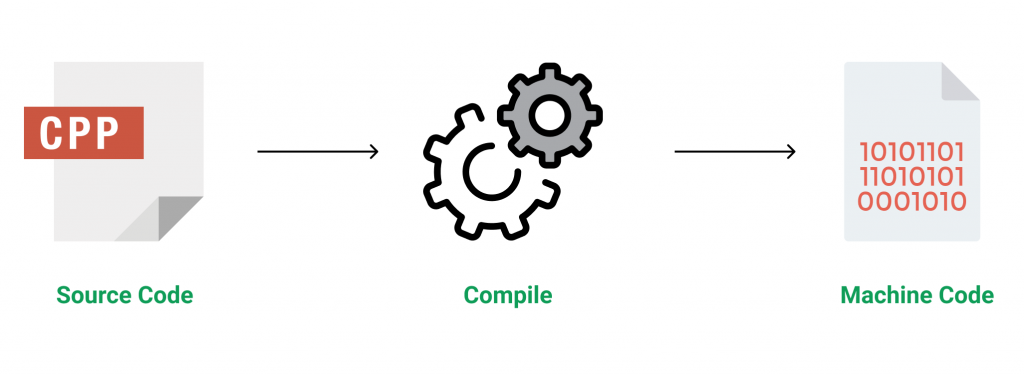
C++ is a general-purpose programming language that was developed as an enhancement of the C language to include object-oriented paradigm. It is an imperative and a compiled language. 
 

C++ is a middle-level language rendering it the advantage of programming low-level (drivers, kernels) and even higher-level applications (games, GUI, desktop apps etc.). The basic syntax and code structure of both C and C++ are the same. 

Some of the features & key-points to note about the programming language are as follows:

  • Simple: It is a simple language in the sense that programs can be broken down into logical units and parts, has a rich libray support and a variety of data-types.
  • Machine Independent but Platform Dependent: A C++ executable is not platform-independent (compiled programs on Linux won’t run on Windows), however they are machine independent.
  • Mid-level language: It is a mid-level language as we can do both systems-programming (drivers, kernels, networking etc.) and build large-scale user applications (Media Players, Photoshop, Game Engines etc.)
  • Rich library support: Has a rich library support (Both standard ~ built-in data structures, algorithms etc.) as well 3rd party libraries (e.g. Boost libraries) for fast and rapid development.
  • Speed of execution: C++ programs excel in execution speed. Since, it is a compiled language, and also hugely procedural. Newer languages have extra in-built default features such as grabage-collection, dynamic typing etc. which slow the execution of the program overall. Since there is no additional processing overhead like this in C++, it is blazing fast.
  • Pointer and direct Memory-Access: C++ provides pointer support which aids users to directly manipulate storage address. This helps in doing low-level programming (where one might need to have explicit control on the storage of variables).
  • Object-Oriented: One of the strongest points of the language which sets it apart from C. Object-Oriented support helps C++ to make maintainable and extensible programs. i.e. Large-scale applications can be built. Procedural code becomes difficult to maintain as code-size grows.
  • Compiled Language: C++ is a compiled language, contributing to its speed.

Applications of C++: 
C++ finds varied usage in applications such as:

  • Operating Systems & Systems Programming. e.g. Linux-based OS (Ubuntu etc.)
  • Browsers (Chrome & Firefox)
  • Graphics & Game engines (Photoshop, Blender, Unreal-Engine)
  • Database Engines (MySQL, MongoDB, Redis etc.)
  • Cloud/Distributed Systems

Some interesting facts about C++: 
Here are some awesome facts about C++ that may interest you:

  1. The name of C++ signifies the evolutionary nature of the changes from C. “++” is the C increment operator.
  2. C++ is one of the predominant languages for the development of all kind of technical and commercial software.
  3. C++ introduces Object-Oriented Programming, not present in C. Like other things, C++ supports the four primary features of OOP: encapsulation, polymorphism, abstraction, and inheritance.
  4. C++ got the OOP features from Simula67 Programming language.
  5. A function is a minimum requirement for a C++ program to run.(at least main() function)

Rated as one of the most sought after skills in the industry, own the basics of coding with our C++ STL Course and master the very concepts by intense problem-solving.