Posted in Self-Driving Car

Convolution Networks

Understanding of Convolutional Neural Network (CNN) — Deep Learning

In neural networks, Convolutional neural network (ConvNets or CNNs) is one of the main categories to do images recognition, images classifications. Objects detections, recognition faces etc., are some of the areas where CNNs are widely used.

CNN image classifications takes an input image, process it and classify it under certain categories (Eg., Dog, Cat, Tiger, Lion). Computers sees an input image as array of pixels and it depends on the image resolution. Based on the image resolution, it will see h x w x d( h = Height, w = Width, d = Dimension ). Eg., An image of 6 x 6 x 3 array of matrix of RGB (3 refers to RGB values) and an image of 4 x 4 x 1 array of matrix of grayscale image.
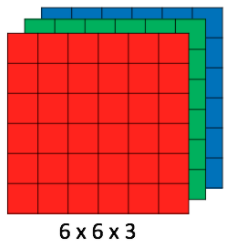
Image for post
Figure 1 : Array of RGB Matrix

Technically, deep learning CNN models to train and test, each input image will pass it through a series of convolution layers with filters (Kernals), Pooling, fully connected layers (FC) and apply Softmax function to classify an object with probabilistic values between 0 and 1. The below figure is a complete flow of CNN to process an input image and classifies the objects based on values.
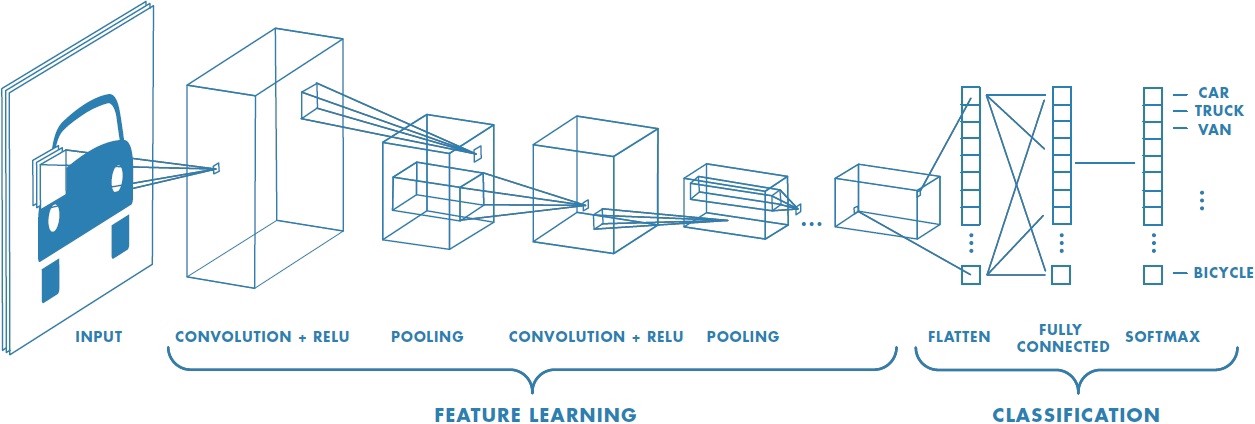
Image for post
Figure 2 : Neural network with many convolutional layers

Convolution Layer

Convolution is the first layer to extract features from an input image. Convolution preserves the relationship between pixels by learning image features using small squares of input data. It is a mathematical operation that takes two inputs such as image matrix and a filter or kernel.

Image for post
Figure 3: Image matrix multiplies kernel or filter matrix

Consider a 5 x 5 whose image pixel values are 0, 1 and filter matrix 3 x 3 as shown in below

Image for post
Figure 4: Image matrix multiplies kernel or filter matrix

Then the convolution of 5 x 5 image matrix multiplies with 3 x 3 filter matrix which is called “Feature Map” as output shown in below

Image for post
Figure 5: 3 x 3 Output matrix

Convolution of an image with different filters can perform operations such as edge detection, blur and sharpen by applying filters. The below example shows various convolution image after applying different types of filters (Kernels).

Image for post
Figure 7 : Some common filters

Strides

Stride is the number of pixels shifts over the input matrix. When the stride is 1 then we move the filters to 1 pixel at a time. When the stride is 2 then we move the filters to 2 pixels at a time and so on. The below figure shows convolution would work with a stride of 2.

Image for post
Figure 6 : Stride of 2 pixels

Padding

Sometimes filter does not fit perfectly fit the input image. We have two options:

  • Pad the picture with zeros (zero-padding) so that it fits
  • Drop the part of the image where the filter did not fit. This is called valid padding which keeps only valid part of the image.

Non Linearity (ReLU)

ReLU stands for Rectified Linear Unit for a non-linear operation. The output is ƒ(x) = max(0,x).

Why ReLU is important : ReLU’s purpose is to introduce non-linearity in our ConvNet. Since, the real world data would want our ConvNet to learn would be non-negative linear values.

Image for post
Figure 7 : ReLU operation

There are other non linear functions such as tanh or sigmoid that can also be used instead of ReLU. Most of the data scientists use ReLU since performance wise ReLU is better than the other two.

Pooling Layer

Pooling layers section would reduce the number of parameters when the images are too large. Spatial pooling also called subsampling or downsampling which reduces the dimensionality of each map but retains important information. Spatial pooling can be of different types:

  • Max Pooling
  • Average Pooling
  • Sum Pooling

Max pooling takes the largest element from the rectified feature map. Taking the largest element could also take the average pooling. Sum of all elements in the feature map call as sum pooling.

Image for post
Figure 8 : Max Pooling

Fully Connected Layer

The layer we call as FC layer, we flattened our matrix into vector and feed it into a fully connected layer like a neural network.
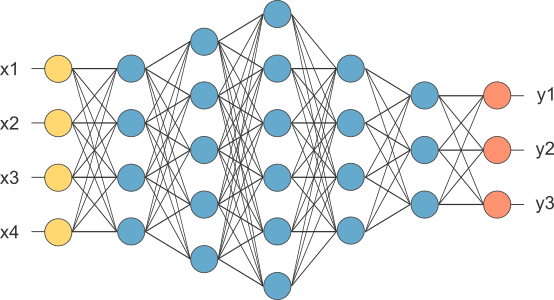
Image for post
Figure 9 : After pooling layer, flattened as FC layer

In the above diagram, the feature map matrix will be converted as vector (x1, x2, x3, …). With the fully connected layers, we combined these features together to create a model. Finally, we have an activation function such as softmax or sigmoid to classify the outputs as cat, dog, car, truck etc.,

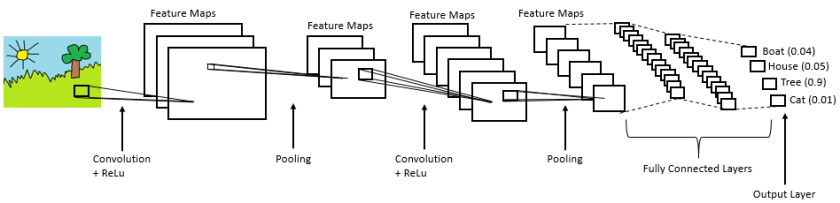
Image for post
Figure 10 : Complete CNN architecture

Summary

  • Provide input image into convolution layer
  • Choose parameters, apply filters with strides, padding if requires. Perform convolution on the image and apply ReLU activation to the matrix.
  • Perform pooling to reduce dimensionality size
  • Add as many convolutional layers until satisfied
  • Flatten the output and feed into a fully connected layer (FC Layer)
  • Output the class using an activation function (Logistic Regression with cost functions) and classifies images.

In the next post, I would like to talk about some popular CNN architectures such as AlexNet, VGGNet, GoogLeNet, and ResNet.
Posted in Self-Driving Car

Tensor Flow

Throughout this lesson, you’ll apply your knowledge of neural networks on real datasets using TensorFlow (link for China), an open source Deep Learning library created by Google.

You’ll use TensorFlow to classify images from the notMNIST dataset – a dataset of images of English letters from A to J. You can see a few example images below.

Your goal is to automatically detect the letter based on the image in the dataset. You’ll be working on your own computer for this lab, so, first things first, install TensorFlow!
Install

OS X, Linux, Windows

Prerequisites

Intro to TensorFlow requires Python 3.4 or higher and Anaconda. If you don’t meet all of these requirements, please install the appropriate package(s).

Install TensorFlow

You’re going to use an Anaconda environment for this class. If you’re unfamiliar with Anaconda environments, check out the official documentation. More information, tips, and troubleshooting for installing tensorflow on Windows can be found here.

Note: If you’ve already created the environment for Term 1, you shouldn’t need to do so again here!

Run the following commands to setup your environment:

conda create --name=IntroToTensorFlow python=3 anaconda
source activate IntroToTensorFlow
conda install -c conda-forge tensorflow

That’s it! You have a working environment with TensorFlow. Test it out with the code in the Hello, world! section below.

Docker on Windows

Docker instructions were offered prior to the availability of a stable Windows installation via pip or Anaconda. Please try Anaconda first, Docker instructions have been retained as an alternative to an installation via Anaconda.

Install Docker

Download and install Docker from the official Docker website.

Run the Docker Container

Run the command below to start a jupyter notebook server with TensorFlow:

docker run -it -p 8888:8888 gcr.io/tensorflow/tensorflow

Users in China should use the b.gcr.io/tensorflow/tensorflow instead of gcr.io/tensorflow/tensorflow

You can access the jupyter notebook at localhost:8888. The server includes 3 examples of TensorFlow notebooks, but you can create a new notebook to test all your code.

Hello, world!

Try running the following code in your Python console to make sure you have TensorFlow properly installed. The console will print “Hello, world!” if TensorFlow is installed. Don’t worry about understanding what it does. You’ll learn about it in the next section.

import tensorflow as tf

# Create TensorFlow object called tensor
hello_constant = tf.constant('Hello World!')

with tf.Session() as sess:
    # Run the tf.constant operation in the session
    output = sess.run(hello_constant)
    print(output)


Errors

If you’re getting the error tensorflow.python.framework.errors.InvalidArgumentError: Placeholder:0 is both fed and fetched, you’re running an older version of TensorFlow. Uninstall TensorFlow, and reinstall it using the instructions above. For more solutions, check out the Common Problems section.

TensorFlow Math

Getting the input is great, but now you need to use it. You’re going to use basic math functions that everyone knows and loves – add, subtract, multiply, and divide – with tensors. (There’s many more math functions you can check out in the documentation.)
Addition

x = tf.add(5, 2)  # 7

You’ll start with the add function. The tf.add() function does exactly what you expect it to do. It takes in two numbers, two tensors, or one of each, and returns their sum as a tensor.

Subtraction and Multiplication

Here’s an example with subtraction and multiplication.

x = tf.subtract(10, 4) # 6
y = tf.multiply(2, 5)  # 10

The x tensor will evaluate to 6, because 10 - 4 = 6. The y tensor will evaluate to 10, because 2 * 5 = 10. That was easy!

Converting types

It may be necessary to convert between types to make certain operators work together. For example, if you tried the following, it would fail with an exception:

tf.subtract(tf.constant(2.0),tf.constant(1))  # Fails with ValueError: Tensor conversion requested dtype float32 for Tensor with dtype int32: 

That’s because the constant 1 is an integer but the constant 2.0 is a floating point value and subtract expects them to match.

In cases like these, you can either make sure your data is all of the same type, or you can cast a value to another type. In this case, converting the 2.0 to an integer before subtracting, like so, will give the correct result:

tf.subtract(tf.cast(tf.constant(2.0), tf.int32), tf.constant(1))   # 1

Quiz

Let’s apply what you learned to convert an algorithm to TensorFlow. The code below is a simple algorithm using division and subtraction. Convert the following algorithm in regular Python to TensorFlow and print the results of the session. You can use tf.constant() for the values 102, and 1.

Posted in Self-Driving Car

Neural Network

Perhaps the hottest topic in the world right now is artificial intelligence. When people talk about this, they often talk about machine learning, and specifically, neural networks.

Now, neural networks should be familiar with you. If you put your hands like this, left and right, do it, then between your hands is a big neural network called your brain with something like 10 to 11 neurons, is crazy. What people have done in the last decades kind of abstracted this big mass in your brain into a basis set of equations that emulate a network of artificial neurons. Then people have invented ways to train these systems based on data.

So, rather than instructing a machine with rules like a piece of software, these neural networks are trained based on data.

So, you’re going to learn the very basics for now, perception, backpropagation, terminology that doesn’t make sense yet, but by the end of this unit, you should be able to write and code and train your own neural network.

That’s is so fun!

A Note on Deep Learning

The following lessons contain introductory and intermediate material on neural networks, building a neural network from scratch, using TensorFlow, and Convolutional Neural Networks:

  • Neural Networks
  • TensorFlow
  • Deep Neural Networks
  • Convolutional Neural Networks

Linear to Logistic Regression

Linear regression helps predict values on a continuous spectrum, like predicting what the price of a house will be.

How about classifying data among discrete classes?

Here are examples of classification tasks:

  • Determining whether a patient has cancer
  • Identifying the species of a fish
  • Figuring out who’s talking on a conference call

Classification problems are important for self-driving cars. Self-driving cars might need to classify whether an object crossing the road is a car, pedestrian, and a bicycle. Or they might need to identify which type of traffic sign is coming up, or what a stop light is indicating.

In the next video, Luis will demonstrate a classification algorithm called “logistic regression”. He’ll use logistic regression to predict whether a student will be accepted to a university.

Linear regression leads to logistic regression and ultimately neural networks, a more advanced classification tool.

QuiZ:

So let’s say we’re studying the housing market and our task is to predict the price of a house given its size. So we have a small house that costs $70,000 and a big house that costs $160,000.

We’d like to estimate the price of these medium-sized house over here. So how do we do it?

Well, first we put them in a grid where the x-axis represents the size of the house in square feet and the y-axis represents the price of the house. And to help us out, we have collected some previous data in the form of these blue dots.

These are other houses that we’ve looked at and we’ve recorded their prices with respect to their size. And here we can see the small house is priced at $70,000 and the big one at $160,000.

Now it’s time for a small quiz.

What do you think is the best estimate for the price of the medium house given this data?

Would it be $80,000, $120,000 or $190,000?

Yes you are right: The answer is 120,000. But how we do that?

Well to help us out, we can see that these points can form a line. And we can draw the line that best fits this data. Now on this line, we can see that our best guess for the price of the house is this point here over the line which corresponds to $120000.

So if you said $120000, that is correct.

This method is known as linear regression. You can think of linear regression as a painter who would look at your data and draw the best fitting line through it. And you may ask, “How do we find this line?”

Well, that’s what the rest of the section will be about.

Linear to Logistic Regression

Linear regression helps predict values on a continuous spectrum, like predicting what the price of a house will be.

How about classifying data among discrete classes?

Here are examples of classification tasks:

  • Determining whether a patient has cancer
  • Identifying the species of a fish
  • Figuring out who’s talking on a conference call

Classification problems are important for self-driving cars. Self-driving cars might need to classify whether an object crossing the road is a car, pedestrian, and a bicycle. Or they might need to identify which type of traffic sign is coming up, or what a stop light is indicating.

In the next video, I will demonstrate a classification algorithm called “logistic regression”. I’ll use logistic regression to predict whether a student will be accepted to a university.

Linear regression leads to logistic regression and ultimately neural networks, a more advanced classification tool.

Problem:

So, let’s start with one classification example.

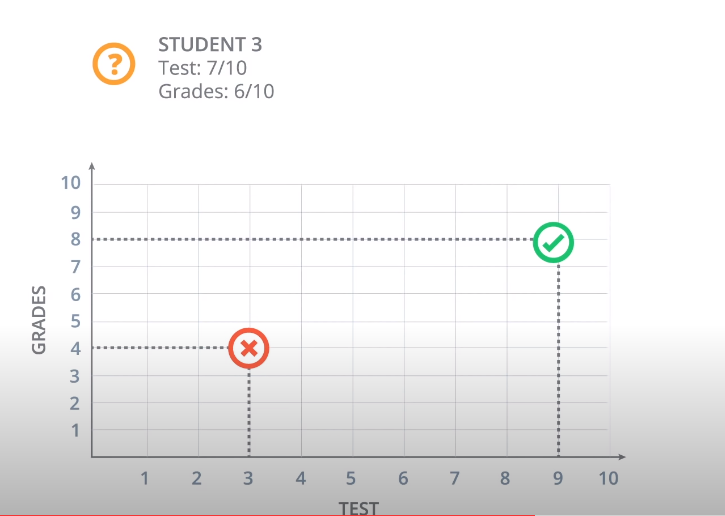
Let’s say we are the admissions office at a university and our job is to accept or reject students. So, in order to evaluate students, we have two pieces of information, the results of a test and their grades in school.

So, let’s take a look at some sample students. We’ll start with Student 1 who got 9 out of 10 in the test and 8 out of 10 in the grades. That student did quite well and got accepted. Then we have Student 2 who got 3 out of 10 in the test and 4 out of 10 in the grades, and that student got rejected.

And now, we have a new Student 3 who got 7 out of 10 in the test and 6 out of 10 in the grades, and we’re wondering if the student gets accepted or not. So, our first way to find this out is to plot students in a graph with the horizontal axis corresponding to the score on the test and the vertical axis corresponding to the grades, and the students would fit here.

The students who got three and four gets located in the point with coordinates (3,4), and the student who got nine and eight gets located in the point with coordinates (9,8).

And now we’ll do what we do in most of our algorithms, which is to look at the previous data.

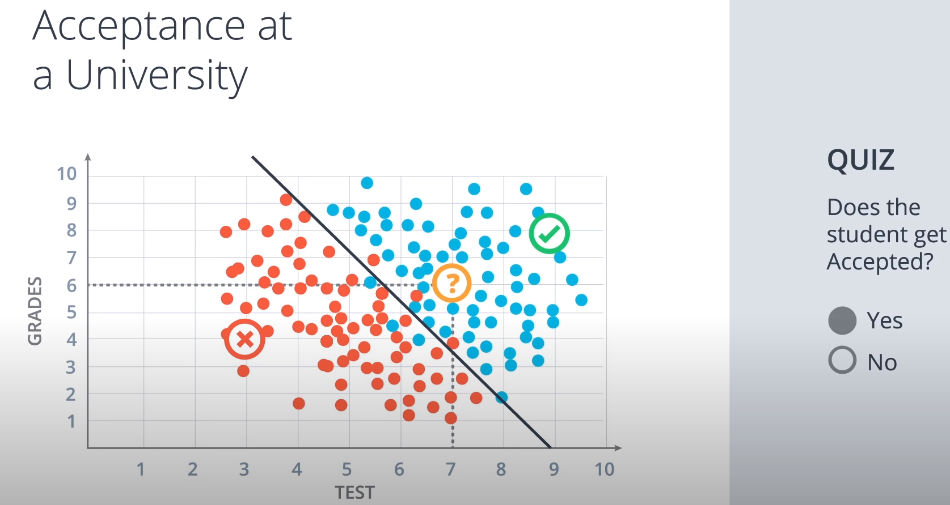
This is how the previous data looks. These are all the previous students who got accepted or rejected.

The blue points correspond to students that got accepted, and the red points to students that got rejected.

So we can see in this diagram that the students would did well in the test and grades are more likely to get accepted, and the students who did poorly in both are more likely to get rejected.

So let’s start with a quiz.

The quiz says, does the Student 3 get accepted or rejected?

What do you think?

The answer is: Student 3 is pass.

Correct. Well, it seems that this data can be nicely separated by a line which is this line over here,

and it seems that most students over the line get accepted and most students under the line get rejected.

So this line is going to be our model. The model makes a couple of mistakes since there area few blue points that are under the line and a few red points over the line. But we’re not going to care about those. I will say that it’s safe to predict that if a point is over the line the student gets accepted and if it’s under the line then the student gets rejected.

So based on this model we’ll look at the new student that we see that they are over here at the point 7:6 which is above the line. So we can assume with some confidence that the student gets accepted. so if you answered yes, that’s the correct answer.

And now a question arises. The question is, how do we find this line?

So we can kind of eyeball it. But the computer can’t. We’ll dedicate the rest of the session to show you algorithms that will find this line, not only for this example, but for much more general and complicated cases. But we will talk about that in my next post. See you later!

Posted in Self-Driving Car

Advance Computer Vision

Processing Each Image

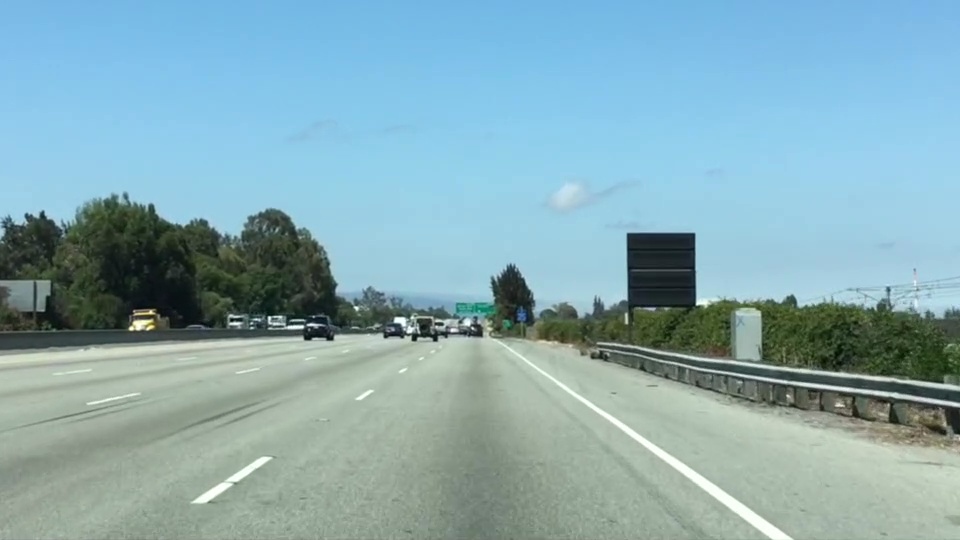
In this chapter, the first thing you’ll do is to compute the camera calibration matrix and distortion coefficients. You only need to compute these once, and then you’ll apply them to undistort each new frame. Next, you’ll apply thresholds to create a binary image and then apply a perspective transform.

Thresholding

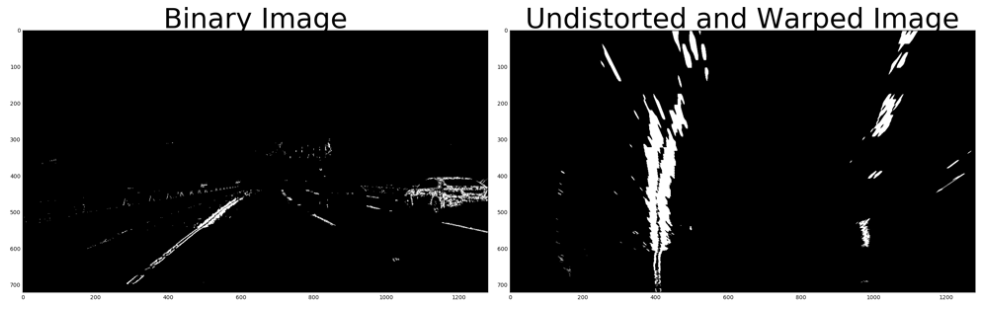
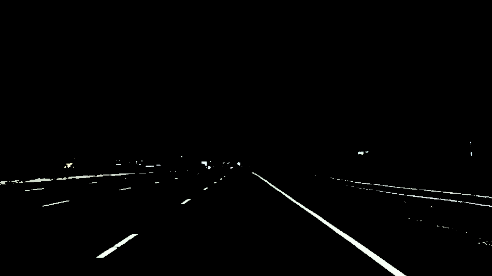
You’ll want to try out various combinations of color and gradient thresholds to generate a binary image where the lane lines are clearly visible. There’s more than one way to achieve a good result, but for example, given the image above, the output you’re going for should look something like this:

Perspective Transform

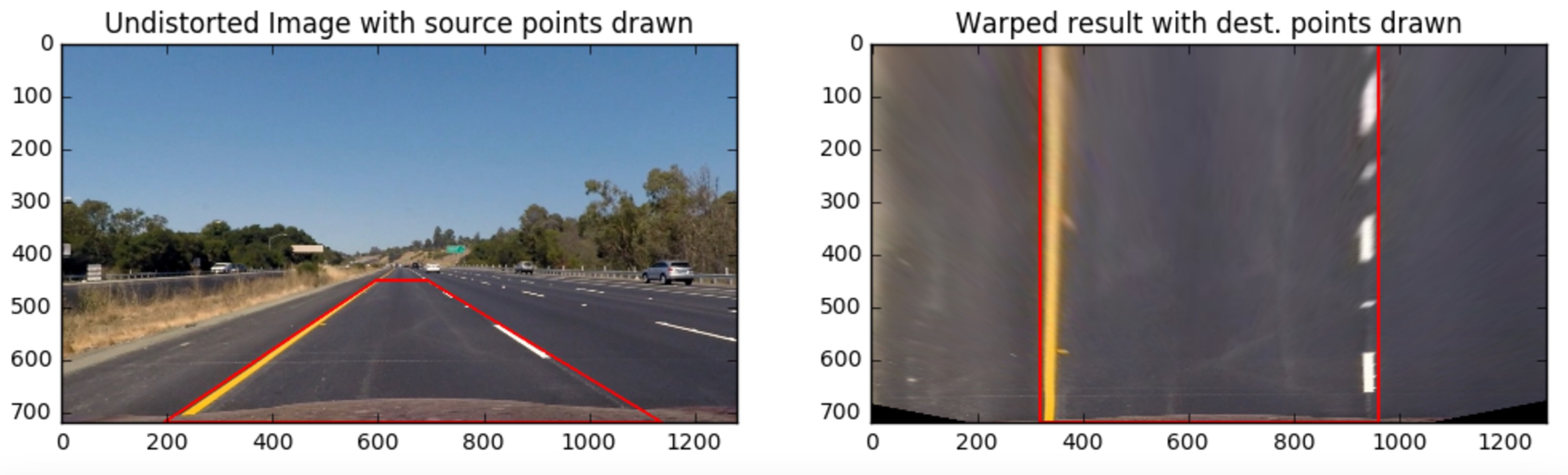
Next, you want to identify four source points for your perspective transform. In this case, you can assume the road is a flat plane. This isn’t strictly true, but it can serve as an approximation for this project. You would like to pick four points in a trapezoidal shape (similar to region masking) that would represent a rectangle when looking down on the road from above.

The easiest way to do this is to investigate an image where the lane lines are straight, and find four points lying along the lines that, after perspective transform, make the lines look straight and vertical from a bird’s eye view perspective.

Here’s an example of the result you are going for with straight lane lines:

Now for curved lines

Those same four source points will now work to transform any image (again, under the assumption that the road is flat and the camera perspective hasn’t changed). When applying the transform to new images, the test of whether or not you got the transform correct, is that the lane lines should appear parallel in the warped images, whether they are straight or curved.

Here’s an example of applying a perspective transform to your thresholded binary image, using the same source and destination points as above, showing that the curved lines are (more or less) parallel in the transformed image:

Locate the Lane Lines

Thresholded and perspective transformed image

You now have a thresholded warped image and you’re ready to map out the lane lines! There are many ways you could go about this, but here’s one example of how you might do it:

Line Finding Method: Peaks in a Histogram

After applying calibration, thresholding, and a perspective transform to a road image, you should have a binary image where the lane lines stand out clearly. However, you still need to decide explicitly which pixels are part of the lines and which belong to the left line and which belong to the right line.

Plotting a histogram of where the binary activations occur across the image is one potential solution for this. In the quiz below, let’s take a couple quick steps to create our histogram!

123456789101112131415161718192021222324import numpy as npimport matplotlib.image as mpimgimport matplotlib.pyplot as plt# Load our image# `mpimg.imread` will load .jpg as 0-255, so normalize back to 0-1img = mpimg.imread(‘warped_example.jpg’)/255print(img.shape)def hist(img): # TO-DO: Grab only the bottom half of the image # Lane lines are likely to be mostly vertical nearest to the car bottom_half = img[img.shape[0]//2:,:] print(bottom_half) # TO-DO: Sum across image pixels vertically – make sure to set `axis` # i.e. the highest areas of vertical lines should be larger values histogram = np.sum(bottom_half, axis = 0) return histogram# Create histogram of image binary activationshistogram = hist(img)# Visualize the resulting histogramplt.plot(histogram)

  • RESET QUIZ
  • TEST RUN
  • SUBMIT ANSWER
Here’s the approach I took.

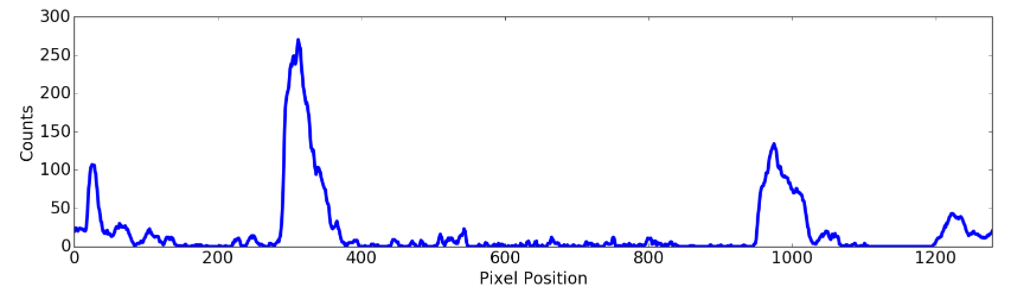
I take a histogram along all the columns in the lower half of the image like this:

import numpy as np
import matplotlib.pyplot as plt

histogram = np.sum(img[img.shape[0]//2:,:], axis=0)
plt.plot(histogram)

The result looks like this:

Sliding Window

With this histogram we are adding up the pixel values along each column in the image. In our thresholded binary image, pixels are either 0 or 1, so the two most prominent peaks in this histogram will be good indicators of the x-position of the base of the lane lines. We can use that as a starting point for where to search for the lines. From that point, we can use a sliding window, placed around the line centers, to find and follow the lines up to the top of the frame.

Implement Sliding Windows and Fit a Polynomial

As shown in the previous animation, we can use the two highest peaks from our histogram as a starting point for determining where the lane lines are, and then use sliding windows moving upward in the image (further along the road) to determine where the lane lines go.

Split the histogram for the two lines

The first step we’ll take is to split the histogram into two sides, one for each lane line.

import numpy as np
import cv2
import matplotlib.pyplot as plt

# Assuming you have created a warped binary image called "binary_warped"
# Take a histogram of the bottom half of the image
histogram = np.sum(binary_warped[binary_warped.shape[0]//2:,:], axis=0)
# Create an output image to draw on and visualize the result
out_img = np.dstack((binary_warped, binary_warped, binary_warped))*255
# Find the peak of the left and right halves of the histogram
# These will be the starting point for the left and right lines
midpoint = np.int(histogram.shape[0]//2)
leftx_base = np.argmax(histogram[:midpoint])
rightx_base = np.argmax(histogram[midpoint:]) + midpoint

Note that in the above, we also create out_img to help with visualizing our output later on.

Set up windows and window hyperparameters

Our next step is to set a few hyperparameters related to our sliding windows, and set them up to iterate across the binary activations in the image. We have some base hyperparameters below, but don’t forget to try out different values in your own implementation to see what works best!

# HYPERPARAMETERS
# Choose the number of sliding windows
nwindows = 9
# Set the width of the windows +/- margin
margin = 100
# Set minimum number of pixels found to recenter window
minpix = 50

# Set height of windows - based on nwindows above and image shape
window_height = np.int(binary_warped.shape[0]//nwindows)
# Identify the x and y positions of all nonzero (i.e. activated) pixels in the image
nonzero = binary_warped.nonzero()
nonzeroy = np.array(nonzero[0])
nonzerox = np.array(nonzero[1])
# Current positions to be updated later for each window in nwindows
leftx_current = leftx_base
rightx_current = rightx_base

# Create empty lists to receive left and right lane pixel indices
left_lane_inds = []
right_lane_inds = []

Iterate through nwindows to track curvature

Now that we’ve set up what the windows look like and have a starting point, we’ll want to loop for nwindows, with the given window sliding left or right if it finds the mean position of activated pixels within the window to have shifted.

You’ll implement this part in the quiz below, but here’s a few steps to get you started:

  1. Loop through each window in nwindows
  2. Find the boundaries of our current window. This is based on a combination of the current window’s starting point (leftx_current and rightx_current), as well as the margin you set in the hyperparameters.
  3. Use cv2.rectangle to draw these window boundaries onto our visualization image out_img. This is required for the quiz, but you can skip this step in practice if you don’t need to visualize where the windows are.
  4. Now that we know the boundaries of our window, find out which activated pixels from nonzeroy and nonzerox above actually fall into the window.
  5. Append these to our lists left_lane_inds and right_lane_inds.
  6. If the number of pixels you found in Step 4 are greater than your hyperparameter minpix, re-center our window (i.e. leftx_current or rightx_current) based on the mean position of these pixels.

Fit a polynomial

Now that we have found all our pixels belonging to each line through the sliding window method, it’s time to fit a polynomial to the line. First, we have a couple small steps to ready our pixels.

# Concatenate the arrays of indices (previously was a list of lists of pixels)
left_lane_inds = np.concatenate(left_lane_inds)
right_lane_inds = np.concatenate(right_lane_inds)

# Extract left and right line pixel positions
leftx = nonzerox[left_lane_inds]
lefty = nonzeroy[left_lane_inds] 
rightx = nonzerox[right_lane_inds]
righty = nonzeroy[right_lane_inds]

We’ll let you implement the function for the polynomial in the quiz below using np.polyfit.

# Assuming we have `left_fit` and `right_fit` from `np.polyfit` before
# Generate x and y values for plotting
ploty = np.linspace(0, binary_warped.shape[0]-1, binary_warped.shape[0])
left_fitx = left_fit[0]*ploty**2 + left_fit[1]*ploty + left_fit[2]
right_fitx = right_fit[0]*ploty**2 + right_fit[1]*ploty + right_fit[2]

Take note of how we fit the lines above – while normally you calculate a y-value for a given x, here we do the opposite. Why? Because we expect our lane lines to be (mostly) vertically-oriented.

Image for post
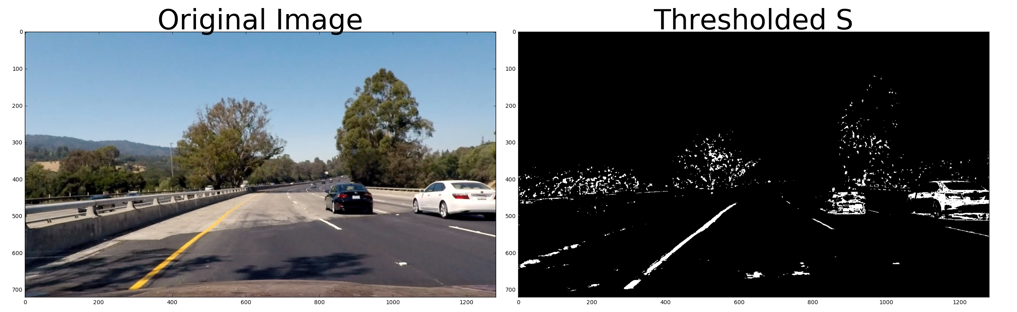
The ‘S’ channel, or Saturation, with binary activation
Image for post
A few more thresholds (left) for activation, with the resulting perspective transformation
Image for post
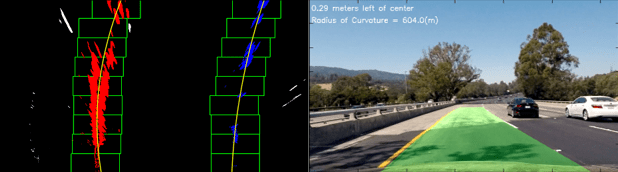
Sliding windows and a decent-looking result
Posted in Self-Driving Car

Canny Edge Detection in Action

Now that you have a conceptual grasp on how the Canny algorithm works, it’s time to use it to find the edges of the lane lines in an image of the road. So let’s give that a try.

First, we need to read in an image:

import matplotlib.pyplot as plt
import matplotlib.image as mpimg
image = mpimg.imread('exit-ramp.jpg')
plt.imshow(image)

Here we have an image of the road, and it’s fairly obvious by eye where the lane lines are, but what about using computer vision?

Let’s go ahead and convert to grayscale.

import cv2  #bringing in OpenCV libraries
gray = cv2.cvtColor(image, cv2.COLOR_RGB2GRAY) #grayscale conversion
plt.imshow(gray, cmap='gray')

Let’s try our Canny edge detector on this image. This is where OpenCV gets useful. First, we’ll have a look at the parameters for the OpenCV Canny function. You will call it like this:

edges = cv2.Canny(gray, low_threshold, high_threshold)

In this case, you are applying Canny to the image gray and your output will be another image called edgeslow_threshold and high_threshold are your thresholds for edge detection.

The algorithm will first detect strong edge (strong gradient) pixels above the high_threshold, and reject pixels below the low_threshold. Next, pixels with values between the low_threshold and high_threshold will be included as long as they are connected to strong edges. The output edges is a binary image with white pixels tracing out the detected edges and black everywhere else. See the OpenCV Canny Docs for more details.

What would make sense as a reasonable range for these parameters? In our case, converting to grayscale has left us with an 8-bit image, so each pixel can take 2^8 = 256 possible values. Hence, the pixel values range from 0 to 255.

This range implies that derivatives (essentially, the value differences from pixel to pixel) will be on the scale of tens or hundreds. So, a reasonable range for your threshold parameters would also be in the tens to hundreds.

As far as a ratio of low_threshold to high_thresholdJohn Canny himself recommended a low to high ratio of 1:2 or 1:3.

We’ll also include Gaussian smoothing, before running Canny, which is essentially a way of suppressing noise and spurious gradients by averaging (check out the OpenCV docs for GaussianBlur). cv2.Canny() actually applies Gaussian smoothing internally, but we include it here because you can get a different result by applying further smoothing (and it’s not a changeable parameter within cv2.Canny()!).

You can choose the kernel_size for Gaussian smoothing to be any odd number. A larger kernel_size implies averaging, or smoothing, over a larger area. The example in the previous lesson was kernel_size = 3.

Note: If this is all sounding complicated and new to you, don’t worry! We’re moving pretty fast through the material here, because for now we just want you to be able to use these tools. If you would like to dive into the math underpinning these functions, please check out the free Udacity course, Intro to Computer Vision, where the third lesson covers Gaussian filters and the sixth and seventh lessons cover edge detection.

#doing all the relevant imports
import matplotlib.pyplot as plt
import matplotlib.image as mpimg
import numpy as np
import cv2

# Read in the image and convert to grayscale
image = mpimg.imread('exit-ramp.jpg')
gray = cv2.cvtColor(image, cv2.COLOR_RGB2GRAY)

# Define a kernel size for Gaussian smoothing / blurring
# Note: this step is optional as cv2.Canny() applies a 5x5 Gaussian internally
kernel_size = 3
blur_gray = cv2.GaussianBlur(gray,(kernel_size, kernel_size), 0)

# Define parameters for Canny and run it
# NOTE: if you try running this code you might want to change these!
low_threshold = 1
high_threshold = 10
edges = cv2.Canny(blur_gray, low_threshold, high_threshold)

# Display the image
plt.imshow(edges, cmap='Greys_r')

Here I’ve called the OpenCV function Canny on a Gaussian-smoothed grayscaled image called blur_gray and detected edges with thresholds on the gradient of high_threshold, and low_threshold.

In the next quiz you’ll get to try this on your own and mess around with the parameters for the Gaussian smoothing and Canny Edge Detection to optimize for detecting the lane lines and not a lot of other stuff.

Posted in Self-Driving Car

Region Masking

In the last exercise, we alredy know how select the color of the lane on highway, this is very important for the camera of self-driving car. In this case, I’ll assume that the front facing camera that took the image is mounted in a fixed position on the car, such that the lane lines will always appear in the same general region of the image. Next, I’ll take advantage of this by adding a criterion to only consider pixels for color selection in the region where we expect to find the lane lines.

Check out the code below. The variables left_bottomright_bottom, and apex represent the vertices of a triangular region that I would like to retain for my color selection, while masking everything else out. Here I’m using a triangular mask to illustrate the simplest case, but later you’ll use a quadrilateral, and in principle, you could use any polygon.

import matplotlib.pyplot as plt
import matplotlib.image as mpimg
import numpy as np

# Read in the image and print some stats
image = mpimg.imread('test.jpg')
print('This image is: ', type(image), 
         'with dimensions:', image.shape)

# Pull out the x and y sizes and make a copy of the image
ysize = image.shape[0]
xsize = image.shape[1]
region_select = np.copy(image)

# Define a triangle region of interest 
# Keep in mind the origin (x=0, y=0) is in the upper left in image processing
# Note: if you run this code, you'll find these are not sensible values!!
# But you'll get a chance to play with them soon in a quiz 
left_bottom = [0, 539]
right_bottom = [900, 300]
apex = [400, 0]

# Fit lines (y=Ax+B) to identify the  3 sided region of interest
# np.polyfit() returns the coefficients [A, B] of the fit
fit_left = np.polyfit((left_bottom[0], apex[0]), (left_bottom[1], apex[1]), 1)
fit_right = np.polyfit((right_bottom[0], apex[0]), (right_bottom[1], apex[1]), 1)
fit_bottom = np.polyfit((left_bottom[0], right_bottom[0]), (left_bottom[1], right_bottom[1]), 1)

# Find the region inside the lines
XX, YY = np.meshgrid(np.arange(0, xsize), np.arange(0, ysize))
region_thresholds = (YY > (XX*fit_left[0] + fit_left[1])) & \
                    (YY > (XX*fit_right[0] + fit_right[1])) & \
                    (YY < (XX*fit_bottom[0] + fit_bottom[1]))

# Color pixels red which are inside the region of interest
region_select[region_thresholds] = [255, 0, 0]

# Display the image
plt.imshow(region_select)

# uncomment if plot does not display
# plt.show()

Combining Color and Region Selections

Now you’ve seen how to mask out a region of interest in an image. Next, let’s combine the mask and color selection to pull only the lane lines out of the image.

Check out the code below. Here we’re doing both the color and region selection steps, requiring that a pixel meet both the mask and color selection requirements to be retained.

import matplotlib.pyplot as plt
import matplotlib.image as mpimg
import numpy as np

# Read in the image
image = mpimg.imread('test.jpg')

# Grab the x and y sizes and make two copies of the image
# With one copy we'll extract only the pixels that meet our selection,
# then we'll paint those pixels red in the original image to see our selection 
# overlaid on the original.
ysize = image.shape[0]
xsize = image.shape[1]
color_select= np.copy(image)
line_image = np.copy(image)

# Define our color criteria
red_threshold = 0
green_threshold = 0
blue_threshold = 0
rgb_threshold = [red_threshold, green_threshold, blue_threshold]

# Define a triangle region of interest (Note: if you run this code, 
# Keep in mind the origin (x=0, y=0) is in the upper left in image processing
# you'll find these are not sensible values!!
# But you'll get a chance to play with them soon in a quiz 😉
left_bottom = [0, 539]
right_bottom = [900, 300]
apex = [400, 0]

fit_left = np.polyfit((left_bottom[0], apex[0]), (left_bottom[1], apex[1]), 1)
fit_right = np.polyfit((right_bottom[0], apex[0]), (right_bottom[1], apex[1]), 1)
fit_bottom = np.polyfit((left_bottom[0], right_bottom[0]), (left_bottom[1], right_bottom[1]), 1)

# Mask pixels below the threshold
color_thresholds = (image[:,:,0] < rgb_threshold[0]) | \
                    (image[:,:,1] < rgb_threshold[1]) | \
                    (image[:,:,2] < rgb_threshold[2])

# Find the region inside the lines
XX, YY = np.meshgrid(np.arange(0, xsize), np.arange(0, ysize))
region_thresholds = (YY > (XX*fit_left[0] + fit_left[1])) & \
                    (YY > (XX*fit_right[0] + fit_right[1])) & \
                    (YY < (XX*fit_bottom[0] + fit_bottom[1]))
# Mask color selection
color_select[color_thresholds] = [0,0,0]
# Find where image is both colored right and in the region
line_image[~color_thresholds & region_thresholds] = [255,0,0]

# Display our two output images
plt.imshow(color_select)
plt.imshow(line_image)

# uncomment if plot does not display
# plt.show()

In the next quiz, you can vary your color selection and the shape of your region mask (vertices of a triangle left_bottomright_bottom, and apex), such that you pick out the lane lines and nothing else.

After combine region-making and color-classification:

import matplotlib.pyplot as plt
import matplotlib.image as mpimg
import numpy as np

# Read in the image
image = mpimg.imread('test.jpg')

# Grab the x and y size and make a copy of the image
ysize = image.shape[0]
xsize = image.shape[1]
color_select = np.copy(image)
line_image = np.copy(image)

# Define color selection criteria
# MODIFY THESE VARIABLES TO MAKE YOUR COLOR SELECTION
red_threshold = 200
green_threshold = 200
blue_threshold = 200

rgb_threshold = [red_threshold, green_threshold, blue_threshold]

# Define the vertices of a triangular mask.
# Keep in mind the origin (x=0, y=0) is in the upper left
# MODIFY THESE VALUES TO ISOLATE THE REGION 
# WHERE THE LANE LINES ARE IN THE IMAGE
left_bottom = [115, 540]
right_bottom = [800, 540]
apex = [455, 300]

# Perform a linear fit (y=Ax+B) to each of the three sides of the triangle
# np.polyfit returns the coefficients [A, B] of the fit
fit_left = np.polyfit((left_bottom[0], apex[0]), (left_bottom[1], apex[1]), 1)
fit_right = np.polyfit((right_bottom[0], apex[0]), (right_bottom[1], apex[1]), 1)
fit_bottom = np.polyfit((left_bottom[0], right_bottom[0]), (left_bottom[1], right_bottom[1]), 1)

# Mask pixels below the threshold
color_thresholds = (image[:,:,0] < rgb_threshold[0]) | \
                    (image[:,:,1] < rgb_threshold[1]) | \
                    (image[:,:,2] < rgb_threshold[2])

# Find the region inside the lines
XX, YY = np.meshgrid(np.arange(0, xsize), np.arange(0, ysize))
region_thresholds = (YY > (XX*fit_left[0] + fit_left[1])) & \
                    (YY > (XX*fit_right[0] + fit_right[1])) & \
                    (YY < (XX*fit_bottom[0] + fit_bottom[1]))
                    
# Mask color and region selection
color_select[color_thresholds | ~region_thresholds] = [0, 0, 0]
# Color pixels red where both color and region selections met
line_image[~color_thresholds & region_thresholds] = [255, 0, 0]

# Display the image and show region and color selections
plt.imshow(image)
x = [left_bottom[0], right_bottom[0], apex[0], left_bottom[0]]
y = [left_bottom[1], right_bottom[1], apex[1], left_bottom[1]]
plt.plot(x, y, 'b--', lw=4)
plt.imshow(color_select)
plt.imshow(line_image)

Final result we have:

Posted in Self-Driving Car

Color Selection

Finding Lane Lines on the Road

Which of the following features could be useful in the identification of lane lines on the road?

Answer : Color, shape, orientation, Position of the image.

Coding up a Color Selection

Let’s code up a simple color selection in Python.

No need to download or install anything, you can just follow along in the browser for now.

We’ll be working with the same image you saw previously.

Check out the code below. First, I import pyplot and image from matplotlib. I also import numpy for operating on the image.

import matplotlib.pyplot as plt
import matplotlib.image as mpimg
import numpy as np

I then read in an image and print out some stats. I’ll grab the x and y sizes and make a copy of the image to work with. NOTE: Always make a copy of arrays or other variables in Python. If instead, you say “a = b” then all changes you make to “a” will be reflected in “b” as well!

# Read in the image and print out some stats
image = mpimg.imread('test.jpg')
print('This image is: ',type(image), 
         'with dimensions:', image.shape)

# Grab the x and y size and make a copy of the image
ysize = image.shape[0]
xsize = image.shape[1]
# Note: always make a copy rather than simply using "="
color_select = np.copy(image)

Next I define a color threshold in the variables red_thresholdgreen_threshold, and blue_threshold and populate rgb_threshold with these values. This vector contains the minimum values for red, green, and blue (R,G,B) that I will allow in my selection.

# Define our color selection criteria
# Note: if you run this code, you'll find these are not sensible values!!
# But you'll get a chance to play with them soon in a quiz
red_threshold = 0
green_threshold = 0
blue_threshold = 0
rgb_threshold = [red_threshold, green_threshold, blue_threshold]

Next, I’ll select any pixels below the threshold and set them to zero.

After that, all pixels that meet my color criterion (those above the threshold) will be retained, and those that do not (below the threshold) will be blacked out.

# Identify pixels below the threshold
thresholds = (image[:,:,0] < rgb_threshold[0]) \
            | (image[:,:,1] < rgb_threshold[1]) \
            | (image[:,:,2] < rgb_threshold[2])
color_select[thresholds] = [0,0,0]

# Display the image                 
plt.imshow(color_select)
plt.show()

The result, color_select, is an image in which pixels that were above the threshold have been retained, and pixels below the threshold have been blacked out.

In the code snippet above, red_thresholdgreen_threshold and blue_threshold are all set to 0, which implies all pixels will be included in the selection.

In the next quiz, you will modify the values of red_thresholdgreen_threshold and blue_threshold until you retain as much of the lane lines as possible while dropping everything else. Your output image should look like the one below.

Posted in Self-Driving Car

Power of Camera

Let’s code up a simple color selection in Python.

No need to download or install anything, you can just follow along in the browser for now.

We’ll be working with the image below:

Check out the code below. First, I import pyplot and image from matplotlib. I also import numpy for operating on the image.

import matplotlib.pyplot as plt
import matplotlib.image as mpimg
import numpy as np

I then read in an image and print out some stats. I’ll grab the x and y sizes and make a copy of the image to work with. NOTE: Always make a copy of arrays or other variables in Python. If instead, you say “a = b” then all changes you make to “a” will be reflected in “b” as well!

# Read in the image and print out some stats
image = mpimg.imread('test.jpg')
print('This image is: ',type(image), 
         'with dimensions:', image.shape)

# Grab the x and y size and make a copy of the image
ysize = image.shape[0]
xsize = image.shape[1]
# Note: always make a copy rather than simply using "="
color_select = np.copy(image)

Next I define a color threshold in the variables red_thresholdgreen_threshold, and blue_threshold and populate rgb_threshold with these values. This vector contains the minimum values for red, green, and blue (R,G,B) that I will allow in my selection.

# Define our color selection criteria
# Note: if you run this code, you'll find these are not sensible values!!
# But you'll get a chance to play with them soon in a quiz
red_threshold = 0
green_threshold = 0
blue_threshold = 0
rgb_threshold = [red_threshold, green_threshold, blue_threshold]

Next, I’ll select any pixels below the threshold and set them to zero.

After that, all pixels that meet my color criterion (those above the threshold) will be retained, and those that do not (below the threshold) will be blacked out.

# Identify pixels below the threshold
thresholds = (image[:,:,0] < rgb_threshold[0]) \
            | (image[:,:,1] < rgb_threshold[1]) \
            | (image[:,:,2] < rgb_threshold[2])
color_select[thresholds] = [0,0,0]

# Display the image                 
plt.imshow(color_select)
plt.show()

The result, color_select, is an image in which pixels that were above the threshold have been retained, and pixels below the threshold have been blacked out.

In the code snippet above, red_thresholdgreen_threshold and blue_threshold are all set to 0, which implies all pixels will be included in the selection.

In the next quiz, you will modify the values of red_thresholdgreen_threshold and blue_threshold until you retain as much of the lane lines as possible while dropping everything else. Your output image should look like the one below.

Image after color selection

Form

Posted in Self-Driving Car

Localization, Path Planning, Control, and System Integration

Image for post

In a self-driving car car, GPS (Global Positioning Systems) use trilateration to locate our position.

Image for post
source

In these measurements, there may be an error from 1 to 10 meters. This error is too important and can potentially be fatal for the passengers or the environment of the autonomous vehicle. We therefore include a step called localization.

Localization is the implementation of algorithms to estimate where is our vehicle with an error of less than 10 cm.

This article follows articles AI … And the vehicle went autonomous and Sensor Fusion.

Image for post

Localization is a step implemented in the majority of robots and vehicles to locate with a really small margin of error. If we want to make decisions like overtaking a vehicle or simply defining a route, we need to know what’s around us (sensor fusion) and where we are (localization). Only with this information we can define a trajectory.

How to locate precisely?

There are many different techniques to help an autonomous vehicle locate itself.

  • Odometry — This first technique, odometry, uses a starting position and a wheel displacement calculation to estimate a position at a time t. This technique is generally very inaccurate and leads to an accumulation of errors due to measurement inaccuracies, wheel slip, …
  • Kalman filter — The previous article evoked this technique to estimate the state of the vehicles around us. We can also implement this to define the state of our own vehicle.
  • Particle Filter — The Bayesian filters can also have a variant called particle filters. This technique compares the observations of our sensors with the environmental map. We then create particles around areas where the observations are similar to the map.
  • SLAM — A very popular technique if we also want to estimate the map exists. It is called SLAM (Simultaneous Localization And Mapping). In this technique, we estimate our position but also the position of landmarks. A traffic light can be a landmark.

Sensors

  • Inertial Measurement Unit (IMU)is a sensor capable of defining the movement of the vehicle along the yaw, pitch, roll axis. This sensor calculates acceleration along the X, Y, Z axes, orientationinclination, and altitude.
Image for post
Inertial Measurement Unit (source)
  • Global Positioning System (GPS) or NAVSTAR are the US system for positioning. In Europe, we talk about Galileo; in Russia, GLONASS. The term Global Navigation Satellite System (GNSS) is a very common satellite positioning system today that can use many of these subsystems to increase accuracy.

Vocabulary

We will introduce several words in this article :

  • Observation — An observation can be a measurement, an image, an angle …
  • Control — This is our movements including our speeds and yaw, pitch, roll values retrieved by the IMU.
  • The position of the vehicle — This vector includes the (x, y) coordinates and the orientation θ.
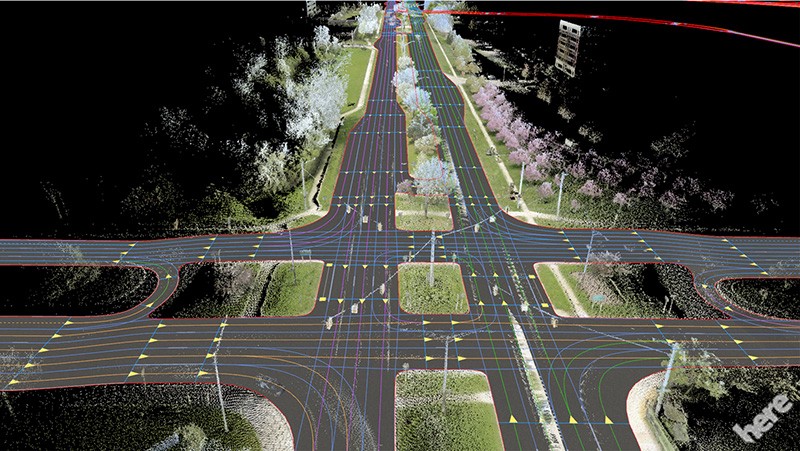
  • The map — This is our landmarks, roads … There are several types of maps; companies like Here Technologies produce HD Maps, accurate maps centimeter by centimeter. These cards are produced according to the environment where the autonomous car will be able to drive.
Image for post

Kalman Filters

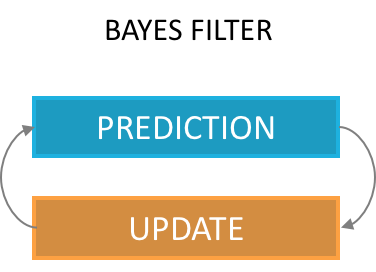
Explained in the previous article, a Kalman filter can estimate the state of a vehicle. As a reminder, this is the implementation of the Bayes Filter, with a prediction phase and an update phase.

Image for post
Image for post
Initialization and 1st measurement (source)

Our first estimate is an equal distribution across the area.
We then have a measurement telling us that we are located next to a door.
Our distribution then changes to give a higher probability to areas located near doors.

Image for post
Motion and 2nd measurement (source)

We then perform a motion, our probabilities are shifted with greater uncertainties.

We take a new measurement, telling us that we are next to a door again.

The only possibility is to be located near the middle door.

In this example of a Kalman filter, we were able to locate ourselves using a few measurements and a comparison with the map. It is essential to know the map (including information only the 1st door has an adjacent door) to make deductions. This technique makes it possible not to use an initial position, which is preferable to the technique using odometry.

Particle Filters

Particle Filter is another implementation of the Bayes Filter.

In a Particle Filter, we create particles throughout the area defined by the GPS and we assign a weight to each particle.

The weight of a particle represents the probability that our vehicle is at the location of the particle.

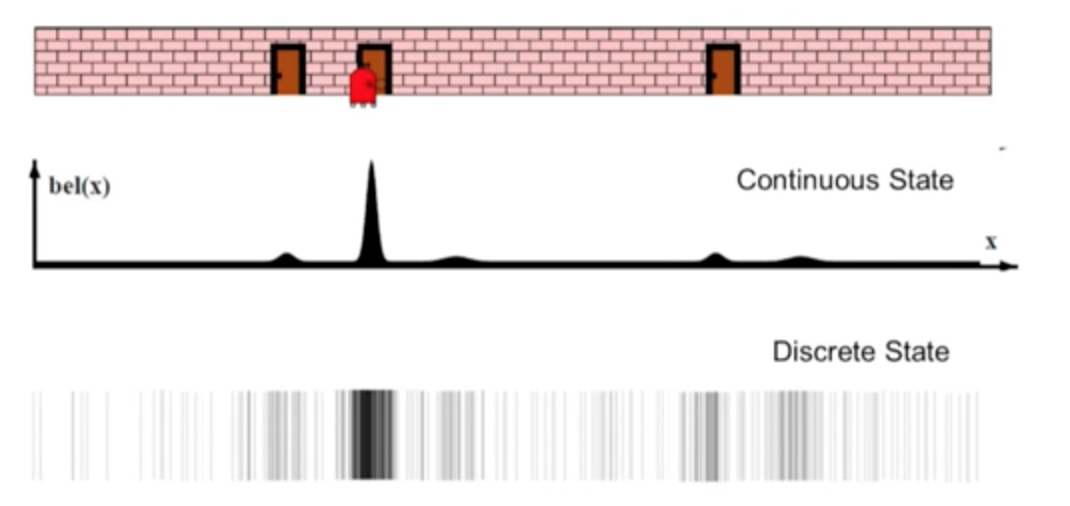
Unlike the Kalman filter, we have our probabilities are not continuous values but discrete values, we talk about weights.

Image for post
Kalman Filter vs Particle Filter (source)

Algorithm

The implementation of the algorithm is according to the following scheme. We distinguish four stages (Initialization, Prediction, Update, Sampling) realized with the help of several data (GPS, IMU, speeds, measurements of the landmarks).

Image for post
Localization algorithm
  • Initialization — We use an initial estimate from the GPS and add noise (due to sensor inaccuracy) to initialize a chosen number of particlesEach particle has a position (x, y) and an orientation θ.
    This gives us a particle distribution throughout the GPS area with equal weights.
  • Prediction — Once our particles are initialized, we make a first prediction taking into account our speed and our rotations. In every prediction, our movements will be taken into account. We use equations describing x, y, θ (orientation) to describe the motion of a vehicle.
Image for post
Motion equations
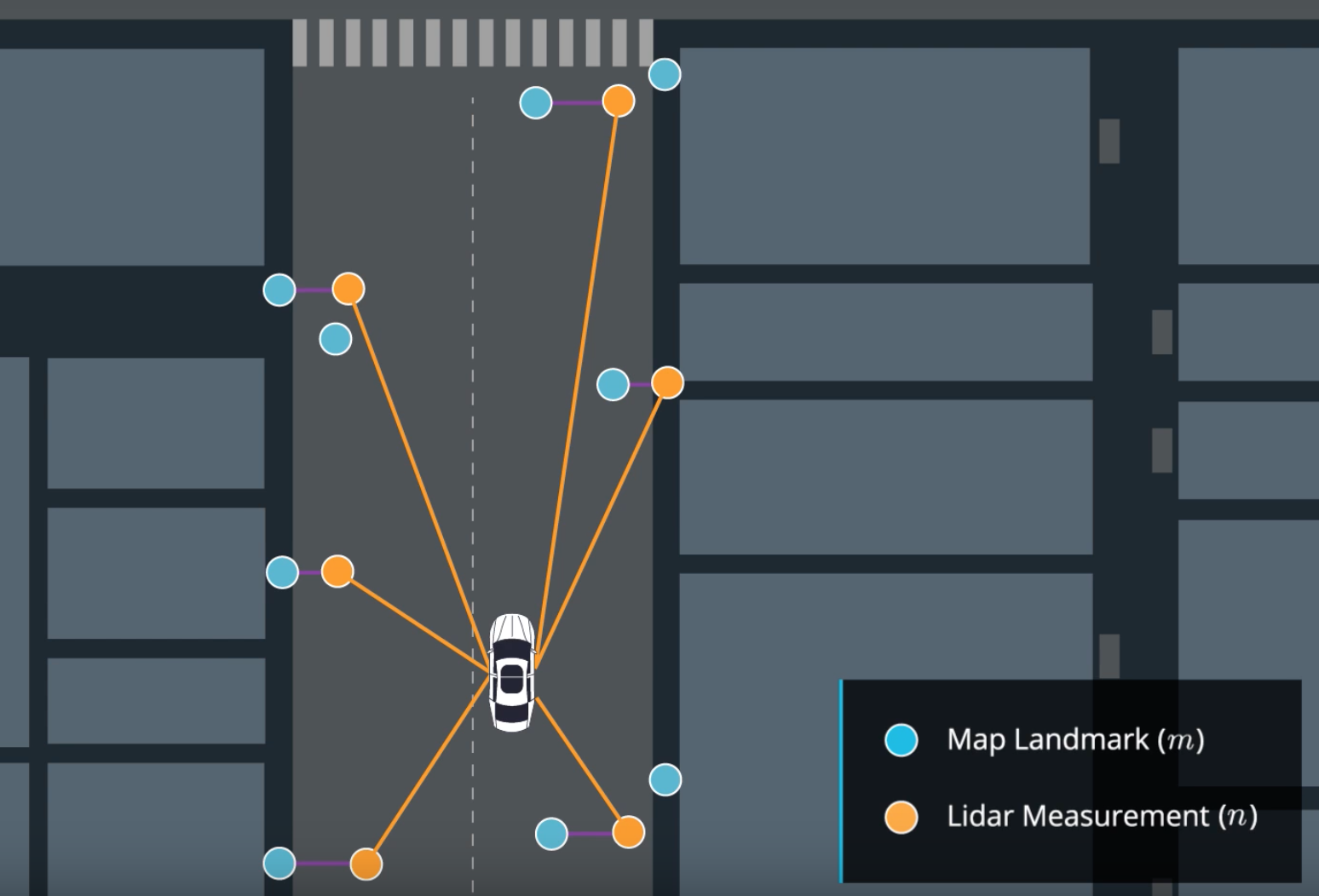
  • Update — In our update phase, we first realize a match between our measurements n and the map m.
Image for post
Match between measurements and map

We use sensor fusion data to determine surrounding objects and then update our weights with the following equation :

Image for post
Update

In this equation, for each particle:
– σx and σy are our uncertainties
– x and y are the observations of the landmarks
– μx and μy are the ground truth coordinates of the landmarks coming from the map.

In the case where the error is strong, the exponential term is 0, the weight of our particle is 0 as well. In the case where it is very low, the weight of the particle is 1 standardized by the term 2π.σx.σy.

  • Resampling — Finally, we have one last stage where we select the particles with the highest weights and destroy the least likely ones.
    The higher the weight, the more likely the particle is to survive.

The cycle is then repeated with the most probable particles, we take into account our displacements since the last computation and realize a prediction then a correction according to our observations.

Image for post
Particle filter in action

Particle filters are effective and can locate a vehicle very precisely. For each particle, we compare the measurements made by the particle with the measurements made by the vehicle and calculate a probability or weight. This calculation can makes the filter slow if we have a lot of particles. It also requires having the map of the environment where we drive permanently.

Results

My projects with Udacity taught me how to implement a Particle Filter in C ++. As in the algorithm described earlier, we implement localization by defining 100 particles and assigning a weight to each particle through measurements made by our sensors.

In the following video, we can see :

  • green laser representing the measurements from the vehicle.
  • blue laser representing the measurements from the nearest particle (blue circle).
  • particle locating the vehicle (blue circle).
  • The black circles are our landmarks (traffic lights, signs, bushes, …) coming from the map.

https://cdn.embedly.com/widgets/media.html?src=https%3A%2F%2Fwww.youtube.com%2Fembed%2FxsRwHrKOBwI%3Ffeature%3Doembed&url=http%3A%2F%2Fwww.youtube.com%2Fwatch%3Fv%3DxsRwHrKOBwI&image=https%3A%2F%2Fi.ytimg.com%2Fvi%2FxsRwHrKOBwI%2Fhqdefault.jpg&key=a19fcc184b9711e1b4764040d3dc5c07&type=text%2Fhtml&schema=youtubeParticle Filter Implementation

SLAM (Simultaneous Localization And Mapping)

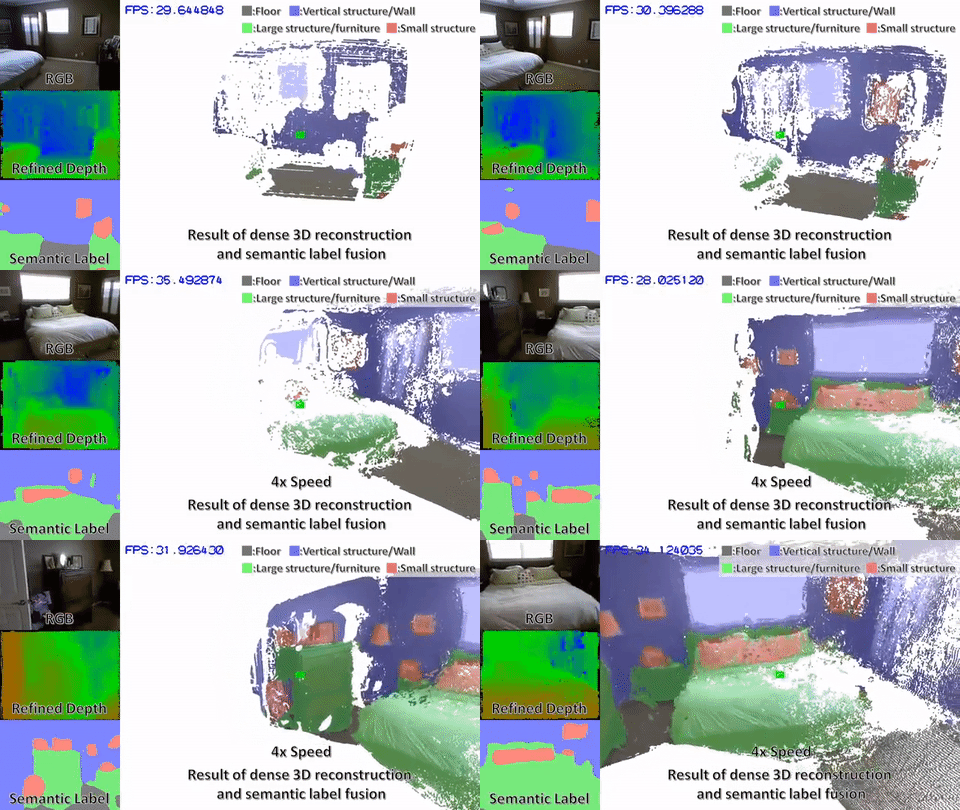
Another very popular method is called SLAM, this technique makes it possible to estimate the map (the coordinates of the landmarks) in addition to estimating the coordinates of our vehicle.

To work, we can with the Lidar find walls, sidewalks and thus build a map. SLAM’s algorithms need to know how to recognize landmarks, then position them and add elements to the map.

Image for post
SLAM created map (source)

Conclusion

Localization is an essential topic for any robot or autonomous vehicle. If we can locate our vehicle very precisely, we can drive independently. This subject is constantly evolving, the sensors are becoming more and more accurate and the algorithms are more and more efficient.

SLAM techniques are very popular for outdoor and indoor navigation where GPS are not very effective. Cartography also has a very important role because without a map, we cannot know where we are.
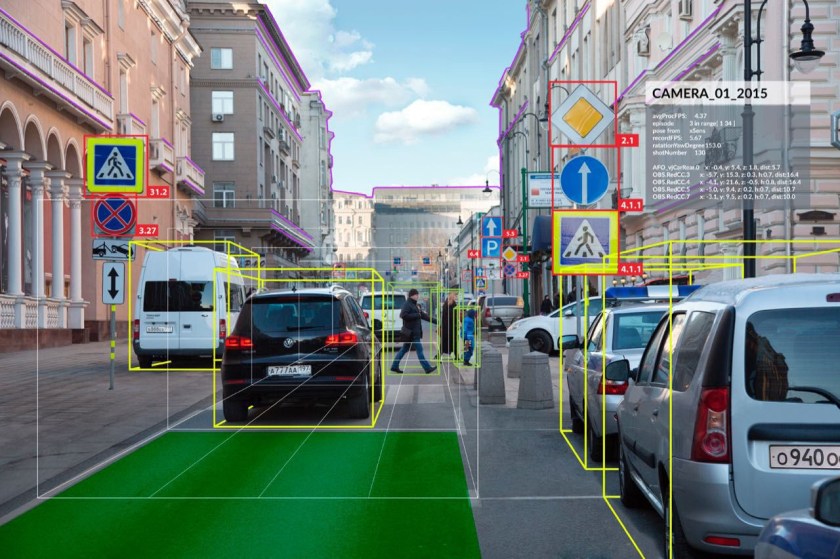
Today, research is exploring localization using deep learning algorithms and cameras.

Image for post
source

Now that we are localized and know our environment, we can discuss algorithms for creating trajectories and making decisions!

Posted in Self-Driving Car

Computervision, Deep Learning and Sensor

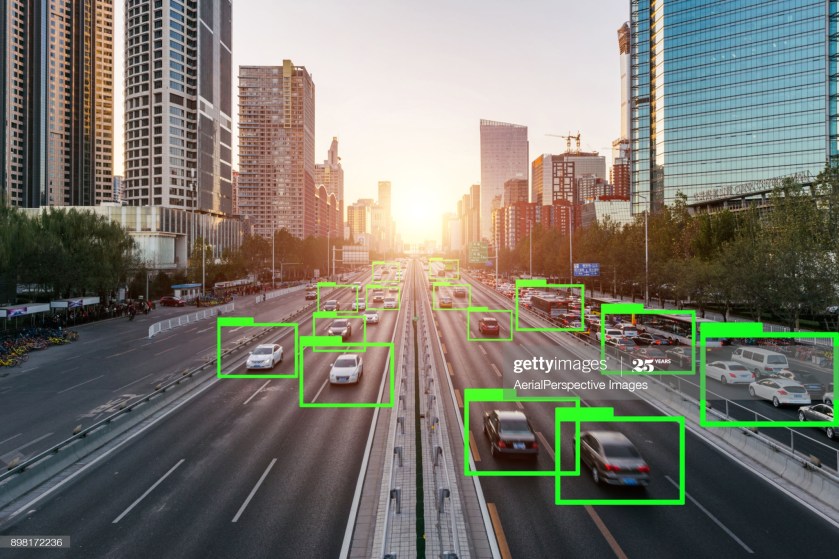
Computer vision (CV) is a process (and a branch of computer science) that involves capturing, processing and analyzing real-world images and video to allow machines to extract meaningful, contextual information from the physical world. Today, computer vision is the foundation and a key means of testing and exploiting deep-learning models that are propelling the evolution of artificial intelligence toward ubiquitous, useful and practical applications. A lot of advancements are expected to occur between 2018 and 2020.

But…what is computer vision?

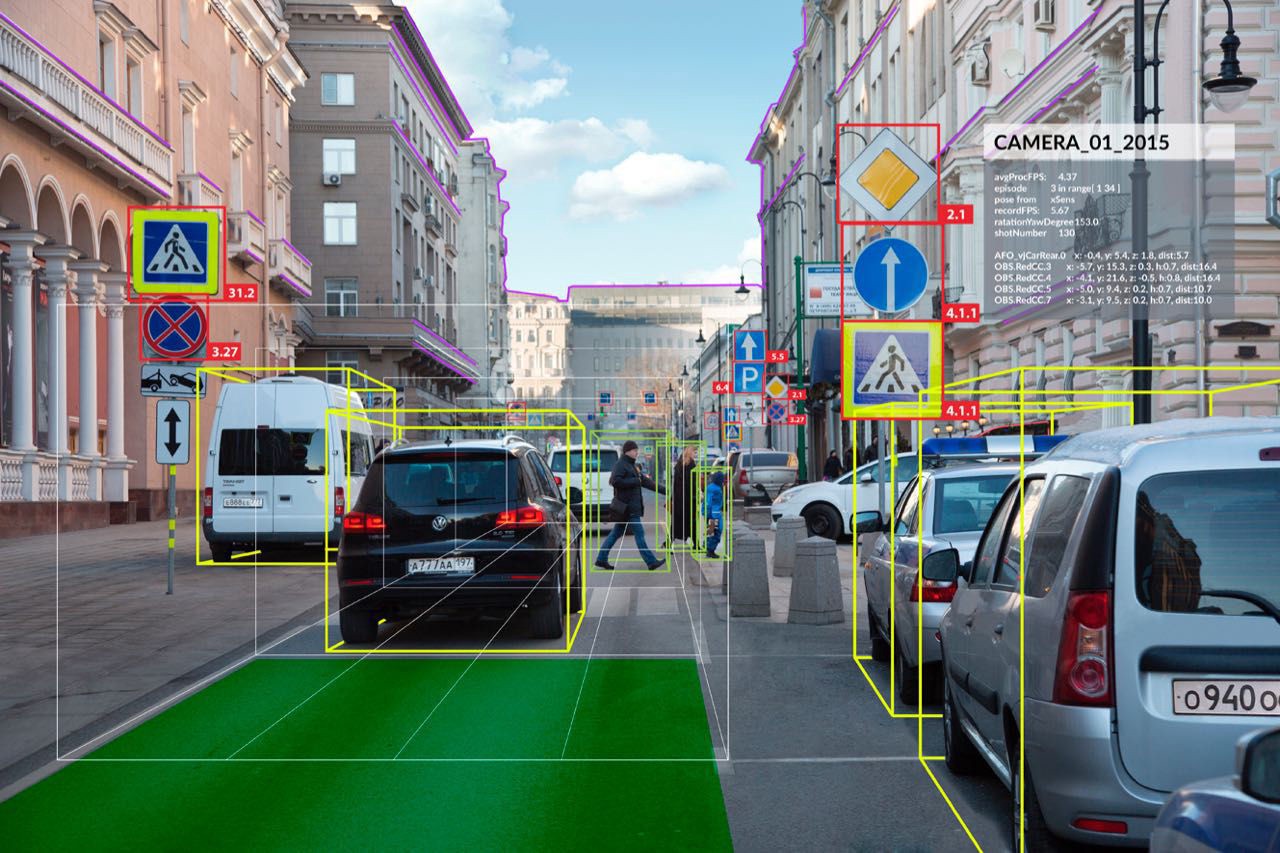
Image for post
Example of Computer Vision, Source: Welker Media

Back in 1955, researchers assumed they could describe the processes that make up human intelligence and automate them, creating an artificial intelligence (AI). Despite being in a time before 1st demonstration of integrated circuits (IC) in 1958, or 1st commercially available microprocessor by Intel in 1971, or the term graphic processing units (GPU) popularized by Nvidia in 1999, serious researches began and one of the most notable “AI” researches started along three distinct lines: replicating the eye (to see); replicating the visual cortex (to describe); and replicating the rest of the brain (to understand). Along these three distinct lines, various degrees of progresses have been made:

  • To See:
    Reinventing the eye is the area with most success. Over the past few decades, sensors and image processors have been created to match or even exceed the human eye’s capabilities. With larger, more optically perfect lenses and nanometer-scaled image sensor and processor, the precision and sensitivity of modern cameras are incredible, especially compared to common human eyes. Cameras can also record thousands of images per second, detect distances and see better in dark environment. However, despite the high fidelity of the outputs, they merely record the distribution of photons coming in a given direction. The best camera sensor ever made couldn’t capture images in 3D until recent hardware breakthroughs (such as flood illuminator with NIR). Modern cameras also provide a much richer and more flexible platform for hardware to work with software.
  • To Describe:
    Seeing isn’t enough, but to describe is unfathomably complex. A computer can apply a series of transformations to an image, and therefore discover edges, the objects that these edges imply, and the perspective and movement when presented with multiple pictures, and so on. The processes involve a great deal of math and statistics, and wasn’t made possible until recent advances in parallel computing powered by GPU.
  • To Understand:
    Even achieving a toddler’s intelligence has been proven to be extremely complex. Researcher could build a system that recognizes every variety of apples, from every angle, in any situation, at rest or in motion, with bites taken out, anything — and it still wouldn’t be able to recognize an orange. For that matter, it couldn’t even tell you what an apple is, whether it’s edible, how big it is or what they’re used for. Why? Because we barely understand how our minds work: Short and long term memory, input from our other senses, attention and cognition, a billion lessons learned from a trillion interactions with the world, etc. This is not a dead end, but it’s definitely hard to pin down. The past efforts of building a know-it-all expert systems have been proven to be fruitless. A new AI architecture has emerged in the past 5 years or so.

As three key interlocking factors has begun to come together since 2012, the concepts of “context, attention, intention” are slowly evolving into computer vision, a new branch of AI:

  • Radical New Hardware:
    Achieved by highly parallel GPU with the rise of foundry-fabless business model (such as TSMC and Nvidia). Liberating IC design and manufacturing from the proprietary-minded IDMs has installed more flexibility into hardware and thus allows software development to prosper. TSMC achieving 28nm mass production in 2012 has been the inflection point. Intel’s 10nm meltdown could further cement this trend.
  • Much More Powerful Algorithms:
    Unbinding software development from hardware manufacturing has invited software developers to join the revolution. With then pure software company like Microsoft bursting onto the scene in 1975, programmers have since invented many powerful tools to utilize radical new hardware, and one of the prime examples is deep neural networks (DNNs). We consider today’s DNNs to be smart because they can identify novel patterns in their input streams. Patterns their programmers did not anticipate. DNN performance on image recognition tests (ImageNet) exhibits lower error rates than humans performing the same tests.
  • Huge Swatches of Data:
    During the transition from centralized to decentralized architecture, internet was invented. With internet, collecting and integrating large amount of data becomes possible. From the internet, feeding DNNs with big data on powerful GPUs becomes a reality. With more application processors (AP) in personal devices adopting AI-enabled CV, CV applications are expanding along with more available frameworks and tools.

Let’s take a look at some of the currently notable/predictable CV applications on personal devices:

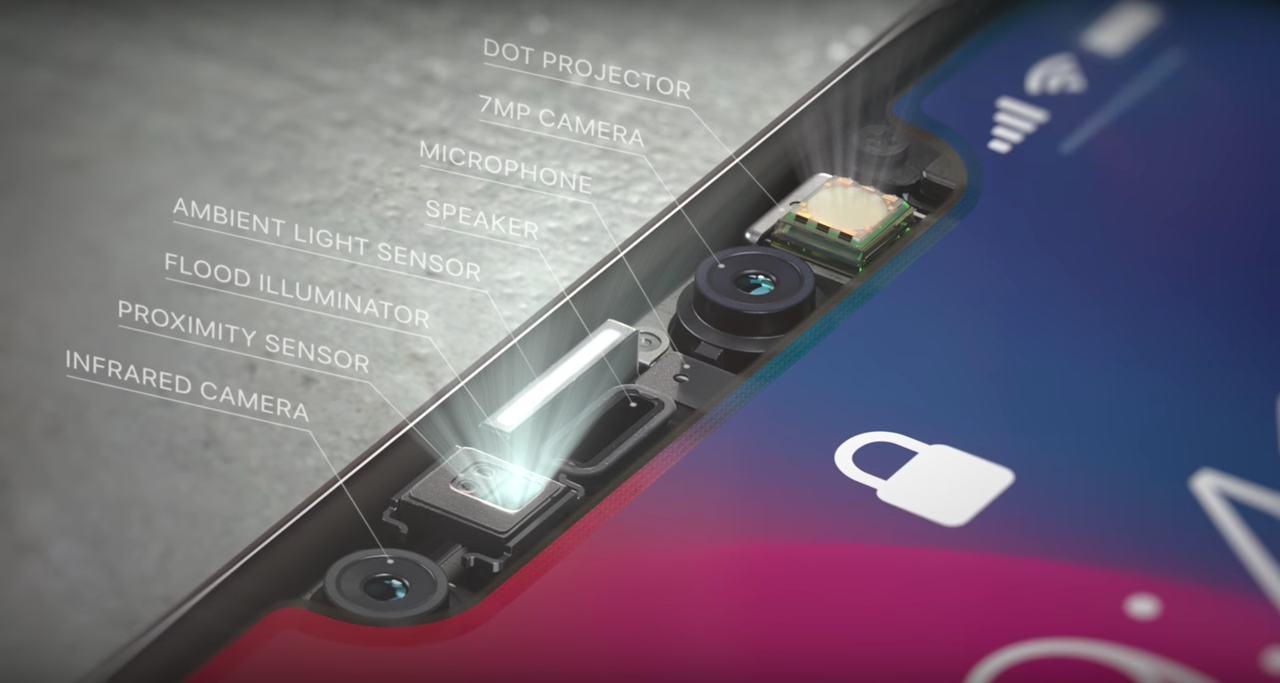
Image for post
iPhone X’s FaceID, Source: New Mobile Life

Smartphone: Differentiation Opportunities

AI-driven capabilities enabled by CV have quickly become critical differentiation factors in the saturated smartphone market. These features attempt to transform smartphones from a passive utility tool to a more proactive personal assistant.

The emergence of CV in smartphones is driven by continued investments in AI techniques by major OEMs (Apple, Samsung, Huawei, and Google) and smartphone software, as well as the evolution of image sensors (Sony), image processing units (Sony and in-house ASICs) and modules’ miniaturization (Largan, etc.). For the past couple of years, new smartphones has been characterized by continued sophistication in cameras, with higher resolutions to capture more data to improve overall accuracy of visual recognition applications and integration of 3D depth-sensing technology to enhance the reliability of facial recognition. Google started it with its Tango-enabled phones, Lenovo Phab 2 and ASUS ZenFone AR, but failed to elaborate. Last year (2017), Apple introduced 3D sensing in the iPhone X, donned “TrueDepth” as part of the front-facing camera setup. Apple’s move has led to a rush in 3D sensing adoption. 3D-sensing technology is still far from mainstream, but increased availability and affordability of 3D sensors for phones is expected to continue and make it into more Android smartphones between 2018 and 2019.

If CV in smartphone follows mobile payment’s (by NFC) footstep, all premium smartphones would likely include CV capability by 2020 and 30% to 50% of non-premium smartphones would have the function before 2022. Facial or gesture recognition could become one of the standard authentication mechanisms and other CV apps would emerge as people get used to it. Here’s some directions for CV applications:

  • Optimize Camera Settings:
    Huawei uses the AI function on its Kirin 970 chip to recognize objects and scenarios to optimize the camera settings automatically. The AI-enabled camera can recognize more than 500 scenarios across 19 categories (food, group, sunset, greenery and night shot, etc.) and will adjust camera-setting features such as exposure, International Organization for Standardization (ISO) and color saturation or contrast, in real time. This enables users to get the best shot for each category. It is also able to perform object recognition linked to shopping applications and text translation based on an application developed with Microsoft Translator.
  • Augmented Reality (AR):
    Apple is already using the TrueDepth system in the iPhone X to produce Animoji, its animated emoji feature, for social networking. In the future, Apple will likely expand on AR applications. Apple acquired computer vision startup Ragaind, whose CV API can analyze photos and recognize in pictures faces, their gender, age and emotions. In 2016, Apple acquired the startup Emotient, which uses AI to recognize people’s emotions from facial expressions (the technology has probably been applied to Animoji already).
  • Query and Assistant:
    Google Lens, integrating Google’s expertise in CV and machine learning (ML), along with its extensive knowledge graph, can perform visual search. Using a smartphone camera, Lens detects an object, landmark or restaurant, recognizes what it sees, and offers information and specific actions about what it detects. At Google I/O 2018, Google announced enhancements to Lens, such as smart text selection and search. It also announced style match (if you see an item you like while shopping, Lens can show not only reviews but other similar shopping options or similar items to the one you like). However, Google Lens has received quite a few harsh reviews so far, likely due to the technology’s immaturity.
  • Health and Record Book:
    Samsung has been exploring CV with Bixby Vision. One of the use cases is food calories calculation. Ideally, Samsung’s Bixby Vision could calculate how much calories you consume by reviewing photos of your meal. For those who have been using MyFitnessPal with Asian dishes, trying to find matches and record calories is a PITA. Some other emerging well-being applications , applications such as Calorie Mama , AI has been employed to help manage and advise on diet and calorie intake, and monitor food composition, from food photos using deep learning and computer vision.

The advancements in computer vision and smartphones will likely have the most far-reaching impact. e-Commerce is also an area worth watching. CV could provide AR function for home décor/furnishing applications or clothes fitting. The biggest advantage of brick-and-mortar could erode fast.

Image for post
Head-Mounted Display, Source: 3D Vision Blog

Head-Mounted Display (HMD): Immersive Experiences

CV can enhance immersive experiences via eye and position tracking, gesture recognition, and by mapping virtual environments. It will also help with realistic overlaying of virtual things in the real world in mixed reality, as well as enabling object or location recognition. However, HMD still only plays in a niche market with relatively few applications. To imagine how HMD could utilize computer vision to change our life, we have to look into the progresses of several major participants:

  • Qualcomm: Turning Smartphone into HMD:
    Qualcomm has Vision Intelligence Platform to support edge/on-device computing for camera processing and machine learning. With in-house CV software development kits, Qualcomm chips (currently on 10nm) can support VR cameras, robotics, and smartphone/wearable cameras. Qualcomm has also partnered with SenseTime(for face, image and object recognition, but as a Chinese AI startup, some privacy concern might emerge), Pilot.ai(for detection, classifications and tracking of objects/actions) and MM Solutions (for image-quality tuning services, acquired by ThinderSoft, another Chinese company which could bring up privacy concern).
  • Facebook: Standalone HMD via Oculus Acquisition
    Since Facebook acquired Oculus, it has been investing in CV in the last two years. Facebook acquired 3 companies to boost its efforts in CV: Surreal Vision (real-time 3D sense reconstruction of real things in a virtual world), Zurich Eye (enabling machines to navigate in any space), Fayteq (adding digital images into videos).
  • Microsoft: Xbox as a Market?
    Next version of HoloLens is expected in 2019 and should support cloud-based CV that will be capable of recognizing objects in AR. Other HMD providers from the Microsoft ecosystem could be offering new devices for MR with CV toward the end of 2019 to support next-generation Xbox (expected to hit market in 2020).

CV is a major enabler for creating more engaging customer experiences on HMDs. It reduces the invasive nature of advertisements. For more corporate use such as using HMD for employee training or collaborating on design or experiments, it could take years to create a viable common platform before collecting enough data. However, the internet has proven that advertisement alone is enough to drive massive innovation. The ability to offer location-specific experiences and services through CV would also help improve user experience for HMD.

Image for post
Honda ASIMO Home Robot: Source: Honda

Personal Robots: a Visual Touch to Non-Optical Sensory Data

Currently, iRobot is probably the first thing that comes up when we think about personal robot, but cleaning bot is neither smart or multi-functional. It’s far from the humanoid that we imagine. Personal robots today are confined within the data generated by their sensors. Some of the more versatile robots, like Honda’s ASIMO in the graph above, cannot really learn despite being equipped with some cameras.

Computer vision could change all these.

CV complements sensory data in personal robots. It will enrich how personal robots can interact with the environment. CV is enabled in robots via camera mapping, 3D sensor mapping and simulations localization and mapping algorithms. It can be used for edge detection for rooms, furniture and stairs, and for floor plan modeling for cleaning robots. With CV, personal service robots could recognize different members of the family to support individual interactions and personal contexts, and assisting elderly people or people with disabilities in their own homes or in care homes. Remote healthcare for diagnostic and ongoing treatments would also become more reliable with CV and ML. At CES 2018, many robots with some implementations of CV were demonstrated. Many more should come in the next few years.

Image for post

Voice-Enabled Personal Assistant (VPA): Multi-modal Speakers

Since its introduction in 2014, more than 12,000 providers have leveraged the functionality of VPA speakers to deliver services, most of them connected home solutions around the Amazon Alexa skill set as Google and Apple were late to the party.

Originally, VPA focuses on audio rendering capabilities and connectivity to cloud-based music services, and as such, these speakers have proven to be a popular music player in the home. However, doubling down on the proven acceptance of these products, 2nd-generation VPAs are now adding cameras and screens to transform into AI-based VPAs.

With Apple’s HomdPod yet to prove its usefulness, VPA market is now dominated by Amazon with Google as the only worthy challenger, especially in the AI-based VPA field:

  • Amazon: the Clear Leader
    Amazon started the VPA trend with the introduction of Amazon Echo in 2014. It features far-field voice capturing, wireless (Wi-Fi and Bluetooth) connectivity, and high quality built-in loudspeakers for audio rendering. It was a huge success, but the AI focuses on voice not visual. In 2017, Amazon announced the Echo Show for the Alexa platform, incorporating a 7-inch LCD screen and a camera. Later that year, the Echo Spot began shipping with a circular 2.5-inch screen and camera. The biggest purpose of screens and cameras was to enable videoconferencing applications to improve the customer experience, but these two devices also serve as the basis of training Alexa’s CV capabilities. The Echo Look then shows how camera-enabled Alexa devices can be developed into CV-enabled platforms (which became available on 2018/6/6). The built-in camera can capture a user’s full body image and apply AI to create effects such as a blurred background. More importantly, cloud-based AI can analyze the attire of the user and make the appropriate shopping recommendations for similar styles. Oddly, the Echo Look does not have a screen. As a result, the rendering of the captured images and the shopping suggestions have to come from a connected device such as a smartphone running the Echo Look app, leaving room for future improvement. Imagine if mixed reality is possible with a built-in projector on next-gen Echo Look, Echo Look could project recommended clothes on your body with the camera recording it for you to review the look or share with others for opinion in real-time.
  • Google: Leader in AI, Follower in VPA
    So far, Google’s participation in VPA has followed Android’ footstep: it hasn’t announced any multimodal Pixel VPA yet, but instead, it relies on hardware partners such as LG, Lenovo and others to provide multimodal devices. At CES 2018, LG announced the LG WK9, a ThinQ-enabled smart speaker device with an 8-inch touch display and camera for videoconferencing for Google Assistant. Lenovo announced its Smart Display with 8-inch or 10-inch screen options and a camera, also running Google Assistant. These device isn’t utilizing CV capabilities yet, but with Qualcomm S624 as application processor (which is designed not only for video applications in connected hubs, but also for device-based AI processing), one can imagine that these devices will have CV either through driver update or in next iteration. However, without clear “profitable” use cases as these hardware partners cannot really make money from retail, the potential remains somewhat undeveloped.
Image for post
Industrial Drone by Iris Automation, Source: PE Hub

Drone: CV to Elevate Freight and Provide Bridge to Last-Mile

Computer vision capabilities are increasingly being leveraged in drones with a potentially transformational impact in both personal and commercial drone applications.

The biggest impact could come from ambitions of drones for delivery. CV can help enable improving autonomous navigation beyond GPS in situations of pilot assistance in low visibility. CV can also enhance obstacle/collision avoidance and analysis of the best route calculation as CV, AI (ML) and simultaneous localization and mapping have been intertwined to enable 3D mapping and structure reconstruction, object detection and tracking, awareness of context, terrain analysis and path planning.

For shipping, CV could also act like Apple’s FaceID in authentication. One of the biggest concern for drone last-mile delivery is that someone could ninja your package. Using CV (if users have pre-registered forfacial recognition), identifying the right receiver won’t be a problem anymore. However, to enable this function, 5G might be a must.

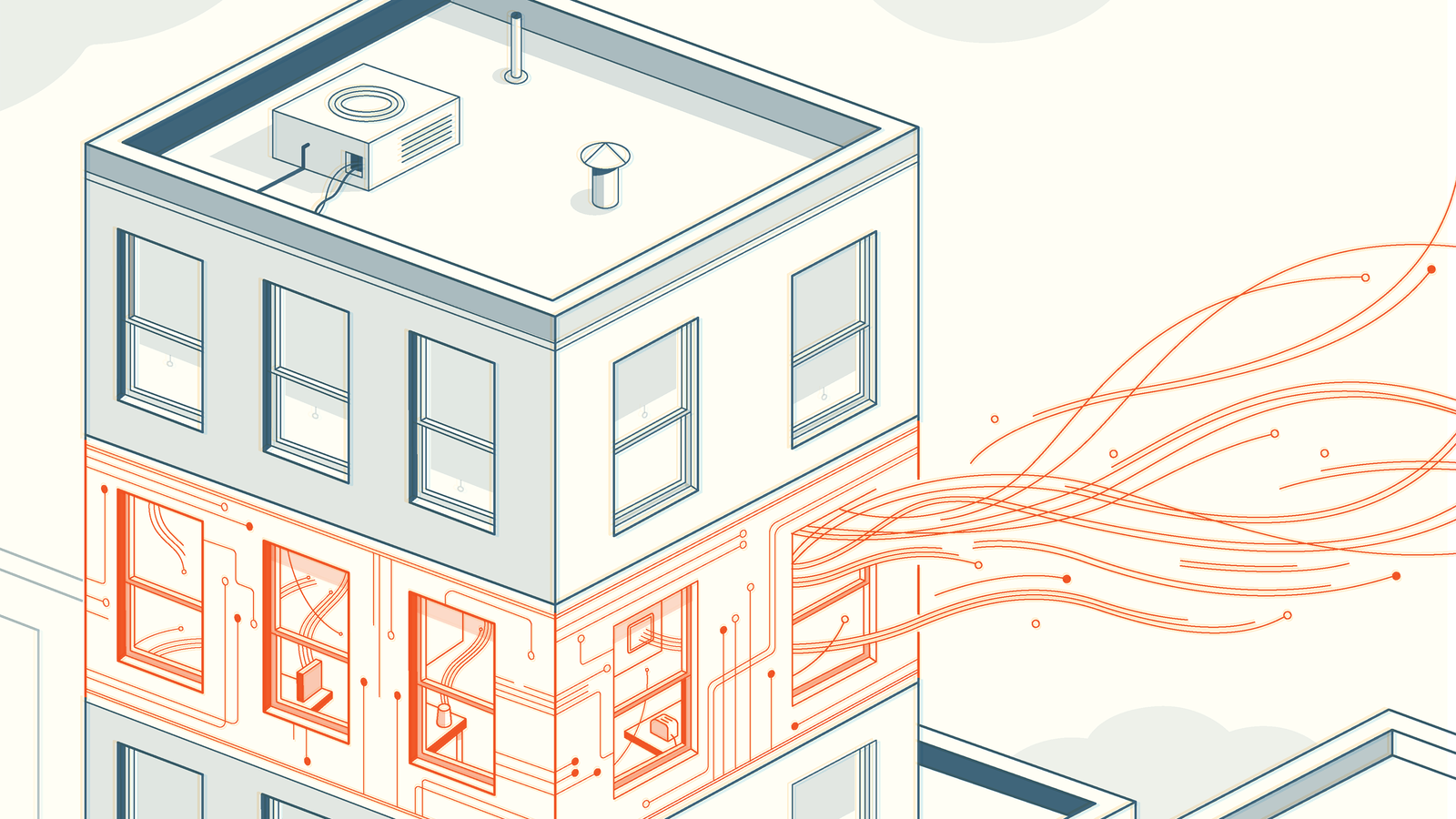
Image for post
The House that Spied on Me, Source: Gizmodo

Connected Home: Personalized Internet of Things

Google is using CV in its Nest Cam IQ and Nest Cam IQ Outdoor to enable recognition of specific family members or friends, as well as the Sightline feature that identifies specific events in the video footage. The company also recently launched a smart camera, Google Clips, which can be placed around the house and will use algorithms and CV to capture “special moments.”

Nonetheless, cameras in connected-home appliances haven’t really evolved beyond home security features (which could provoke privacy concern as parents might be using these cameras by taking video footage without permission). Google introduced Nest Hello doorbell with a wide-angle camera for video able to perform facial recognition, which could be used as a means to unlock (or not to unlock) the door.

Computer vision adds a natural way for users to interact with the digital and physical worlds around them. It is enabling new interaction models for devices with users and the environment around them, but there are two main concerns around CV.

The first one is technological. As a young technology, there is no definitive algorithm for CV, and most of the popular algorithms out there are proprietary. The proprietary algorithms restricted CV capabilities on specific devices and use cases. For example, iRobot’s cleaning bots won’t share CV with your home security cameras. Facial recognition for a family in iPhones would coordinate with Amazon’s VPAs.

The second major concern is around privacy and country/region-specific regulations (such as GDPR in Europe). Many devices — HMDs and personal robots — with CV will collect a lot of data, images, video around individual consumers, a household, their routine, personal data information, information about kids, and patient information in a hospital’s reception area. The limitation of data retrieval could hamper the development of CV and AI.

Computer vision would be the closest AI that we will experience on a daily basis. Visual processing unit (VPU) for CV, 5G development and the deployment of edge computing will help CV form our future in the next few years.

Reference: Michael Wang-Medium