
A function is a group of statements that together perform a task. Every C++ program has at least one function, which is main(), and all the most trivial programs can define additional functions.
You can divide up your code into separate functions. How you divide up your code among different functions is up to you, but logically the division usually is such that each function performs a specific task.
A function declaration tells the compiler about a function’s name, return type, and parameters. A function definition provides the actual body of the function.
The C++ standard library provides numerous built-in functions that your program can call. For example, function strcat() to concatenate two strings, function memcpy() to copy one memory location to another location and many more functions.
A function is known with various names like a method or a sub-routine or a procedure etc.
Defining a Function
The general form of a C++ function definition is as follows −
return_type function_name( parameter list ) {
   body of the function
}
A C++ function definition consists of a function header and a function body. Here are all the parts of a function −
- Return Type − A function may return a value. The return_type is the data type of the value the function returns. Some functions perform the desired operations without returning a value. In this case, the return_type is the keyword void.
- Function Name − This is the actual name of the function. The function name and the parameter list together constitute the function signature.
- Parameters − A parameter is like a placeholder. When a function is invoked, you pass a value to the parameter. This value is referred to as actual parameter or argument. The parameter list refers to the type, order, and number of the parameters of a function. Parameters are optional; that is, a function may contain no parameters.
- Function Body − The function body contains a collection of statements that define what the function does.
Example
Following is the source code for a function called max(). This function takes two parameters num1 and num2 and return the biggest of both −
// function returning the max between two numbers

int max(int num1, int num2) {
   // local variable declaration
   int result;

   if (num1 > num2)
      result = num1;
   else
      result = num2;

   return result;
}
Function Declarations
A function declaration tells the compiler about a function name and how to call the function. The actual body of the function can be defined separately.
A function declaration has the following parts −
return_type function_name( parameter list );
For the above defined function max(), following is the function declaration −
int max(int num1, int num2);
Parameter names are not important in function declaration only their type is required, so following is also valid declaration −
int max(int, int);
Function declaration is required when you define a function in one source file and you call that function in another file. In such case, you should declare the function at the top of the file calling the function.
Calling a Function
While creating a C++ function, you give a definition of what the function has to do. To use a function, you will have to call or invoke that function.
When a program calls a function, program control is transferred to the called function. A called function performs defined task and when it’s return statement is executed or when its function-ending closing brace is reached, it returns program control back to the main program.
To call a function, you simply need to pass the required parameters along with function name, and if function returns a value, then you can store returned value. For example −Live Demo
#include <iostream>
using namespace std;

// function declaration
int max(int num1, int num2);

int main () {
   // local variable declaration:
   int a = 100;
   int b = 200;
   int ret;

   // calling a function to get max value.
   ret = max(a, b);
   cout << "Max value is : " << ret << endl;

   return 0;
}

// function returning the max between two numbers
int max(int num1, int num2) {
   // local variable declaration
   int result;

   if (num1 > num2)
      result = num1;
   else
      result = num2;

   return result;
}
I kept max() function along with main() function and compiled the source code. While running final executable, it would produce the following result −
Max value is : 200
Function Arguments
If a function is to use arguments, it must declare variables that accept the values of the arguments. These variables are called the formal parameters of the function.
The formal parameters behave like other local variables inside the function and are created upon entry into the function and destroyed upon exit.
While calling a function, there are two ways that arguments can be passed to a function −
| Sr.No | Call Type & Description |
|---|---|
| 1 | Call by ValueThis method copies the actual value of an argument into the formal parameter of the function. In this case, changes made to the parameter inside the function have no effect on the argument. |
| 2 | Call by PointerThis method copies the address of an argument into the formal parameter. Inside the function, the address is used to access the actual argument used in the call. This means that changes made to the parameter affect the argument. |
| 3 | Call by ReferenceThis method copies the reference of an argument into the formal parameter. Inside the function, the reference is used to access the actual argument used in the call. This means that changes made to the parameter affect the argument. |
By default, C++ uses call by value to pass arguments. In general, this means that code within a function cannot alter the arguments used to call the function and above mentioned example while calling max() function used the same method.
Default Values for Parameters
When you define a function, you can specify a default value for each of the last parameters. This value will be used if the corresponding argument is left blank when calling to the function.
This is done by using the assignment operator and assigning values for the arguments in the function definition. If a value for that parameter is not passed when the function is called, the default given value is used, but if a value is specified, this default value is ignored and the passed value is used instead. Consider the following example −Live Demo
#include <iostream>
using namespace std;

int sum(int a, int b = 20) {
   int result;
   result = a + b;

   return (result);
}
int main () {
   // local variable declaration:
   int a = 100;
   int b = 200;
   int result;

   // calling a function to add the values.
   result = sum(a, b);
   cout << "Total value is :" << result << endl;

   // calling a function again as follows.
   result = sum(a);
   cout << "Total value is :" << result << endl;

   return 0;
}
When the above code is compiled and executed, it produces the following result −
Total value is :300
Total value is :120
Hàm trong C++
Một hàm là một nhóm các câu lệnh cùng nhau thực hiện một nhiệm vụ. Mỗi chương trình C++ có ít nhất một hàm, là hàm main().
Bạn có thể chia mã của bạn thành các hàm riêng biệt. Cách bạn phân chia mã của bạn giữa các hàm khác nhau tùy thuộc vào bạn, nhưng về mặt logic mỗi hàm thực hiện một tác vụ cụ thể.
Một khai báo hàm cho trình biên dịch biết về tên, kiểu trả về và các tham số của hàm. Định nghĩa hàm cung cấp phần thân thực của hàm.
Thư viện chuẩn C++ cung cấp nhiều hàm được tích hợp sẵn mà chương trình của bạn có thể gọi. Ví dụ, strcat() để nối hai chuỗi, memcpy() để sao chép một vị trí bộ nhớ sang một vị trí khác và nhiều hàm khác.
Hàm trong C++ còn được gọi là thủ tục hoặc chương trình con trong các ngôn ngữ lập trình khác.
Để thực hiện bất kỳ tác vụ nào, chúng ta có thể tạo ra các hàm. Một hàm có thể được gọi nhiều lần. Nó cung cấp tính mô đun và khả năng sử dụng lại mã. Hàm giúp phân chia vấn đề phức tạp thành các thành phần nhỏ giúp chương trình dễ hiểu và dễ sử dụng.
Lợi thế của các hàm trong C++
1. Tái sử dụng mã
Bằng cách tạo các hàm trong C++, bạn có thể gọi nó nhiều lần. Vì vậy, bạn không cần phải viết cùng một mã một hoặc nhiều lần nữa.
2. Tối ưu hóa mã
Nó làm cho mã được tối ưu hóa, chúng ta không cần phải viết nhiều mã.
Giả sử, bạn phải kiểm tra 3 số (531, 883 và 781) có phải là số nguyên tố hay không. Không sử dụng hàm, bạn cần viết logic số nguyên tố 3 lần. Vì vậy, có sự lặp lại của mã.
Nhưng nếu bạn sử dụng các hàm, bạn chỉ cần viết logic một lần và bạn có thể sử dụng lại nó nhiều lần.
Định nghĩa một hàm
Dạng chung của định nghĩa hàm trong C++ như sau:
return_type function_name(parameter list) {
    // code
}
Định nghĩa hàm trong lập trình C++ bao gồm tên hàm và phần thân hàm . Dưới đây là tất cả các phần của hàm:
- Kiểu trả về: Một hàm có thể trả về một giá trị. Các return_type là kiểu dữ liệu của giá trị hàm trả về. Một số hàm thực hiện các hoạt động mong muốn mà không trả về một giá trị. Trong trường hợp này, return_type là từ khóa void.
- Tham số: Một tham số giống như một trình giữ chỗ. Khi một hàm được gọi, bạn chuyển một giá trị cho tham số. Giá trị này được gọi là tham số hoặc đối số thực tế. Danh sách tham số tham chiếu đến loại, thứ tự và số tham số của hàm. Các tham số là tùy chọn; có nghĩa là, một hàm có thể không chứa tham số.
- Thân hàm: Phần thân hàm chứa một tập hợp các câu lệnh xác định chức năng của hàm.
Ví dụ hàm trong C++
Ví dụ dưới đây là mã nguồn cho một hàm được gọi là max(). Hàm này truyền vào hai tham số num1 và num2 và trả về giá trị lớn nhất giữa hai tham số:
/* hàm trả về giá trị lớn nhất giữa 2 số */
int max(int num1, int num2) {

   /* khai báo biến local */
   int result;

   if (num1 > num2)
      result = num1;
   else
      result = num2;

   return result;
}
Khai báo hàm trong C++
Một khai báo hàm cho trình biên dịch biết về tên hàm và cách gọi hàm. Cơ thể thực tế của hàm có thể được định nghĩa riêng.
Một khai báo hàm có các phần sau:
return_type function_name(parameter list);
Đối với hàm được định nghĩa ở trên max (), khai báo hàm như sau:
int max(int num1, int num2);
Tên tham số không quan trọng trong khai báo hàm chỉ loại của chúng là bắt buộc, vì vậy sau đây cũng là khai báo hợp lệ:
int max(int, int);
Khai báo hàm là bắt buộc khi bạn định nghĩa một hàm trong một tệp nguồn và bạn gọi hàm đó trong một tệp khác. Trong trường hợp này, bạn nên khai báo hàm ở đầu tệp gọi hàm.
Gọi một hàm trong C++
Hàm trong lập trình C++ hoạt động như thế nào? Hình ảnh sau đây mô tả gọi một hàm do người dùng định nghĩa bên trong hàm main():
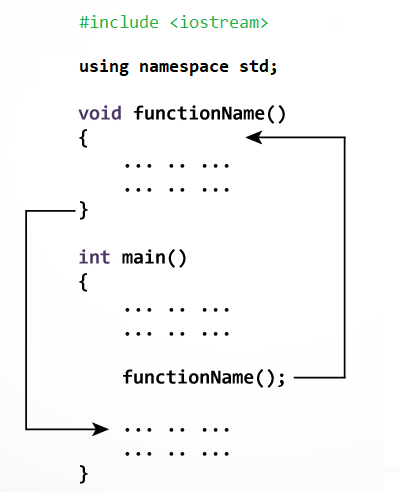
Trong khi tạo một hàm C, bạn đưa ra một định nghĩa về chức năng của hàm. Để sử dụng một hàm, bạn sẽ phải gọi hàm đó để thực hiện tác vụ được xác định.
Khi một chương trình gọi một hàm, điều khiển chương trình được chuyển đến hàm được gọi. Một hàm được gọi thực hiện một nhiệm vụ đã định nghĩa và khi câu lệnh trả về của nó được thực hiện hoặc khi nó kết thúc bằng hàm đóng, nó sẽ trả về chương trình điều khiển quay trở lại chương trình chính.
Để gọi một hàm, bạn chỉ cần chuyển các tham số bắt buộc cùng với tên hàm và nếu hàm trả về một giá trị, thì bạn có thể lưu trữ giá trị trả về. Ví dụ:
#include <iostream>

using namespace std;

/* khai bao ham */
int max(int num1, int num2);

int main () {

   /* dinh nghia bien local */
   int a = 100;
   int b = 200;
   int ret;

   /* goi mot ham de lay gia tri lon nhat */
   ret = max(a, b);

   cout << "Max value is: " << ret << endl;

   return 0;
}

/* ham tra ve gia tri lon nhat giua hai so */
int max(int num1, int num2) {

   /* dinh nghia bien local */
   int result;

   if (num1 > num2)
      result = num1;
   else
      result = num2;

   return result;
}
Kết quả:
Max value is : 200





 ACE IT SKILLS