The Standard Template Library (STL) is a set of C++ template classes to provide common programming data structures and functions such as lists, stacks, arrays, etc. It is a library of container classes, algorithms, and iterators. It is a generalized library and so, its components are parameterized. A working knowledge of template classes is a prerequisite for working with STL.
STL has four components
Algorithms
Containers
Functions
Iterators
Algorithms
The header algorithm defines a collection of functions especially designed to be used on ranges of elements.They act on containers and provide means for various operations for the contents of the containers.
Containers or container classes store objects and data. There are in total seven standard “first-class” container classes and three container adaptor classes and only seven header files that provide access to these containers or container adaptors.
Sequence Containers: implement data structures which can be accessed in a sequential manner.
The STL includes classes that overload the function call operator. Instances of such classes are called function objects or functors. Functors allow the working of the associated function to be customized with the help of parameters to be passed.
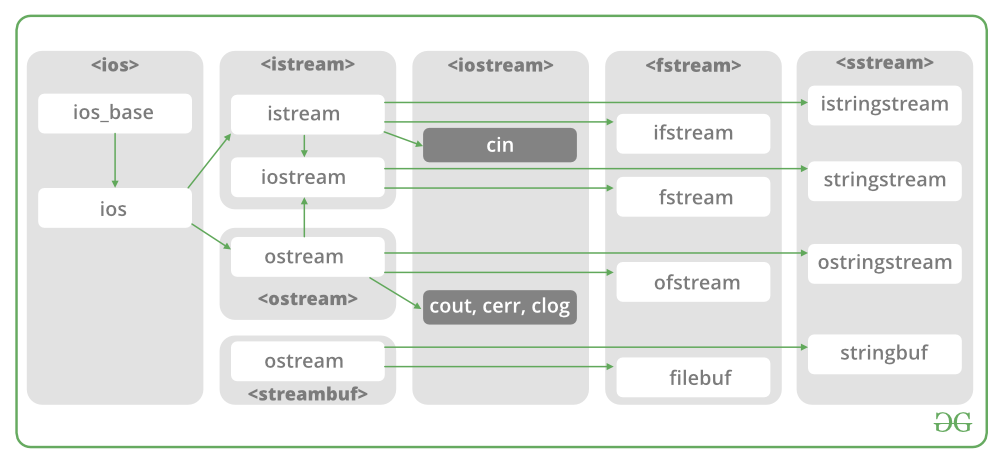
In C++, files are mainly dealt by using three classes fstream, ifstream, ofstream available in fstream headerfile. ofstream: Stream class to write on files ifstream: Stream class to read from files fstream: Stream class to both read and write from/to files.
Now the first step to open the particular file for read or write operation. We can open file by 1. passing file name in constructor at the time of object creation 2. using the open method For e.g.
Open File by using constructor ifstream (const char* filename, ios_base::openmode mode = ios_base::in); ifstream fin(filename, openmode) by default openmode = ios::in ifstream fin(“filename”);
Open File by using open method Calling of default constructor ifstream fin;
File open for reading: the internal stream buffer supports input operations.
out
output
File open for writing: the internal stream buffer supports output operations.
binary
binary
Operations are performed in binary mode rather than text.
ate
at end
The output position starts at the end of the file.
app
append
All output operations happen at the end of the file, appending to its existing contents.
trunc
truncate
Any contents that existed in the file before it is open are discarded.
Default Open Modes :
ifstream
ios::in
ofstream
ios::out
fstream
ios::in | ios::out
Below is the implementation by using fstream class.:
/* File Handling with C++ using ifstream & ofstream class object*//* To write the Content in File*//* Then to read the content of file*
#include <iostream>
/* fstream header file for ifstream, ofstream, fstream classes */
#include <fstream>
using namespace std;
// Creation of ofstream class object
int main()
string line;
ofstream fout;
// by default ios::out mode, automatically deletes
// the content of file. To append the content, open in ios:app
// fout.open("sample.txt", ios::app)
fout.open("sample.txt");
// Execute a loop If file successfully opened
while (fout) {
// Read a Line from standard input
getline(cin, line);
// Press -1 to exit
if (line == "-1")
break;
// Write line in file
fout << line << endl;
}
// Close the File
fout.close();
// Creation of ifstream class object to read the file
ifstream fin;
// by default open mode = ios::in mode
fin.open("sample.txt");
// Execute a loop until EOF (End of File)
while (fin) {
// Read a Line from File
getline(fin, line);
// Print line in Console
cout << line << endl;
}
// Close the file
fin.close();
return 0;
One of the advantages of C++ over C is Exception Handling. Exceptions are run-time anomalies or abnormal conditions that a program encounters during its execution. There are two types of exceptions: a)Synchronous, b)Asynchronous(Ex:which are beyond the program’s control, Disc failure etc). C++ provides following specialized keywords for this purpose. try: represents a block of code that can throw an exception. catch: represents a block of code that is executed when a particular exception is thrown. throw: Used to throw an exception. Also used to list the exceptions that a function throws, but doesn’t handle itself.
Why Exception Handling? Following are main advantages of exception handling over traditional error handling.
1) Separation of Error Handling code from Normal Code: In traditional error handling codes, there are always if else conditions to handle errors. These conditions and the code to handle errors get mixed up with the normal flow. This makes the code less readable and maintainable. With try catch blocks, the code for error handling becomes separate from the normal flow.
2) Functions/Methods can handle any exceptions they choose: A function can throw many exceptions, but may choose to handle some of them. The other exceptions which are thrown, but not caught can be handled by caller. If the caller chooses not to catch them, then the exceptions are handled by caller of the caller. In C++, a function can specify the exceptions that it throws using the throw keyword. The caller of this function must handle the exception in some way (either by specifying it again or catching it)
Xử lý ngoại lệ trong C ++
Một trong những ưu điểm của C ++ so với C là Xử lý ngoại lệ. Các trường hợp ngoại lệ là các bất thường về thời gian chạy hoặc các điều kiện bất thường mà một chương trình gặp phải trong quá trình thực thi. Có hai loại ngoại lệ: a) Đồng bộ, b) Không đồng bộ (Ví dụ: nằm ngoài tầm kiểm soát của chương trình, Lỗi đĩa, v.v.). C ++ cung cấp các từ khóa chuyên dụng sau đây cho mục đích này. try: đại diện cho một khối mã có thể ném một ngoại lệ. catch: đại diện cho một khối mã được thực thi khi một ngoại lệ cụ thể được ném ra. ném: Dùng để ném một ngoại lệ. Cũng được sử dụng để liệt kê các ngoại lệ mà một hàm ném ra, nhưng không tự xử lý.
Tại sao phải xử lý ngoại lệ? Sau đây là những ưu điểm chính của xử lý ngoại lệ so với xử lý lỗi truyền thống.
1) Tách mã Xử lý lỗi khỏi Mã Thông thường: Trong các mã xử lý lỗi truyền thống, luôn có các điều kiện nếu khác để xử lý lỗi. Các điều kiện này và mã để xử lý lỗi bị trộn lẫn với quy trình bình thường. Điều này làm cho mã ít dễ đọc và dễ bảo trì hơn. Với khối try catch, mã để xử lý lỗi trở nên tách biệt với quy trình bình thường.
2) Các hàm / phương thức có thể xử lý bất kỳ ngoại lệ nào mà chúng chọn: Một hàm có thể đưa ra nhiều ngoại lệ, nhưng có thể chọn xử lý một số ngoại lệ. Người gọi có thể xử lý các trường hợp ngoại lệ khác được ném nhưng không bắt được. Nếu người gọi chọn không bắt chúng, thì các trường hợp ngoại lệ sẽ được xử lý bởi người gọi của người gọi. Trong C ++, một hàm có thể chỉ định các ngoại lệ mà nó ném bằng từ khóa ném. Người gọi hàm này phải xử lý ngoại lệ theo một cách nào đó (bằng cách chỉ định lại hoặc bắt nó)
3) Nhóm các loại lỗi: Trong C ++, cả các loại cơ bản và các đối tượng đều có thể được ném ra như một ngoại lệ. Chúng ta có thể tạo một hệ thống phân cấp các đối tượng ngoại lệ, nhóm các ngoại lệ trong không gian tên hoặc lớp, phân loại chúng theo các kiểu.
3) Grouping of Error Types: In C++, both basic types and objects can be thrown as exception. We can create a hierarchy of exception objects, group exceptions in namespaces or classes, categorize them according to types.
What is constructor? A constructor is a member function of a class which initializes objects of a class. In C++, Constructor is automatically called when object(instance of class) create. It is special member function of the class. How constructors are different from a normal member function?
A constructor is different from normal functions in following ways:
Constructor has same name as the class itself
Constructors don’t have return type
A constructor is automatically called when an object is created.
If we do not specify a constructor, C++ compiler generates a default constructor for us (expects no parameters and has an empty body).
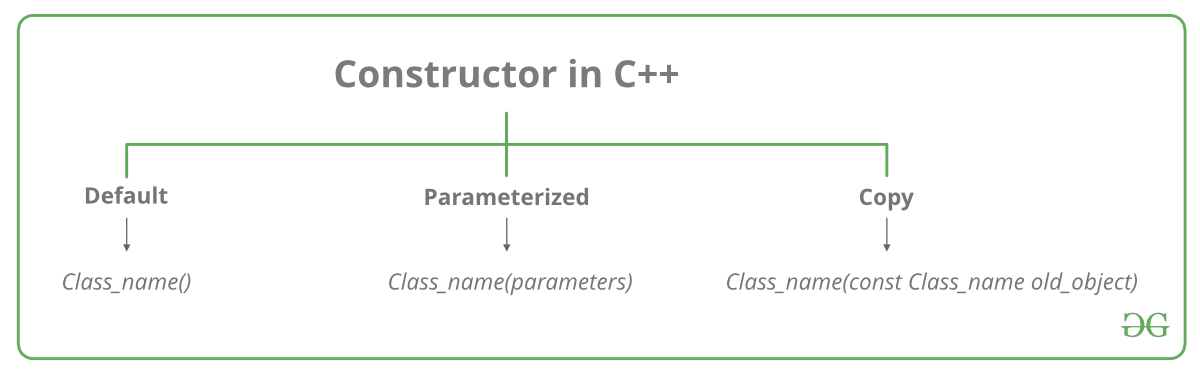
Let us understand the types of constructors in C++ by taking a real-world example. Suppose you went to a shop to buy a marker. When you want to buy a marker, what are the options? The first one you go to a shop and say give me a marker. So just saying give me a marker mean that you did not set which brand name and which color, you didn’t mention anything just say you want a marker. So when we said just I want a marker so whatever the frequently sold marker is there in the market or in his shop he will simply hand over that. And this is what a default constructor is! The second method you go to a shop and say I want a marker a red in color and XYZ brand. So you are mentioning this and he will give you that marker. So in this case you have given the parameters. And this is what a parameterized constructor is! Then the third one you go to a shop and say I want a marker like this(a physical marker on your hand). So the shopkeeper will see that marker. Okay, and he will give a new marker for you. So copy of that marker. And that’s what copy constructor is! Types of Constructors
Default Constructors: Default constructor is the constructor which doesn’t take any argument. It has no parameters.
// Cpp program to illustrate the
// concept of Constructors

include

using namespace std;

class construct
{
  public:
    int a, b;
    // Default Constructor
    construct()
   {
     a = 10;
     b = 20;
    }
};

int main()
{
// Default constructor called automatically
// when the object is created
What are the main principles of Object-Oriented Programming?
The four principles of object-oriented programming are encapsulation, abstraction, inheritance,and polymorphism.
These words may sound scary for a junior developer. And the complex, excessively long explanations in Wikipedia sometimes double the confusion.
That’s why I want to give a simple, short, and clear explanation for each of these concepts. It may sound like something you explain to a child, but I would actually love to hear these answers when I conduct an interview.
Encapsulation
Say we have a program. It has a few logically different objects which communicate with each other — according to the rules defined in the program.
Encapsulation is achieved when each object keeps its state private, inside a class. Other objects don’t have direct access to this state. Instead, they can only call a list of public functions — called methods.
So, the object manages its own state via methods — and no other class can touch it unless explicitly allowed. If you want to communicate with the object, you should use the methods provided. But (by default), you can’t change the state.
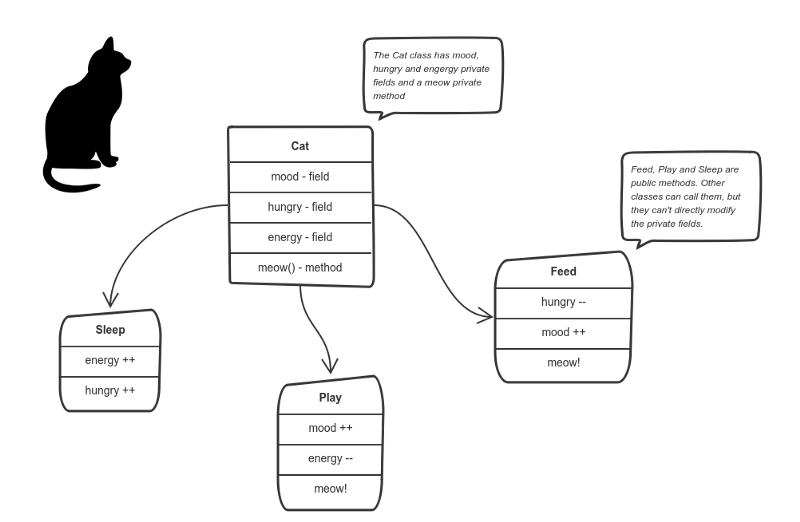
Let’s say we’re building a tiny Sims game. There are people and there is a cat. They communicate with each other. We want to apply encapsulation, so we encapsulate all “cat” logic into a Catclass. It may look like this:
You can feed the cat. But you can’t directly change how hungry the cat is.
Here the “state” of the cat is the private variablesmood, hungry and energy. It also has a private method meow(). It can call it whenever it wants, the other classes can’t tell the cat when to meow.
What they can do is defined in the public methodssleep(), play() and feed(). Each of them modifies the internal state somehow and may invoke meow(). Thus, the binding between the private state and public methods is made.
This is encapsulation.
Abstraction
Abstraction can be thought of as a natural extension of encapsulation.
In object-oriented design, programs are often extremely large. And separate objects communicate with each other a lot. So maintaining a large codebase like this for years — with changes along the way — is difficult.
Abstraction is a concept aiming to ease this problem.
Applying abstraction means that each object should only expose a high-level mechanism for using it.
This mechanism should hide internal implementation details. It should only reveal operations relevant for the other objects.
Think — a coffee machine. It does a lot of stuff and makes quirky noises under the hood. But all you have to do is put in coffee and press a button.
Preferably, this mechanism should be easy to use and should rarely change over time. Think of it as a small set of public methods which any other class can call without “knowing” how they work.
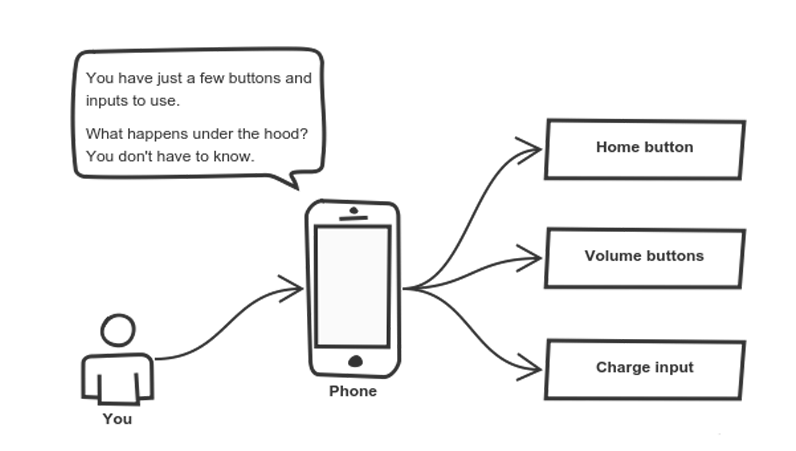
Another real-life example of abstraction? Think about how you use your phone:
Cell phones are complex. But using them is simple.
You interact with your phone by using only a few buttons. What’s going on under the hood? You don’t have to know — implementation details are hidden. You only need to know a short set of actions.
Implementation changes — for example, a software update — rarely affect the abstraction you use.
Inheritance
OK, we saw how encapsulation and abstraction can help us develop and maintain a big codebase.
But do you know what is another common problem in OOP design?
Objects are often very similar. They share common logic. But they’re not entirely the same. Ugh…
So how do we reuse the common logic and extract the unique logic into a separate class? One way to achieve this is inheritance.
It means that you create a (child) class by deriving from another (parent) class. This way, we form a hierarchy.
The child class reuses all fields and methods of the parent class (common part) and can implement its own (unique part).
For example:
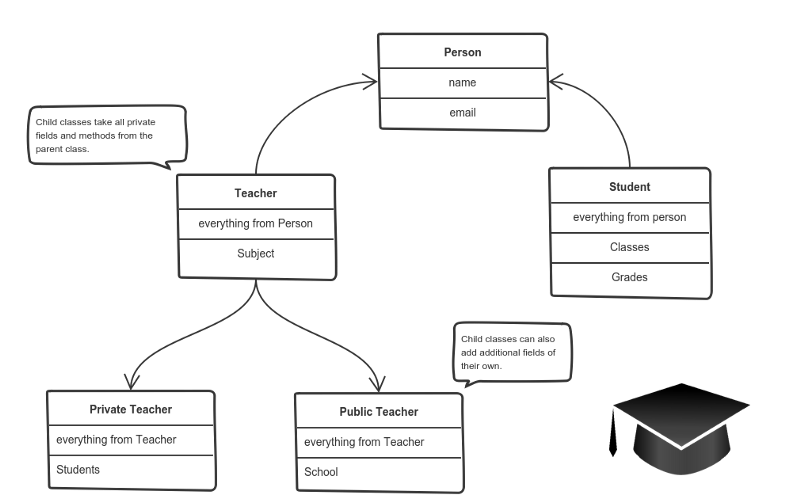
A private teacher is a type of teacher. And any teacher is a type of Person.
If our program needs to manage public and private teachers, but also other types of people like students, we can implement this class hierarchy.
This way, each class adds only what is necessary for it while reusing common logic with the parent classes.
Polymorphism
We’re down to the most complex word! Polymorphism means “many shapes” in Greek.
So we already know the power of inheritance and happily use it. But there comes this problem.
Say we have a parent class and a few child classes which inherit from it. Sometimes we want to use a collection — for example a list — which contains a mix of all these classes. Or we have a method implemented for the parent class — but we’d like to use it for the children, too.
This can be solved by using polymorphism.
Simply put, polymorphism gives a way to use a class exactly like its parent so there’s no confusion with mixing types.But each child class keeps its own methods as they are.
This typically happens by defining a (parent) interface to be reused. It outlines a bunch of common methods. Then, each child class implements its own version of these methods.
Any time a collection (such as a list) or a method expects an instance of the parent (where common methods are outlined), the language takes care of evaluating the right implementation of the common method — regardless of which child is passed.
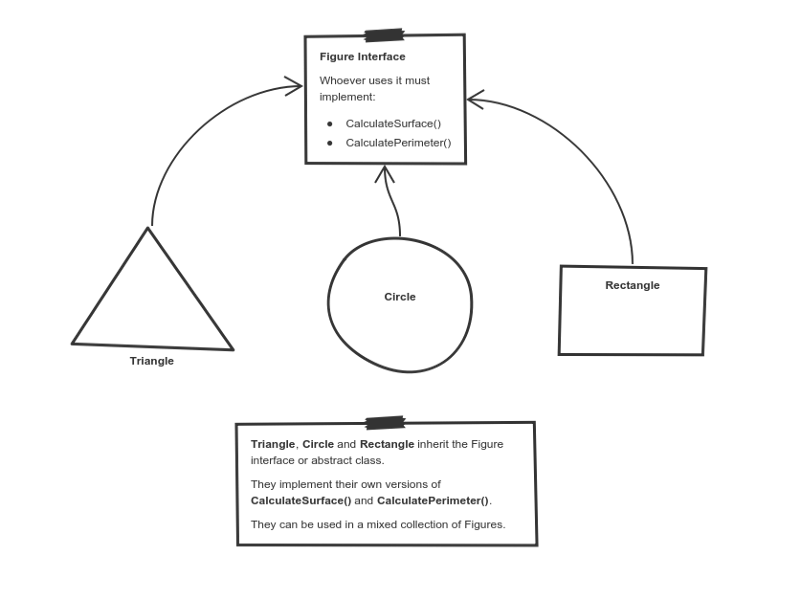
Take a look at a sketch of geometric figures implementation. They reuse a common interface for calculating surface area and perimeter:
Triangle, Circle, and Rectangle now can be used in the same collection
Having these three figures inheriting the parent Figure Interface lets you create a list of mixed triangles, circles, and rectangles. And treat them like the same type of object.
Then, if this list attempts to calculate the surface for an element, the correct method is found and executed. If the element is a triangle, triangle’s CalculateSurface()is called. If it’s a circle — then cirlce’s CalculateSurface()is called. And so on.
If you have a function which operates with a figure by using its parameter, you don’t have to define it three times — once for a triangle, a circle, and a rectangle.
You can define it once and accept a Figureas an argument. Whether you pass a triangle, circle or a rectangle — as long as they implement CalculateParamter(), their type doesn’t matter.
I hope this helped. You can directly use these exact same explanations at job interviews.
If you find something still difficult to understand — don’t hesitate to ask in the comments below.
What’s next?
Being prepared to answer one of the all-time interview question classics is great — but sometimes you never get called for an interview.
Next, I’ll focus on what employers want to see in a junior developer and how to stand out from the crowd when job hunting.
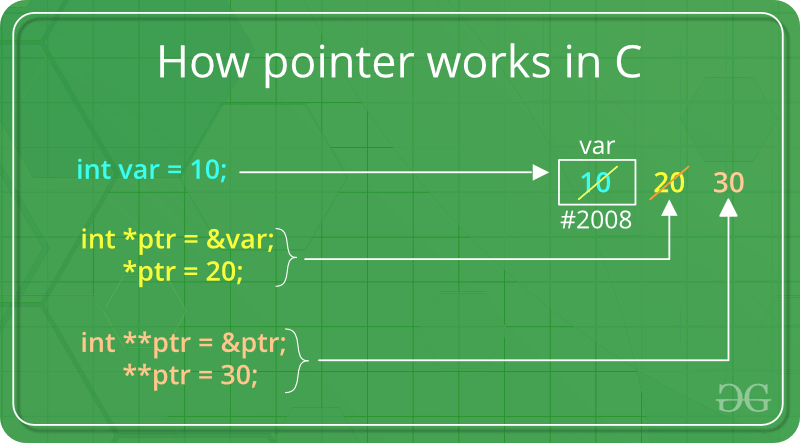
Pointers store address of variables or a memory location.
// General syntax
datatype *var_name;

// An example pointer "ptr" that holds
// address of an integer variable or holds
// address of a memory whose value(s) can
// be accessed as integer values through "ptr"
int *ptr;
Using a Pointer:
To use pointers in C, we must understand below two operators.
To access address of a variable to a pointer, we use the unary operator & (ampersand) that returns the address of that variable. For example &x gives us address of variable x.
// The output of this program can be different
// in different runs. Note that the program
// prints address of a variable and a variable
// can be assigned different address in different
// runs.
#include <stdio.h>

int main()
// Prints address of x
printf("%p", &x);

return 0;
}
One more operator is unary * (Asterisk) which is used for two things :
To declare a pointer variable: When a pointer variable is declared in C/C++, there must be a * before its name.
// C program to demonstrate declaration of
// pointer variables.
#include <stdio.h>
int main()
{
    int x = 10;
// 1) Since there is * in declaration, ptr
// becomes a pointer varaible (a variable
// that stores address of another variable)
// 2) Since there is int before *, ptr is
// pointer to an integer type variable
int *ptr;

// & operator before x is used to get address
// of x. The address of x is assigned to ptr.
ptr = &x;

return 0;
}
To access the value stored in the address we use the unary operator (*) that returns the value of the variable located at the address specified by its operand. This is also called Dereferencing.
A function is a group of statements that together perform a task. Every C++ program has at least one function, which is main(), and all the most trivial programs can define additional functions.
You can divide up your code into separate functions. How you divide up your code among different functions is up to you, but logically the division usually is such that each function performs a specific task.
A function declaration tells the compiler about a function’s name, return type, and parameters. A function definition provides the actual body of the function.
The C++ standard library provides numerous built-in functions that your program can call. For example, function strcat() to concatenate two strings, function memcpy() to copy one memory location to another location and many more functions.
A function is known with various names like a method or a sub-routine or a procedure etc.
Defining a Function
The general form of a C++ function definition is as follows −
return_type function_name( parameter list ) {
   body of the function
}
A C++ function definition consists of a function header and a function body. Here are all the parts of a function −
Return Type − A function may return a value. The return_type is the data type of the value the function returns. Some functions perform the desired operations without returning a value. In this case, the return_type is the keyword void.
Function Name − This is the actual name of the function. The function name and the parameter list together constitute the function signature.
Parameters − A parameter is like a placeholder. When a function is invoked, you pass a value to the parameter. This value is referred to as actual parameter or argument. The parameter list refers to the type, order, and number of the parameters of a function. Parameters are optional; that is, a function may contain no parameters.
Function Body − The function body contains a collection of statements that define what the function does.
Example
Following is the source code for a function called max(). This function takes two parameters num1 and num2 and return the biggest of both −
// function returning the max between two numbers

int max(int num1, int num2) {
   // local variable declaration
   int result;

   if (num1 > num2)
      result = num1;
   else
      result = num2;

   return result;
}
Function Declarations
A function declaration tells the compiler about a function name and how to call the function. The actual body of the function can be defined separately.
A function declaration has the following parts −
return_type function_name( parameter list );
For the above defined function max(), following is the function declaration −
int max(int num1, int num2);
Parameter names are not important in function declaration only their type is required, so following is also valid declaration −
int max(int, int);
Function declaration is required when you define a function in one source file and you call that function in another file. In such case, you should declare the function at the top of the file calling the function.
Calling a Function
While creating a C++ function, you give a definition of what the function has to do. To use a function, you will have to call or invoke that function.
When a program calls a function, program control is transferred to the called function. A called function performs defined task and when it’s return statement is executed or when its function-ending closing brace is reached, it returns program control back to the main program.
To call a function, you simply need to pass the required parameters along with function name, and if function returns a value, then you can store returned value. For example −Live Demo
#include <iostream>
using namespace std;

// function declaration
int max(int num1, int num2);

int main () {
   // local variable declaration:
   int a = 100;
   int b = 200;
   int ret;

   // calling a function to get max value.
   ret = max(a, b);
   cout << "Max value is : " << ret << endl;

   return 0;
}

// function returning the max between two numbers
int max(int num1, int num2) {
   // local variable declaration
   int result;

   if (num1 > num2)
      result = num1;
   else
      result = num2;

   return result;
}
I kept max() function along with main() function and compiled the source code. While running final executable, it would produce the following result −
Max value is : 200
Function Arguments
If a function is to use arguments, it must declare variables that accept the values of the arguments. These variables are called the formal parameters of the function.
The formal parameters behave like other local variables inside the function and are created upon entry into the function and destroyed upon exit.
While calling a function, there are two ways that arguments can be passed to a function −
Sr.No
Call Type & Description
1
Call by ValueThis method copies the actual value of an argument into the formal parameter of the function. In this case, changes made to the parameter inside the function have no effect on the argument.
2
Call by PointerThis method copies the address of an argument into the formal parameter. Inside the function, the address is used to access the actual argument used in the call. This means that changes made to the parameter affect the argument.
3
Call by ReferenceThis method copies the reference of an argument into the formal parameter. Inside the function, the reference is used to access the actual argument used in the call. This means that changes made to the parameter affect the argument.
By default, C++ uses call by value to pass arguments. In general, this means that code within a function cannot alter the arguments used to call the function and above mentioned example while calling max() function used the same method.
Default Values for Parameters
When you define a function, you can specify a default value for each of the last parameters. This value will be used if the corresponding argument is left blank when calling to the function.
This is done by using the assignment operator and assigning values for the arguments in the function definition. If a value for that parameter is not passed when the function is called, the default given value is used, but if a value is specified, this default value is ignored and the passed value is used instead. Consider the following example −Live Demo
#include <iostream>
using namespace std;

int sum(int a, int b = 20) {
   int result;
   result = a + b;

   return (result);
}
int main () {
   // local variable declaration:
   int a = 100;
   int b = 200;
   int result;

   // calling a function to add the values.
   result = sum(a, b);
   cout << "Total value is :" << result << endl;

   // calling a function again as follows.
   result = sum(a);
   cout << "Total value is :" << result << endl;

   return 0;
}
When the above code is compiled and executed, it produces the following result −
Total value is :300
Total value is :120
Hàm trong C++
Một hàm là một nhóm các câu lệnh cùng nhau thực hiện một nhiệm vụ. Mỗi chương trình C++ có ít nhất một hàm, là hàm main().
Bạn có thể chia mã của bạn thành các hàm riêng biệt. Cách bạn phân chia mã của bạn giữa các hàm khác nhau tùy thuộc vào bạn, nhưng về mặt logic mỗi hàm thực hiện một tác vụ cụ thể.
Một khai báo hàm cho trình biên dịch biết về tên, kiểu trả về và các tham số của hàm. Định nghĩa hàm cung cấp phần thân thực của hàm.
Thư viện chuẩn C++ cung cấp nhiều hàm được tích hợp sẵn mà chương trình của bạn có thể gọi. Ví dụ, strcat() để nối hai chuỗi, memcpy() để sao chép một vị trí bộ nhớ sang một vị trí khác và nhiều hàm khác.
Hàm trong C++ còn được gọi là thủ tục hoặc chương trình con trong các ngôn ngữ lập trình khác.
Để thực hiện bất kỳ tác vụ nào, chúng ta có thể tạo ra các hàm. Một hàm có thể được gọi nhiều lần. Nó cung cấp tính mô đun và khả năng sử dụng lại mã. Hàm giúp phân chia vấn đề phức tạp thành các thành phần nhỏ giúp chương trình dễ hiểu và dễ sử dụng.
Lợi thế của các hàm trong C++
1. Tái sử dụng mã
Bằng cách tạo các hàm trong C++, bạn có thể gọi nó nhiều lần. Vì vậy, bạn không cần phải viết cùng một mã một hoặc nhiều lần nữa.
2. Tối ưu hóa mã
Nó làm cho mã được tối ưu hóa, chúng ta không cần phải viết nhiều mã.
Giả sử, bạn phải kiểm tra 3 số (531, 883 và 781) có phải là số nguyên tố hay không. Không sử dụng hàm, bạn cần viết logic số nguyên tố 3 lần. Vì vậy, có sự lặp lại của mã.
Nhưng nếu bạn sử dụng các hàm, bạn chỉ cần viết logic một lần và bạn có thể sử dụng lại nó nhiều lần.
Định nghĩa hàm trong lập trình C++ bao gồm tên hàm và phần thân hàm . Dưới đây là tất cả các phần của hàm:
Kiểu trả về: Một hàm có thể trả về một giá trị. Các return_type là kiểu dữ liệu của giá trị hàm trả về. Một số hàm thực hiện các hoạt động mong muốn mà không trả về một giá trị. Trong trường hợp này, return_type là từ khóa void.
Tham số: Một tham số giống như một trình giữ chỗ. Khi một hàm được gọi, bạn chuyển một giá trị cho tham số. Giá trị này được gọi là tham số hoặc đối số thực tế. Danh sách tham số tham chiếu đến loại, thứ tự và số tham số của hàm. Các tham số là tùy chọn; có nghĩa là, một hàm có thể không chứa tham số.
Thân hàm: Phần thân hàm chứa một tập hợp các câu lệnh xác định chức năng của hàm.
Ví dụ hàm trong C++
Ví dụ dưới đây là mã nguồn cho một hàm được gọi là max(). Hàm này truyền vào hai tham số num1 và num2 và trả về giá trị lớn nhất giữa hai tham số:
/* hàm trả về giá trị lớn nhất giữa 2 số */
int max(int num1, int num2) {

   /* khai báo biến local */
   int result;

   if (num1 > num2)
      result = num1;
   else
      result = num2;

   return result;
}
Khai báo hàm trong C++
Một khai báo hàm cho trình biên dịch biết về tên hàm và cách gọi hàm. Cơ thể thực tế của hàm có thể được định nghĩa riêng.
Một khai báo hàm có các phần sau:
return_type function_name(parameter list);
Đối với hàm được định nghĩa ở trên max (), khai báo hàm như sau:
int max(int num1, int num2);
Tên tham số không quan trọng trong khai báo hàm chỉ loại của chúng là bắt buộc, vì vậy sau đây cũng là khai báo hợp lệ:
int max(int, int);
Khai báo hàm là bắt buộc khi bạn định nghĩa một hàm trong một tệp nguồn và bạn gọi hàm đó trong một tệp khác. Trong trường hợp này, bạn nên khai báo hàm ở đầu tệp gọi hàm.
Gọi một hàm trong C++
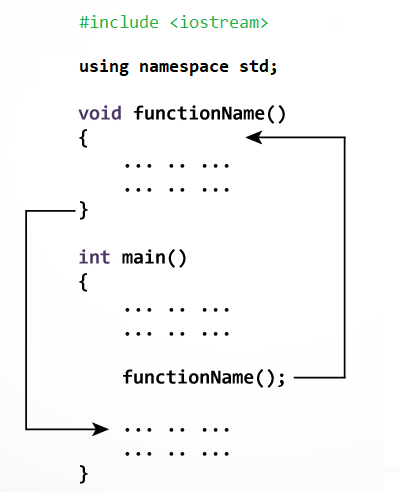
Hàm trong lập trình C++ hoạt động như thế nào? Hình ảnh sau đây mô tả gọi một hàm do người dùng định nghĩa bên trong hàm main():
Trong khi tạo một hàm C, bạn đưa ra một định nghĩa về chức năng của hàm. Để sử dụng một hàm, bạn sẽ phải gọi hàm đó để thực hiện tác vụ được xác định.
Khi một chương trình gọi một hàm, điều khiển chương trình được chuyển đến hàm được gọi. Một hàm được gọi thực hiện một nhiệm vụ đã định nghĩa và khi câu lệnh trả về của nó được thực hiện hoặc khi nó kết thúc bằng hàm đóng, nó sẽ trả về chương trình điều khiển quay trở lại chương trình chính.
Để gọi một hàm, bạn chỉ cần chuyển các tham số bắt buộc cùng với tên hàm và nếu hàm trả về một giá trị, thì bạn có thể lưu trữ giá trị trả về. Ví dụ:
#include <iostream>

using namespace std;

/* khai bao ham */
int max(int num1, int num2);

int main () {

   /* dinh nghia bien local */
   int a = 100;
   int b = 200;
   int ret;

   /* goi mot ham de lay gia tri lon nhat */
   ret = max(a, b);

   cout << "Max value is: " << ret << endl;

   return 0;
}

/* ham tra ve gia tri lon nhat giua hai so */
int max(int num1, int num2) {

   /* dinh nghia bien local */
   int result;

   if (num1 > num2)
      result = num1;
   else
      result = num2;

   return result;
}
There is no native “string” data type in C++ but its <string> library class provides a string object that emulates a string data type. To make this available to a program, the library must be added with an #include <string> directive at the start of the program.
#include<iostream>
#include<string.h>using namespace std;
int main()
{
    char str[50];
    int len;
    cout << "Enter an array or string : ":
    gets(str);
    len = strlen(str);
    cout << "Length of the string is : " << len;
    return 0;
}
Like the <iostream> class library, the <string> library is part of the std namespace that is used by the C++ standard library classes. That means that a string object can be referred to as std::string, or more simply as string when using namespace std; again the directive must be at the start of the program.
Initializing Strings
A string “variable” can be declared in the same way as other variables. The declaration may optionally initialized the variable using the = assignment operator, or it may be initialized later in the program. Additionally a string variable may be initialized by including a text string between parentheses after the variable name.
Text strings in C++ must always be enclosed with double quotes(“”). Single quotes (‘’) are only used for character values of the char data type.
Any numeric values that are assigned to a string variable, are no longer a numeric data type, so attempting to add string values of “4” and “5” with the addition operator(+) would add up to “45” instead of 9.
Converting Strings to other Data Types
Arithmetic cannot be performed on numeric values assigned to string variables until they are converted to a numeric data type. Luckily, there is a C++ <sstream> library provides a “stringstream” object that acts as an intermediary to convert strings to other data types.
Other features of a string variable can be revealed by calling its size(), capacity(), and empty() functions. Written below is short summary of other features.
a string variable can be emptied by assigning it an empty string (=“”) or by calling its clear() function.
Multiple string values can be concatenated by the + operator
A string can be can be appended to another string by the += operator or by calling its append() function.
A string can be compared to another string by the == operator or by calling its append() function.
A string can be assigned to a stringvariable using the = operator or by calling its assign() function.
The swap() function swaps the values of two string variables.
Substrings of a string can be sought with the find() function, or specialized functions such as find_first_of(), and a character retrieved from a specified index position by the at() function.
Next we will be focusing more on control structure of the flow such as while loops, do-while loops, and for loops in addition to using the switch case for complex conditional tests.
An array is a variable that can store multiple items of data unlike a regular variable that stores one pierce of data. Just like any variable, arrays must be declared before they can be accessed.
Initializing Arrays
You can initialize a simple array of built-in types, like integers (int) or characters (char), when you first declare the array. After the array name, put an equal sign and a list of comma separated values enclosed in the braces.
This declared nums to be an array of 10 integers. Remember that the data are stored sequentially in array are elements that are numbered starting at zero. So nums[0] equals to 0, nums[1] equals to 10, and so on.
Arrays can be created for any data type but each element may only contain data of the same data type.
Inserting and Printing Elements
int mike[5] = {19, 10, 8, 17, 9}// change 4th element to 9
mike[3] = 9;// take input from the user and insert in third element
cin >> mike[2];// take input from the user and insert in (i+1)th element
cin >> mike[i];// print first element of the array
cout << mike[0];// print ith element of the array
cout >> mike[i-1];
Character Arrays
An array of characters can be used to store a string of text if the final elements contains the special \0 null character. For example:
char name[5] = {'p', 'n', 'o', 'p', '\0'};
Because this character-by-character approach is difficult to type and admits too many opportunities for error, C++ enables a shorthand form of string initialization using a literal:
char name[] = "pnop";
This form of initialization doesn’t require the null character; the compiler adds it automatically. The string “pnop” is 5 bytes including null.
Multidimensial Arrays
Collectively elements in an array is known as an index. Arrays can have more than one index. Arrays are suitable for data that consists of a known number of elements like a chessboard or coordinates which would be good examples in need of a two dimensional array.
C++ supports a wide range of functions that can manipulate null-terminated strings. The header file <cstring> defines several functions to manipulate C strings and arrays.
╔═════════════════╦════════════════════════════════════════════╗
║ Keyword         ║ Functions and Purpose                      ║
╠═════════════════╬════════════════════════════════════════════╣
║ strcpy(s1,s2)   ║ copies string s2 into string s1.           ║        ╠═════════════════╬════════════════════════════════════════════╣
║ strcat(s1,s2)   ║ concatenates string s2 onto the end of     ║
║                 ║ string s1.                                 ║
╠═════════════════╬════════════════════════════════════════════╣
║ strlen(s1)      ║ Returns the length of string s1;           ║             ╠═════════════════╬════════════════════════════════════════════╣
║ strcmp(s1,s2)   ║ Returns 0 if s1 and s2 are the same;       ║
║                 ║ less than 0 if s1<s2; greater than 0 if    ║                                       ║                 ║ if s1>s2.                                  ║
╠═════════════════╬════════════════════════════════════════════╣
║ strchr(s1,ch)   ║ Returns a pointer to the first occurrence  ║            ║                 ║ of character ch in string s1.              ║
╠═════════════════╬════════════════════════════════════════════╣
║ strstr(s1,s2)   ║ Returns a pointer to the first string s2   ║
║                 ║ in string s1.                              ║
╚═════════════════╩════════════════════════════════════════════╝
The header file <cstring> defines several functions to manipulate C strings and arrays.
Operators are the foundation of any programming language. Thus the functionality of C/C++ programming language is incomplete without the use of operators. We can define operators as symbols that help us to perform specific mathematical and logical computations on operands. In other words, we can say that an operator operates the operands. For example, consider the below statement:
c = a + b;
Here, ‘+’ is the operator known as addition operator and ‘a’ and ‘b’ are operands. The addition operator tells the compiler to add both of the operands ‘a’ and ‘b’.
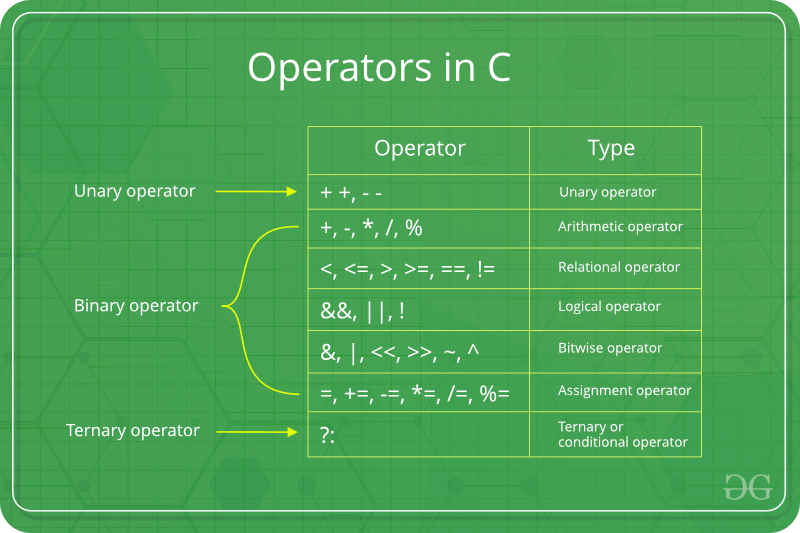
C/C++ has many built-in operator types and they are classified as follows:
Arithmetic Operators: These are the operators used to perform arithmetic/mathematical operations on operands. Examples: (+, -, *, /, %,++,–). Arithmetic operator are of two types:
Unary Operators: Operators that operates or works with a single operand are unary operators. For example: (++ , –)
Binary Operators: Operators that operates or works with two operands are binary operators. For example: (+ , – , * , /)
To learn Arithmetic Operators in details visit this link.
Relational Operators: These are used for comparison of the values of two operands. For example, checking if one operand is equal to the other operand or not, an operand is greater than the other operand or not etc. Some of the relational operators are (==, >= , <= ). To learn about each of these operators in details go to this link.
Logical Operators: Logical Operators are used to combine two or more conditions/constraints or to complement the evaluation of the original condition in consideration. The result of the operation of a logical operator is a boolean value either true or false. For example, the logical AND represented as ‘&&’ operator in C or C++ returns true when both the conditions under consideration are satisfied. Otherwise it returns false. Therfore, a && b returns true when both a and b are true (i.e. non-zero). To learn about different logical operators in details please visit this link.
Bitwise Operators: The Bitwise operators is used to perform bit-level operations on the operands. The operators are first converted to bit-level and then the calculation is performed on the operands. The mathematical operations such as addition, subtraction, multiplication etc. can be performed at bit-level for faster processing. For example, the bitwise AND represented as & operator in C or C++ takes two numbers as operands and does AND on every bit of two numbers. The result of AND is 1 only if both bits are 1. To learn bitwise operators in details, visit this link.
Assignment Operators: Assignment operators are used to assign value to a variable. The left side operand of the assignment operator is a variable and right side operand of the assignment operator is a value. The value on the right side must be of the same data-type of variable on the left side otherwise the compiler will raise an error. Different types of assignment operators are shown below:
“=”: This is the simplest assignment operator. This operator is used to assign the value on the right to the variable on the left. For example:a = 10; b = 20; ch = ‘y’;
“+=”: This operator is combination of ‘+’ and ‘=’ operators. This operator first adds the current value of the variable on left to the value on right and then assigns the result to the variable on the left. Example:(a += b) can be written as (a = a + b) If initially value stored in a is 5. Then (a += 6) = 11.
“-=”: This operator is combination of ‘-‘ and ‘=’ operators. This operator first subtracts the value on right from the current value of the variable on left and then assigns the result to the variable on the left. Example:(a -= b) can be written as (a = a – b) If initially value stored in a is 8. Then (a -= 6) = 2.
“*=”: This operator is combination of ‘*’ and ‘=’ operators. This operator first multiplies the current value of the variable on left to the value on right and then assigns the result to the variable on the left. Example:(a *= b) can be written as (a = a * b) If initially value stored in a is 5. Then (a *= 6) = 30.
“/=”: This operator is combination of ‘/’ and ‘=’ operators. This operator first divides the current value of the variable on left by the value on right and then assigns the result to the variable on the left. Example:(a /= b) can be written as (a = a / b) If initially value stored in a is 6. Then (a /= 2) = 3.
Other Operators: Apart from the above operators there are some other operators available in C or C++ used to perform some specific task. Some of them are discussed here:
sizeof operator: sizeof is a much used in the C/C++ programming language. It is a compile time unary operator which can be used to compute the size of its operand. The result of sizeof is of unsigned integral type which is usually denoted by size_t. Basically, sizeof operator is used to compute the size of the variable. To learn about sizeof operator in details you may visit this link.
Comma Operator: The comma operator (represented by the token ,) is a binary operator that evaluates its first operand and discards the result, it then evaluates the second operand and returns this value (and type). The comma operator has the lowest precedence of any C operator. Comma acts as both operator and separator. To learn about comma in details visit this link.
Conditional Operator: Conditional operator is of the form Expression1 ? Expression2 : Expression3 . Here, Expression1 is the condition to be evaluated. If the condition(Expression1) is True then we will execute and return the result of Expression2 otherwise if the condition(Expression1) is false then we will execute and return the result of Expression3. We may replace the use of if..else statements by conditional operators. To learn about conditional operators in details, visit this link.
Operator precedence chart
The below table describes the precedence order and associativity of operators in C / C++ . Precedence of operator decreases from top to bottom.

 ACE IT SKILLS